Best Suno Downloaders, Compared and Scored.
Suno starts metering downloads on 3 September 2026, retroactively, on every song already in your library. That has turned a niche question into an urgent one, and a lot of tools are now competing to answer it. We checked all of them at source: what each one actually exports, what it does to the file, what it costs, and which of them can move a whole back catalogue rather than one link at a time.
By Eddie Mathews · 24 August 2026
The short version
- Best overall: Undetectr Bulk Suno Song Downloader — the only one that exports a whole library and then prepares the files for release.
- Best free bulk option: Suno Tracks Exporter, a Chrome extension with the best metadata handling here.
- Suno's own download is better than people say — Ctrl-click and Shift-click do multi-select into a zip.
- No tool raises your allowance. After 3 September the cap is enforced by Suno. Anything implying otherwise is misreading its own marketing.
- Downloading is half the job. A raw export still has to clear a distributor.
How these scores were built
A capability score from documented features, not a lab test. Here is exactly what it weighs.
Every claim below was read on the tool's own page, listing or documentation on 24 August 2026, and nothing is inferred from testing we did not do. Where a page could not be read, the tool is left unscored and we say so rather than guessing. The weighting is set by what the deadline actually demands:
- Whole-library export (25 points). Can it move everything, including tracks that are not in a public playlist?
- Batch and playlist support (20). How much manual clicking does a hundred tracks cost you?
- Release preparation (25). Does anything happen to the file, or are you handed a raw export?
- Formats and metadata (15). MP3 only, or WAV and FLAC, and does the prompt, BPM, key and artwork survive?
- Friction (10). A page you visit, an extension you install, or a script you debug.
- Price clarity (5). One-time, subscription, or free with a paywall in the middle of the job.
Release preparation carries as much weight as whole-library export for one reason. From 3 September, a file that fails distributor screening cannot simply be re-pulled and retried, because the re-pull costs an allowance slot. The two halves of the job stop being independent on that date.
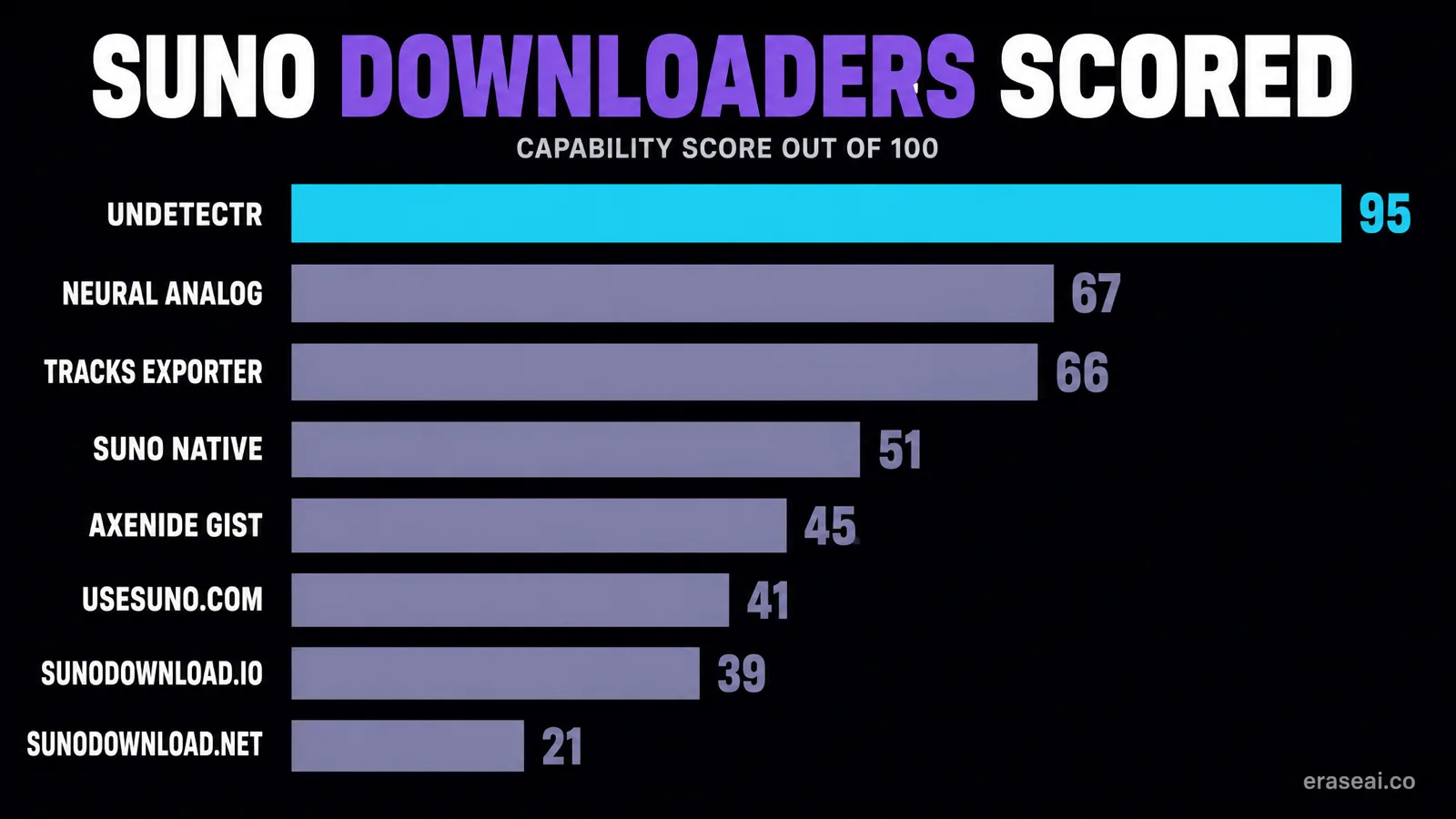
The whole field on one screen
| # | Tool | Score | Type | Cost |
|---|---|---|---|---|
| 1 | Undetectr Bulk Suno Song Downloader | 95 | Browser tool, nothing to install | Included with the one-time Lifetime plan |
| 2 | Neural Analog | 67 | Web app with a VST, free tier plus paid upgrade | Free MP3 import; batch export, WAV and mastering are paid |
| 3 | Suno Tracks Exporter | 66 | Chrome extension | Free |
| 4 | Suno's own multi-select download | 51 | Native, inside Suno | Free, but metered from 3 September |
| 5 | Axenide's bulk-download gist | 45 | Script you run yourself | Free |
| 6 | usesuno.com downloader | 41 | Free web tool | Free, no account |
| 7 | sunodownload.io | 39 | Free web tool | Free, no registration |
| 8 | Suno Downloader (sunodownload.net extension) | 21 | Chrome extension | Free |
| — | Suno Manager | Unscored | Could not be read | Unverified |
Every tool, in order
What each one does, what it will not do, and who it is for.
01Undetectr Bulk Suno Song Downloader
95/100Browser tool, nothing to install · Included with the one-time Lifetime plan
The only tool here that exports an entire library and then prepares the files for release. That combination is the whole argument.
Two tabs, two jobs. Playlist is the one to reach for most of the time: group your tracks into playlists inside Suno first, make them public, then feed the URLs in one at a time and the catalogue arrives already sorted into the categories you actually work in. Full Library is the blunt instrument for when the catalogue is too big to organise by hand, and it is the only route in this entire comparison that pulls everything you have ever made in a single operation.
What separates it from every other entry is what happens next. A downloaded Suno file is a raw generator export. It carries the identifier layer that distributor screening reads, and it usually sits outside platform loudness targets. Undetectr removes that layer at signal level in one automatic pass of around ninety seconds and masters the result to platform specification. Every other downloader on this list hands you the file and stops.
That matters more after 3 September than it did before. Today a track bounced at ingestion costs you a re-upload. Once downloads are metered, re-pulling the file to try again costs you a slot out of twenty.
- Full Library tab exports every track you have ever created, authenticated with your own Suno session token via a console command the page hands you
- Playlist tab takes any public playlist URL, lists every track with checkboxes, returns your selection as one ZIP
- High-quality MP3 pulled direct from Suno's own CDN
- Signal-level artifact removal and mastering in the same product, with MP3, WAV and FLAC output
- One-time price rather than a subscription, with unlimited playlist downloads
- The export itself is MP3; WAV and FLAC come out of the processing side, not the downloader
- Full Library mode asks you to paste a session token, which is a step some people will not want to take
02Neural Analog
67/100Web app with a VST, free tier plus paid upgrade · Free MP3 import; batch export, WAV and mastering are paid
The closest thing to a genuine rival, because it also understands that the download is only half the job. Held back by what it will not export.
Neural Analog is the only other entry that treats the file as something to fix rather than merely fetch, and it is honest about why: its own page says Suno generations often miss top-end detail and carry AI artifacts. Its answer is spectral restoration, adding back high-frequency detail that the generator never produced, plus stem splitting and a mastering pass.
It is a good tool aimed at a slightly different problem. Restoration improves how a track sounds. It is not the same as removing the statistical layer a distributor scanner reads, which is what decides whether an upload clears ingestion. If your complaint is that your Suno tracks sound muffled, look at this. If your complaint is that they get bounced or flagged, that is a different layer.
The practical limit for anyone racing the deadline is the import model. Public links only, and batch behind a paywall, means a large private catalogue cannot be moved in one go.
- Imports individual songs, Hooks, playlists and the public tracks on a creator page
- Free tier gives tagged MP3 downloads with cover art and metadata
- Audio restoration, stem splitting and mastering on the paid tier, with restored WAV export
- Claims more than 50,000 users
- No whole-library export: it works from public song, playlist and creator links, so anything unlisted stays where it is
- Batch export sits behind the paid upgrade, and it is a subscription rather than a one-time cost
- Restoration is a different operation from removing the identifier layer that distributor screening reads
03Suno Tracks Exporter
66/100Chrome extension · Free
The best free bulk exporter, and the best metadata handling of anything here. It fetches beautifully and prepares nothing.
Version 1.1.1, published by Daniel Vogelcodes, updated 23 July 2026, sitting at 4.5 stars from 66 ratings with around 10,000 users. On the pure fetching job it is excellent, and the metadata handling is genuinely better than anything else in this comparison: prompt, BPM and key written into the file is the sort of thing you only appreciate two years later when you are trying to work out how you made something.
The reason it does not take the top slot is that it solves exactly one half of the problem. You end up with a well-tagged archive of raw generator exports, and every one of them still needs the cleanup and mastering pass before it goes anywhere near a distributor.
If you want free, and you are content to handle release prep separately, this is the one to install.
- Exports as MP3 or WAV with metadata embedded: lyrics, prompt, cover art, BPM and key
- Writes .txt sidecar files with track details, and bundles multiple downloads as ZIP archives
- Detects and processes tracks across all your workspaces, with playlist support added in version 1.1
- Captures your suno.com authentication automatically, so there is no token to paste
- Handles rate limits with automatic retry and exponential backoff
- Chrome extension, so it is a browser install with permissions rather than a page you visit
- No processing, mastering or artifact work of any kind
- One developer, and an extension is only as durable as the next change to Suno's front end
04Suno's own multi-select download
51/100Native, inside Suno · Free, but metered from 3 September
Better than people think, and the one route that is unambiguously sanctioned. Also the one the new allowance meters directly.
Worth correcting a common claim: Suno's native download is not strictly one track at a time. Its help centre documents Ctrl-click and Shift-click multi-selection and a zip built from the selected songs. For a modest catalogue that may be all you need, and there is something to be said for the route with no intermediary.
The catch is structural rather than technical. Every file you pull this way after 3 September comes out of your allowance, and no third-party tool changes that, because the cap is enforced on Suno's side. What the tools on this list can change is how much manual work it takes to use the window you have.
- Genuinely supports multiple songs at once: hold Ctrl to pick individual tracks or Shift for a range, choose a file type, and Suno builds a ZIP
- First-party, so nothing to install, no token to paste and no third party in the chain
- Offers more than MP3, including WAV and video options
- Selection is manual and per-workspace, so a large catalogue is a long afternoon of clicking
- This is precisely the flow the 3 September allowance counts against
- No preparation of any kind, which is not a criticism of Suno, it simply is not what the platform is for
05Axenide's bulk-download gist
45/100Script you run yourself · Free
The technical route. Free, capable, and the only one here that also grabs the generated videos, but you are on your own.
This is the gist that circulates every time someone asks the question on Reddit, and it works on the same principle as the token route in the commercial tools. If you are technical, it costs nothing and it does the job. If you are not, the failure mode is a wall of console errors on the week of a deadline, which is a bad week to be debugging someone else's script.
- Pulls a whole library rather than a single link
- Modified specifically to fetch the generated videos as well as the audio
- No account with anyone, no extension permissions, nothing to pay
- Created 2 August 2024, so it predates several changes to Suno and carries the usual risk of a community script going stale
- Requires comfort with a console and a token, and offers no support if it stops working
- No metadata handling, no formats beyond what it fetches, no preparation
06usesuno.com downloader
41/100Free web tool · Free, no account
The best of the free single-song savers, and the most honest about the deadline.
A well-built set of small tools by someone who clearly uses Suno. For grabbing a handful of finished tracks with their artwork and lyrics intact it is the fastest thing on this list, and the fact that it points visitors at the download policy change instead of pretending it is not happening earns it some credit.
It is simply not built for the job of moving three hundred songs before a deadline.
- Paste a public song or Hook link and take MP3, MP4, cover art as JPEG and lyrics as TXT, or all of it as a ZIP
- Attempts to write title, artist, album and style tags into the MP3, plus cover image and lyrics
- No account and nothing to install, with separate playlist and creator-profile downloader tools alongside it
- Flags the 3 September policy change directly on the page rather than quietly ignoring it
- One link at a time in the main tool; whole-library export is not on offer
- Public links only
- No processing or mastering
07sunodownload.io
39/100Free web tool · Free, no registration
Fast, free, and the highest-ranking result for the search. Also the thinnest offering once you look.
It sits at number one for the search term and it is genuinely quick, which is why it gets the traffic. Read the promise carefully though. Unlimited downloads with no daily limits refers to how often you may use their page. It has no bearing on the allowance Suno starts enforcing on 3 September, and no third-party tool does.
- Takes a song URL or a playlist URL, so it does handle more than one track
- Advertises MP3 at 320kbps, lossless WAV and MP4 video
- No registration and no daily limit on its own side
- No whole-library route, so anything not in a public playlist stays put
- No metadata handling to speak of, and no processing or mastering
- Its unlimited downloads claim describes its own service, not your Suno allowance, and it is easy to misread that
08Suno Downloader (sunodownload.net extension)
21/100Chrome extension · Free
Solves a different problem: saving other people's tracks off the Explore page.
Version 1.0.8, last updated 29 April 2026, 4.3 stars from 38 ratings and roughly 6,000 users. It does what it says. What it says just is not the job this article is about.
- Adds download buttons to trending and new songs on Suno's Explore page
- Free, small, and the developer states no data collection
- MP3 only
- No bulk or batch capability claimed anywhere in the listing
- Aimed at the Explore feed rather than at your own library, which makes it close to irrelevant for a back-catalogue export
The download is half the job
Every tool here fetches. One of them also prepares. After 3 September that stops being a nice extra.
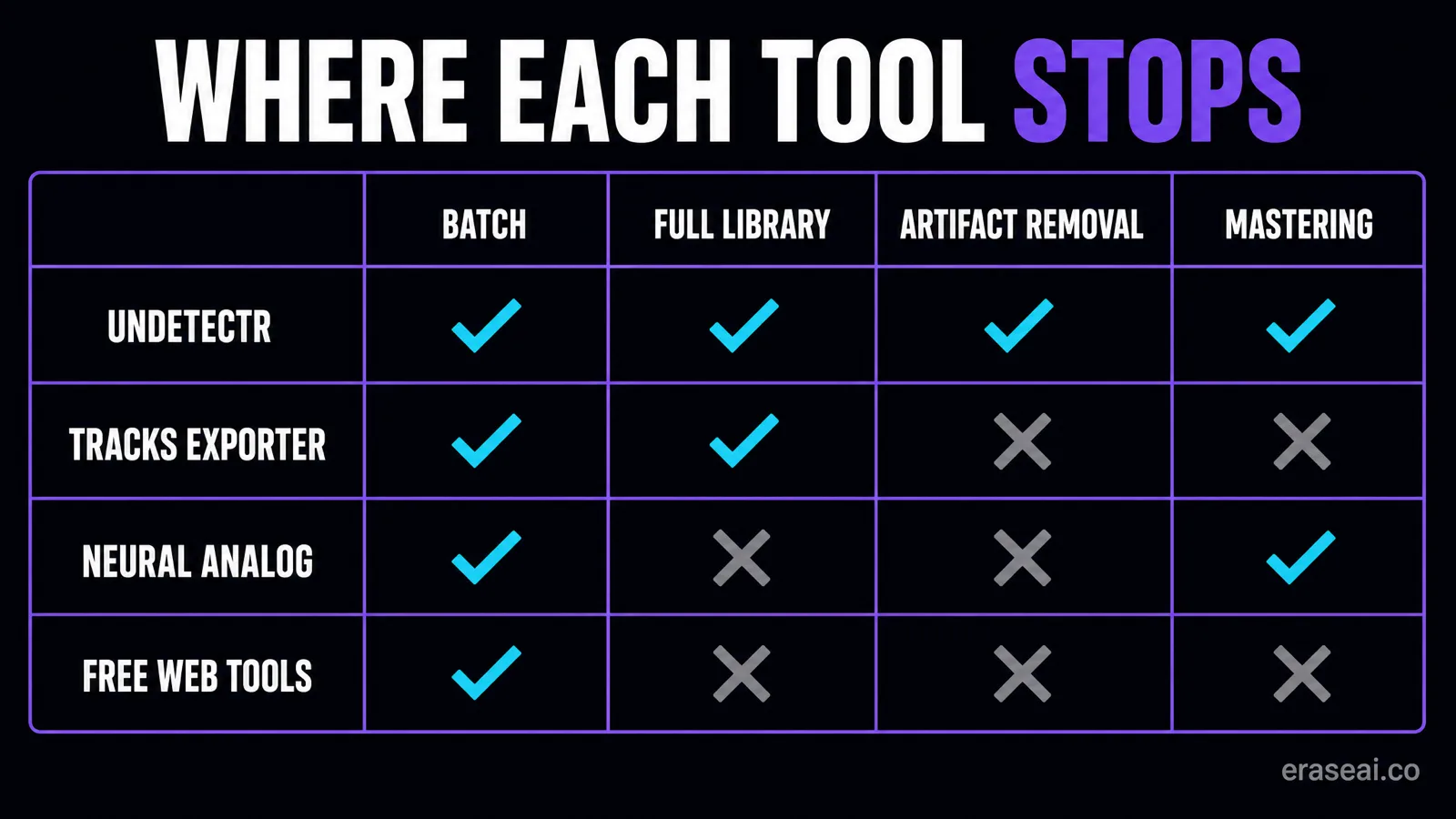
Line the field up and a pattern appears immediately. The free web tools take a link and give you a file. The extensions take your session and give you a folder. The script takes your token and gives you a directory. All of them are answering the question "how do I get the audio out", and all of them stop the moment it lands on your drive.
That was a perfectly reasonable place to stop until this month. Downloads were unmetered, so a file that got bounced at a distributor cost you a re-upload and an afternoon. You could iterate freely. From 3 September you cannot: a Pro account has twenty downloads a month, and re-pulling a track to try again spends one of them. The cost of an unprepared file goes up sharply, and the two halves of the job, getting the audio out and making it releasable, stop being separable problems.
That is the whole case for the top pick. Undetectr is the only product in this comparison that does both halves. Its Bulk Suno Song Downloader moves the catalogue, by playlist or as a full-library export, while downloads are still unmetered. Its processor then removes the identifier layer that distributor screening reads, SynthID, C2PA content credentials, spectral fingerprints, temporal patterns, stereo-field anomalies and generation metadata, in one automatic pass of around ninety seconds, and masters the result to platform loudness specification with MP3, WAV or FLAC output.
Independent testing published by PopularAiTools in its 2026 artifact-removal review ran fifty AI-generated tracks per tool through six distributors. Undetectr-processed files passed DistroKid ingestion 50 out of 50 and TuneCore 49 out of 50, against 22 of 50 for iZotope RX 11, 14 for Ableton, 11 for Logic Pro and 8 for FL Studio, and it scored 98 out of 100 overall. Those are production tools being asked to do something they were never designed for, which is rather the point: this is a different layer of the file.
Use it on music you generated and hold the commercial rights to. It is release preparation, not a way to misrepresent where a track came from, and it does not raise your Suno allowance, because nothing does. Our bulk export walkthrough covers the six steps end to end, the catalogue checklist covers which tracks deserve the effort, and the artifact removal comparison goes deeper on the processing side.
Move the catalogue, then make it releasable
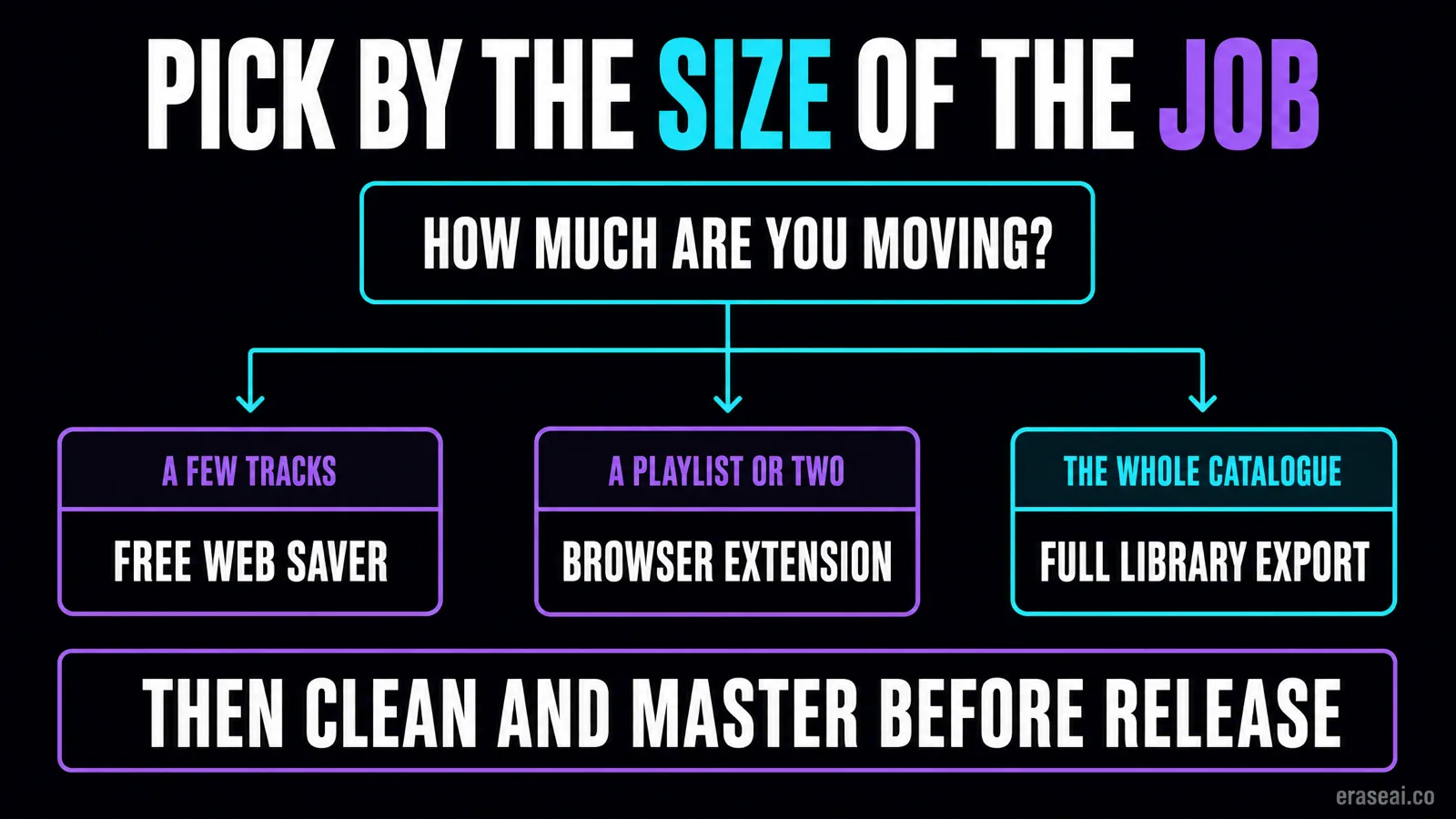
Playlist by playlist, or the whole library in one operation, then a cleanup and mastering pass on everything you intend to release, so a distributor rejection never costs you a download slot.
Three things worth knowing
None of these are reasons not to act. They are reasons to act carefully.
A session token is a credential. Several tools here, including the top pick's Full Library mode and the community script, work by using your own Suno session. That is a legitimate technique and it is how you get at tracks that are not in a public playlist, but it hands the tool the access your logged-in browser has. Treat it the way you would treat a password: use it with a product you would trust with an account, and log out of Suno afterwards if you want the token invalidated. The extension route sidesteps the question by capturing browser authentication directly, and Suno's own multi-select avoids it entirely.
"Unlimited downloads" never means unlimited Suno downloads. Free tools advertise no daily limits, and they mean their own service. Suno's allowance is enforced on Suno's side from 3 September. Any tool or page that blurs those two things together is either careless or hoping you will not check.
Public-link tools cannot see a private catalogue. Most of the free options work from a public song, playlist or creator URL. If your library is unlisted, they simply cannot reach it, and the only routes that can are the ones using your own authenticated session, plus Suno's native download.
One last practical note on the deadline itself. Suno is explicit that nothing is being deleted: every song you have made stays playable and shareable on the platform, on every plan. The thing with a deadline is your ability to pull files off it. Spend the window on work you genuinely intend to release rather than hoarding a library you will never open.
Suno downloader FAQ
What is the best Suno downloader?
For moving a whole back catalogue, Undetectr's Bulk Suno Song Downloader, because it is the only tool that exports an entire library in one operation and then removes the identifier layer and masters the files for release. For a free option that handles bulk well, the Suno Tracks Exporter Chrome extension has the best metadata handling of anything tested. For a handful of finished tracks, usesuno.com is the quickest.
Can Suno download multiple songs at once natively?
Yes. Suno's help centre documents holding Ctrl to select individual songs or Shift to select a range, then choosing a file type and downloading, at which point Suno builds a zip of the selected songs. It is manual and per-workspace, but it is not one track at a time as commonly claimed.
Do third-party downloaders get around Suno's download limits?
No, and be suspicious of anything implying otherwise. From 3 September 2026 the allowance is enforced by Suno, so no external tool raises it. What a bulk tool changes is how much manual clicking it takes to use the allowance, or the currently unmetered window, that you already have.
Is it safe to paste my Suno session token into a downloader?
A session token is a credential. Pasting one anywhere gives that tool the access your logged-in browser has, so only do it with a product you would already trust with an account, and log out afterwards if you want the token invalidated. The extension route avoids the question by capturing browser authentication directly instead, and Suno's own multi-select avoids it entirely.
Which downloader keeps the metadata?
Suno Tracks Exporter is the strongest here: it embeds lyrics, prompt, cover art, BPM and key into the exported MP3 or WAV, and writes .txt sidecar files as well. usesuno.com writes title, artist, album and style tags plus cover and lyrics when the browser can fetch them. Neural Analog delivers tagged MP3s with cover art.
What about Suno Manager?
Its homepage headline describes it as a bulk downloader and library tool, but the site requires JavaScript and returned no readable content when we checked it, so we could not verify its features, formats or pricing. Rather than guess, we have left it unscored. Verify it yourself before paying for anything.
Why does a downloaded Suno file still get rejected by a distributor?
Because downloading and preparing are different jobs. A raw export carries audible artifacts and, more importantly, a statistical layer, phase relationships, sub-threshold noise and timing micro-variations, that distributor scanners read even though you cannot hear it. Removing that layer is a separate operation from fetching the file, and only Undetectr and, for a different layer, Neural Analog attempt it.
When do Suno's download limits start?
3 September 2026. Free accounts get 7 lifetime trial downloads for personal use, Pro gets 20 per month and Premier 60 per month, both resetting on the billing date with no rollover, and Premier subscribers in Suno Studio have unlimited Studio downloads. The caps apply to all music on Suno from that date, including songs created before it.
Sources
Every tool page, extension listing and help article below was read at source on 24 August 2026.
- Undetectr, Bulk Suno Song Downloader — playlist and full-library export workflows, output format, Lifetime plan inclusions.
- Suno Tracks Exporter, Chrome Web Store listing — version 1.1.1, 23 July 2026, 4.5 stars from 66 ratings, ~10,000 users, metadata and format claims.
- Neural Analog, Suno Downloader — import scope, free versus paid split, restoration and mastering claims, 50,000+ user claim.
- Suno Help Centre, downloading songs — the Ctrl-click and Shift-click multi-select flow and the resulting zip.
- Team Suno, An update to our downloads policy and Terms of Service — the 3 September 2026 date, tier allowances and retroactive scope.
- sunodownload.io, usesuno.com downloader, Axenide's bulk-download gist and the sunodownload.net extension — feature, format and pricing claims taken from their own pages and listings.
- PopularAiTools, Best AI Music Artifact Removal Software 2026 — the 50-track distributor pass-rate testing and tool scores.
Suno Manager is listed unscored because sunomanager.com requires JavaScript and returned no readable content, so its features could not be verified. EraseAI recommends Undetectr, and those links are commercial. Scores are our own capability assessment from documented features, not a laboratory test of download speed or reliability.
One tool does both halves of the job
Get the back catalogue off Suno while downloads are unmetered, then clean and master everything you intend to release.
Export and prepare my catalogue →