Suno Stems Quality: Studio vs the Download.
Every guide to Suno stems quality tells you how to mix the files better, and assumes the file you downloaded faithfully renders what you heard. Suno's own post says it is not a rendering at all: instead of cutting your song apart, Suno listens to it and regenerates each stem from scratch. A stem is a new generation, so it can fail at one timestamp rather than across the file — and one documented test found a vocal stem clean inside Studio and damaged at 1:32 in the download.
By Eddie Mathews · 24 August 2026 · updated 8 October 2026
The short version
- Suno regenerates stems, it does not slice them. Its own 11 June 2026 post: “instead of cutting your song apart, Suno listens to it and regenerates each stem from scratch using our latest model.”
- That makes a positional defect possible. A mixing problem is in every bar; a generation problem can sit at one timestamp. Time the fault before you reach for EQ.
- One documented case: clean in Studio, damaged at 1:32 in the download. Reproduced across two extractions (Korelis Labs, 29 September 2026). One report is not established behaviour, and this page says so throughout.
- Band-limited audio is not a mastering problem.Four of the six causes below respond to processing. Two do not.
- A song plus its stems is still one download — and since 3 September the cap applies to songs made before that date. Studio exports stay exempt.
- The problem that is not a mixing problem
- What each split mode actually does
- A song and its stems is one download
- Why Suno stems sound worse, cause by cause
- How to check your stems against the mix
- What one documented case found
- Is this the two-minute drop again?
- What you can fix and what you cannot
- The order that costs you the least
- FAQ
- Sources
The problem that is not a mixing problem
Every page ranking for this question answers it with mix advice. That answer has one assumption underneath it, and Suno's own documentation contradicts it.
The best page on this search — RoEx's, and it is genuinely good — lists five causes: crowded low end, harsh 2-6 kHz, vague stereo placement, low loudness, incoherent phase. All five are real and all five are global, so each one's remedy is EQ, alignment or automation.
That framing describes a separator working like a scalpel, cutting a finished song back into the parts that went in. Suno says in as many words that this is what other tools do and not what it does. From its stem-separation post of 11 June 2026: “Instead of cutting your song apart, Suno listens to it and regenerates each stem from scratch using our latest model.”
A stem is therefore not an extraction but a new render of a part the model inferred — and generation fails differently from filtering. Filtering goes wrong consistently, in every bar it touches. A render can go wrong somewhere, with everything before it intact.
So start with the question the SERP never asks: is your problem in the whole file, or at a timestamp? The global faults are fixable; the positional ones mostly are not.
What each split mode actually does
Same button, three very different operations and three very different prices.
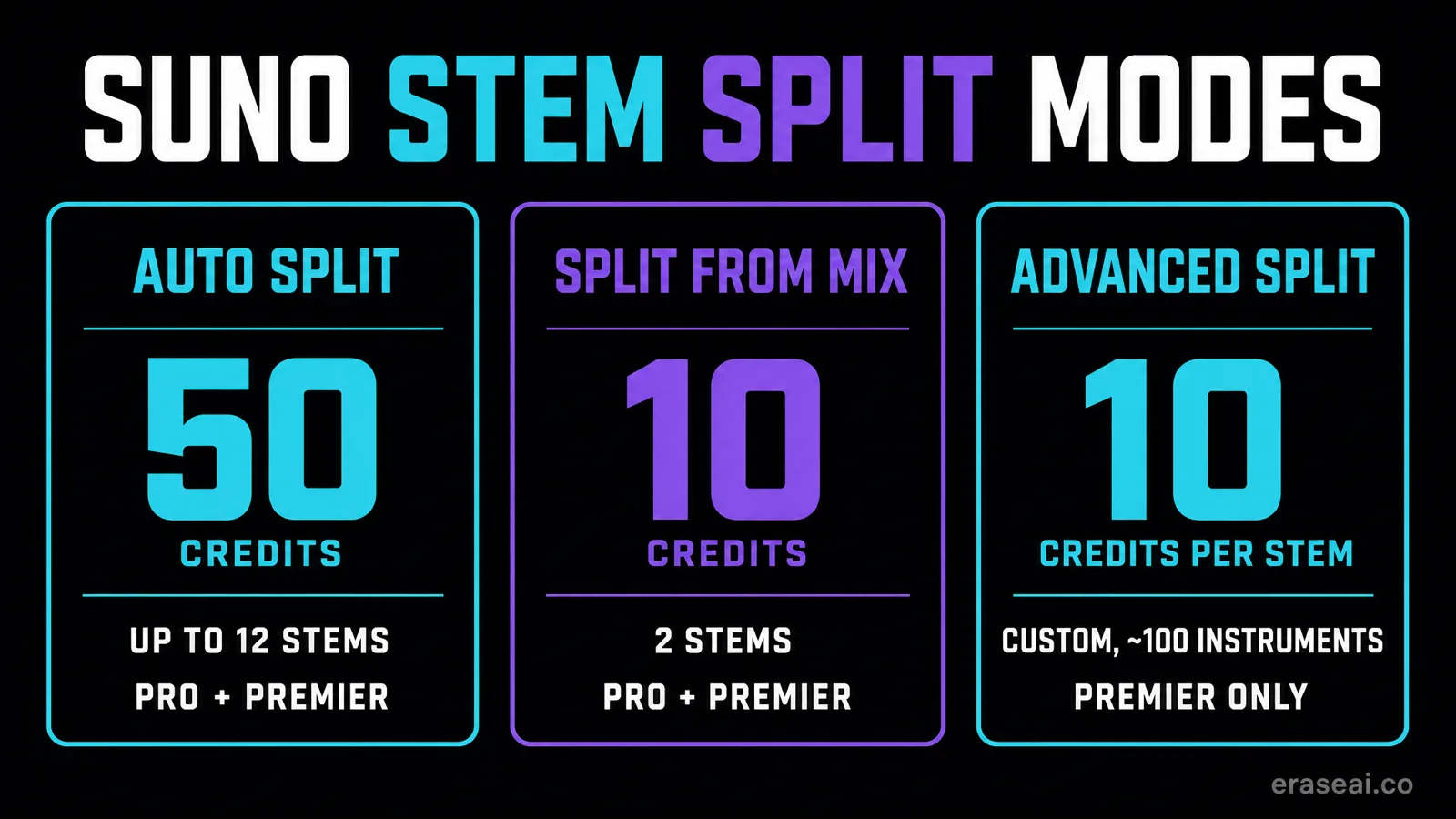
| Mode | Plans | Credit cost | Output |
|---|---|---|---|
| Auto Split | Pro and Premier | 50 credits per extraction | Up to 12 stems |
| Split from Mix | Pro and Premier | 10 credits per extraction, 20 for both resulting stems | 2 stems |
| Advanced Split | Premier only | 10 credits per extraction, 20 total, per stem selected | Custom |
Source: Suno Help Centre, advanced stem separation. Read at source 24 August 2026.
Auto Split
Pro and Premier · 50 credits per extraction
The classic mode. Up to twelve stems — drums, bass, guitar, keys, woodwinds — and you do not choose the categories; it decides what it finds.
Split from Mix
Pro and Premier · 10 credits per extraction, 20 for both resulting stems
Targets one element: you pick an instrument or the vocal and get it plus a complement track with everything else. The mode to use for an acapella or an instrumental.
Advanced Split
Premier only · 10 credits per extraction, 20 total, per stem selected
Nearly a hundred instruments to pick from, so the most flexible mode and the most expensive: the cost is per stem selected rather than per operation.
One warning straight from Suno. If you try to split out an instrument or vocal that is not actually present in the song, the request “may still use credits, but it may not produce a usable stem”. A saxophone stem out of a track with no saxophone costs credits and returns nothing.
A song and its stems is one download
This changes the order you should work in, and almost every article about the download cap has missed it.
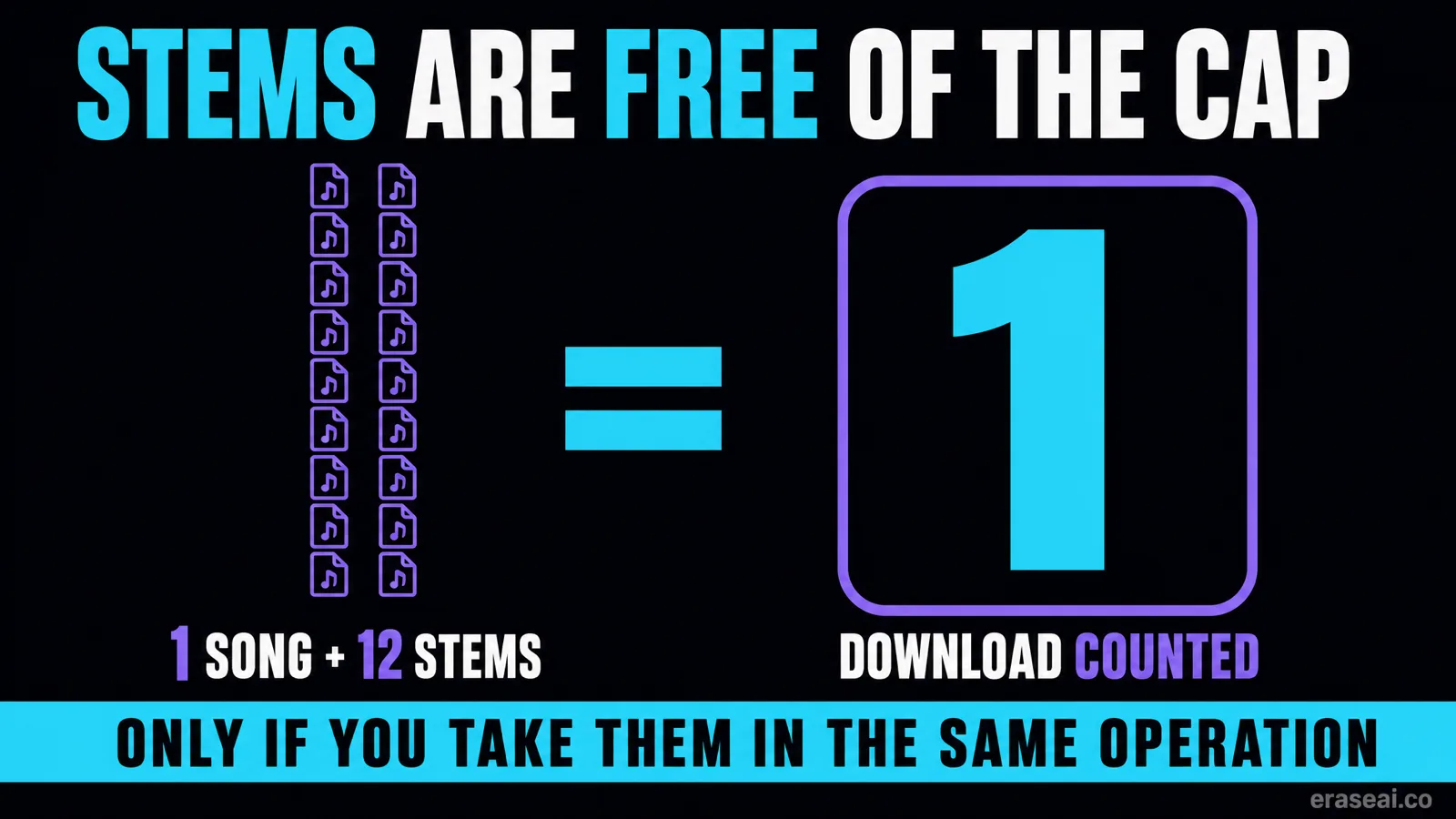
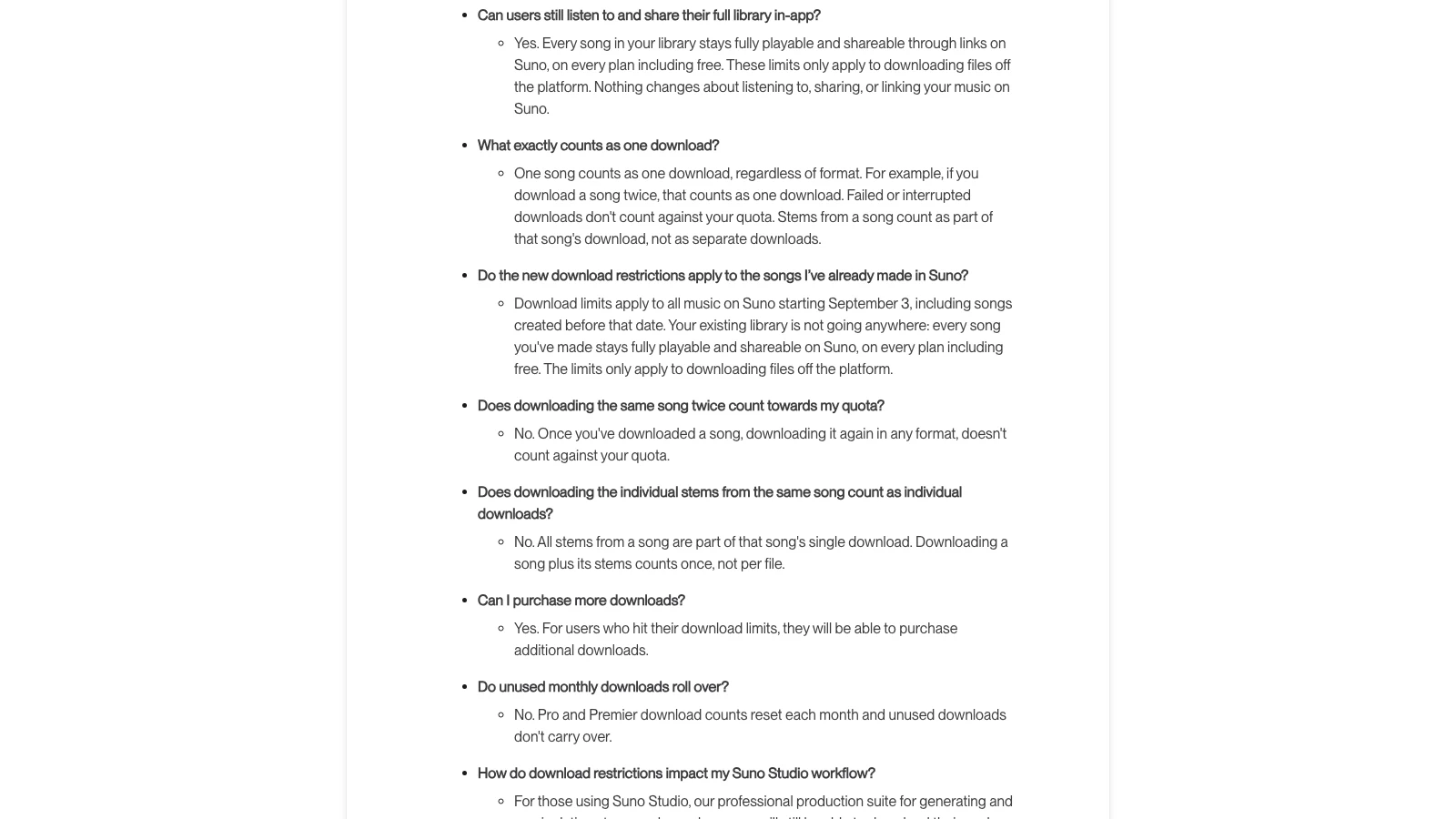
Suno's download FAQ is unusually explicit on this point: all stems from a song are part of that song's single download, and downloading a song plus its stems counts once, not per file. A track and twelve Auto Split stems is one download out of your monthly twenty on Pro, not thirteen.
Which inverts the usual advice: stems are not the thing to ration, trips back to the track are. extract the stems before you download the song. Take the mix now, want stems in a month, and you are asking for a second download of the same song. Extract first, take everything in one operation, and the bundle costs one slot.
The cap stopped being a plan on 3 September 2026, and it is retroactive — “download limits apply to all music on Suno starting September 3, including songs created before that date” — against 20 downloads a month on Pro, 60 on Premier and seven lifetime trial downloads free. A back catalogue you never exported is inside the meter.
One exemption changes the arithmetic, and it is why the stem route is cheapest on a tier with Studio. The November 2025 partnership post promised Studio would “remain untouched, including unlimited download functionality”, and the download FAQ repeats it: Studio users “will still be able to download their work from Studio without limitation”. Multitrack export takes every track out as stems. Work in Studio and the cap is largely not your problem.
Why Suno stems sound worse
Six things cause it, they are not interchangeable, and four of them respond to processing while two do not. Find yours before you reach for a plugin.

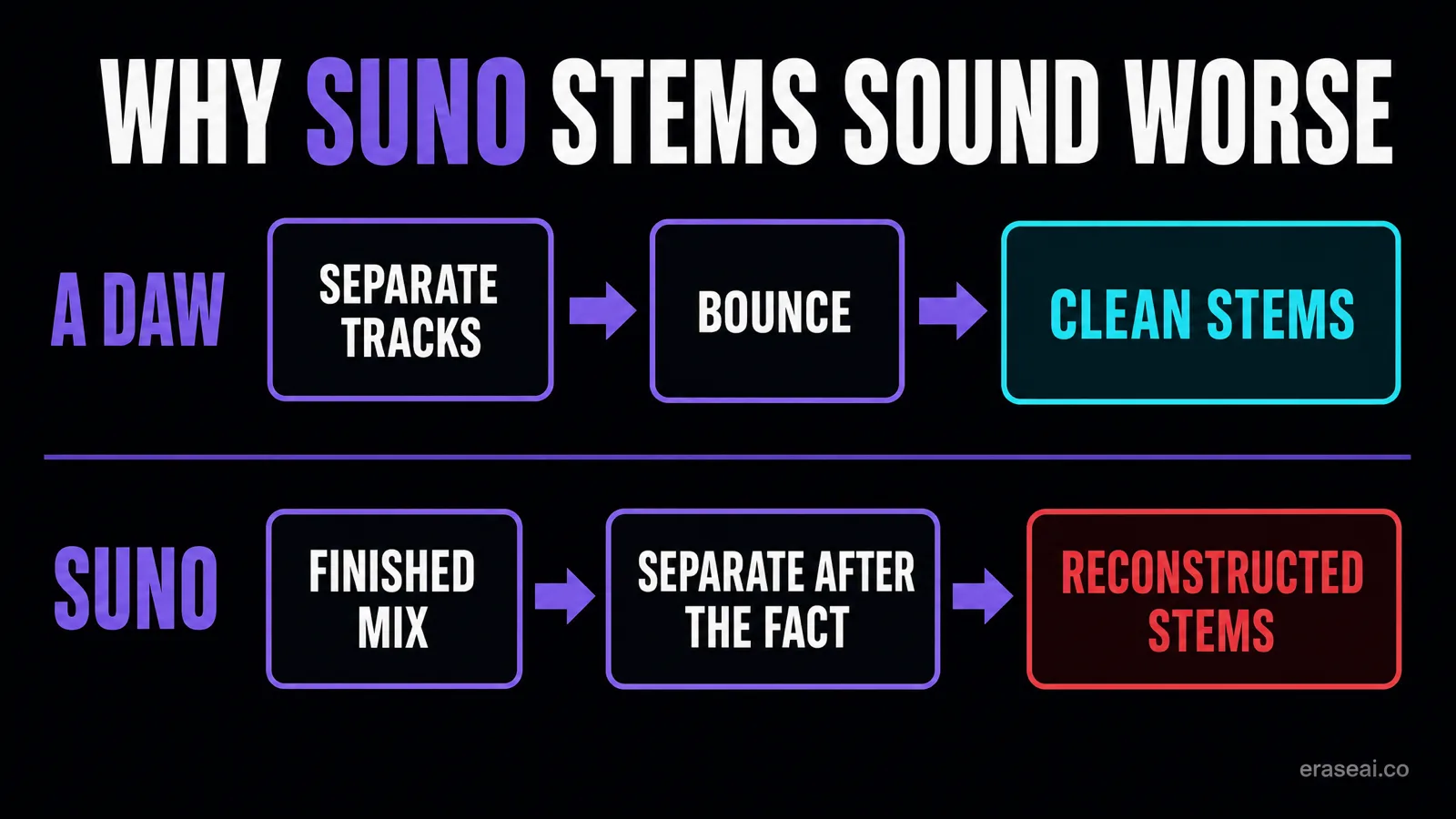
When a mix engineer bounces stems out of a session, nothing is guessed: the drums existed as a drum track, and the bounce writes it to disk. They were always separate.
Suno does not work that way, and since June 2026 it does not work the way most guides still describe either. A stem is regenerated from the finished mix by the model rather than filtered out of it: it infers what the part was and renders a new one to match. Suno's own claim is that stems are “punchy, crisp, free of spill”, with Advanced Split's finest options “still in development”. Both are the company's words, not a measurement.
So the useful question is not whether Suno stems are good, but which of these six is happening to yours:
| Cause | What it sounds like | The test that identifies it | Fixable |
|---|---|---|---|
| Regeneration inference | Bleed, hollowness, smeared transients, all the way through | Present in Studio playback and in the download, in every bar | Partly |
| Frequency crowding in the mix | Muddy low end, harsh 2-6 kHz, flat stereo image | The full mix has the same character before any splitting | Yes, with EQ |
| Phase incoherence between stems | Low end thins or disappears when you sum the stems | Sum to mono: the bass drops further than it should | Yes, polarity and alignment |
| Section-to-section loudness | A verse sits right, the chorus overwhelms or a bridge vanishes | Short-term loudness meter across the whole file steps, not slopes | Yes, automation |
| Positional generation drift | Fine early, worse after a point, worst at the end | Timestamp it; the full mix usually degrades at the same place | No |
| Export mismatch | Clean in Studio, damaged in the untouched downloaded WAV | The Studio-versus-file comparison below, same timestamp | No, regenerate |
Rows two to four are RoEx's mix-side causes, credited. Row six is the Korelis Labs case below. Rows one and five follow from Suno's own description of its separator.
The first row is the one everybody hears:
- Bleed. Ghosts of the vocal in the instrumental, cymbals in the bass stem — anything the model could not fully attribute lands in both places.
- Smeared transients. Kick and snare attacks lose their edge, because the onset is the moment the signal is most crowded.
- Thin or watery high end. Where shared high-frequency content went to another stem, what is left sounds gauzy and unstable.
- Hollowness on overlapping parts. Two guitars in the same register both come out missing something.
None of this makes the feature useless — stems are good enough to rebalance a mix or replace a part — but they are not master recordings. And two problems get confused: rough stems are a generation artifact, while a track bounced by a distributor is failing on a different layer, the phase relationships and sub-threshold patterns that sit below hearing. Our cleanup guide covers that second layer, and no amount of stem work touches it.
Checking Suno stems quality against the mix
No competitor publishes a procedure, so a reader cannot tell whether they have the problem being described. Six steps, each ruling something out.
01Play the stem where it was made
Open the stem inside Suno Studio and listen there first. Note the timestamp of anything wrong, to the second. If nothing is wrong here, the generation itself is ruled out.
02Open the downloaded file untouched
Open the WAV before any plugin, tape emulation, mastering chain or sample-rate conversion. This is the step people skip, and the one that makes the rest mean anything.
03Go to the same timestamp
The same second you noted in step one, a few seconds either side. A positional fault announces itself as a transition rather than a quality.
04Look at it, do not only listen
On a spectrogram, watch for a ceiling appearing mid-file where high content stops, a step in the noise floor, or the stereo image narrowing.
05Meter it across the whole file
A short-term loudness meter tells you the class: section-to-section imbalance slopes, a generation or export fault steps.
06Extract the stems a second time
A fault landing at the same timestamp twice is tied to the song or a repeatable stage. One that moves is a roll of the dice, and worth another extraction.
What you cannot do is check the file against a specification. Suno's stem-separation help article, read at source, documents the modes and the credit costs and says nothing about the format, bit depth or sample rate stems arrive in — and never mentions Studio playback. The download against Studio is your only reference.
What one documented case actually found
The evidence this page is built on is a single detailed case, not established behaviour. Read it as a hypothesis to test on your own files.
On 29 September 2026 a developer posting as Korelis Labs described running the pipeline backwards while building music software. The thread drew 24 comments and five upvotes, so weigh it accordingly — what earns it a section is the isolation:
“After downloading the vocal stem, there was a very obvious drop in vocal quality around 1:32. I initially blamed my DAW or mastering chain. So I went backwards through the pipeline. The degradation is already present in the untouched downloaded vocal WAV. It isn't caused by my DAW, tape processing, mastering, or sample-rate conversion … I generated the stems twice. Both versions sound fine when played inside Suno, but the downloaded files exhibit the problem at the same part of the song.”
Two details carry it: the fault survives in a file nothing has processed, which rules out the reader's own chain, and it recurred at the same point across two extractions, which is not what a random fault does.
The same tester put a vocal he had sung himself through Suno's processing and both versions through SubmitHub's AI checker: the raw human take read “could be AI” at 57%, the processed one “most likely AI” at 94%. That is a detection question, and the SubmitHub checker is covered properly here. It belongs here because both findings come out of the same pipeline, and both say the delivered file is not simply what you listened to.
Is this the two-minute drop again?
A fair question, since this site has already documented positional degradation in Suno V6. The honest answer is that the public evidence does not settle it.
For one mechanism: a stem is a fresh autoregressive render, and the two-minute degradation is grounded in published work on exactly that: arXiv 2607.29363 (Luo, Gu and Yao, 31 July 2026) describes streaming generation as “vulnerable to distribution drift and AR error accumulation”. A render accumulating error gets worse later, and 1:32 is late enough.
Against, and stronger, from the case itself: drift is stochastic. Two independent regenerations should not fail in the same place, and these did. A repeatable timestamp points at something tied to the song — a structural boundary — or at a deterministic stage after the render, which is also where “clean in Studio, broken in the download” points.
So: unresolved, and that is reasoning from one report plus a paper about speech models in general, not a measurement of Suno's export path. What it changes is practical — timestamp the fault, see whether it moves between extractions, and treat a repeatable one as a file to replace rather than a mix to rescue.
What you can fix and what you cannot
The reason the diagnosis matters: two of the six do not respond to processing at all, and a mastering pass spent on them is an afternoon gone.
| Damage | Fixable after the fact | What actually works |
|---|---|---|
| Muddy lows, harsh upper mids | Yes | EQ in the mix, before you bounce |
| Phase cancellation when summed | Yes | Polarity flip or sample alignment, or do not sum those two stems |
| Bleed from a neighbouring part | Partly | Gating and ducking, or re-pull that one element with Split from Mix |
| Smeared drum transients | Partly | Transient shaping, or replace the hit with a sample |
| A band-limited or collapsed section | No | Regenerate the stem, splice the good take, or re-record the part |
| A stem for an instrument not in the song | No | Nothing: Suno warns the credits are spent and the stem may be unusable |
The line through the middle of that table is the information. If content was never written into the file, there is nothing for a processor to recover — recovery would mean inventing it. Our artifact removal page draws the same line for full mixes, and cleaning up AI audio covers the processing that does help.
Which is the honest frame for release preparation too. Undetectr works on the finished stereo bounce — audible generation artifacts and the identifier layer distributors' automated screening reads. Two things it is not: it does not change whether a platform labels your track as AI — Apple's transparency tags are declared on delivery and Spotify's badge is disclosure-driven, so no processing tool touches either — and it does not repair a stem that came out of the generator missing its top octave. That goes back to Suno.
The order that costs you the least
Six steps. The second saves the download; the third catches the fault.
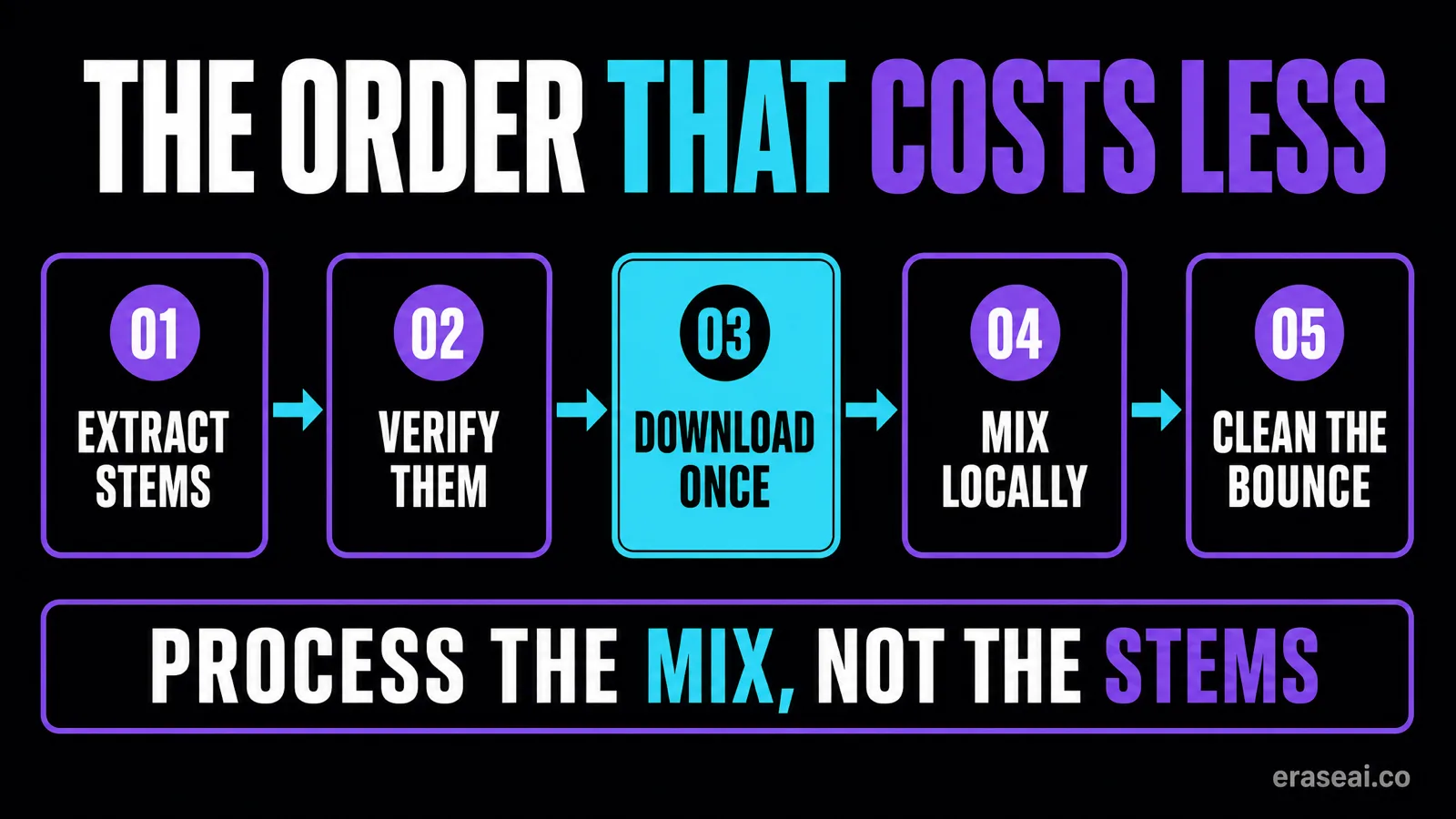
01Decide whether you actually need stems
If you only want an instrumental or an acapella, Split from Mix at 10 credits does that job and Auto Split at 50 is a waste.
02Extract the stems BEFORE you download the song
The step that saves you allowance: all stems from a song are part of that song's single download. Pull the song first and come back later and you pay twice out of a capped allowance.
03Check the stems before you spend more credits
Listen to each one in isolation, and time anything that sounds wrong. Suno warns that splitting out an instrument that is not in the song can spend credits and return nothing usable.
04Download the song and its stems together, in one go
One operation, one download counted, at the highest quality your plan offers.
05Do your mixing work locally, not on the platform
Once the files are on your drive nobody is metering the work. Rebalance, replace parts, comp the vocal, then bounce a new stereo mix.
06Clean and master the final bounce, not the stems
Release preparation belongs on the finished stereo file, because the summed result is what a distributor scans. Process the bounce, not the parts.
Step six is the one people get backwards. Cleaning each stem first sounds right, but a distributor never sees your stems — it sees the summed stereo file, and summing twelve processed stems makes a new signal nobody has checked. Mix, bounce, then one pass on the bounce.
It does not separate stems. It handles the file you release.
Straight answer: Undetectr is not a stem separator. It handles the step after the mixing: the identifier layer distributor screening reads — SynthID, C2PA content credentials, spectral fingerprints, temporal patterns and generation metadata — then masters the result to platform loudness specification.
Get the archive off the platform
The Bulk Suno Song Downloader pulls a playlist or a whole library as ZIP archives. Extract the stems first and they travel inside those downloads, one slot apiece.
One pass on the bounce
Cleanup and mastering on the stereo file, so what a distributor scans is what you prepared. With downloads metered, a rejected upload costs a slot.
Use it on music you generated and hold the rights to. Our Suno mastering guide covers the order of operations, and the downloader comparison scores every export tool.
Related guides
The two-minute degradation
Positional quality loss in full V6 songs, and the published mechanism.
Cleaning up AI audio
What processing genuinely improves, in order.
Artifact removal
The four artifact layers, and which survive mastering.
Why AI tracks disappear from streaming
Five causes, ranked, before you assume a claim.
Where you can release the finished track
Every published distributor and promo policy, dated.
Mastering a Suno track
The order of operations once the stems are back in a bounce.
Or browse every guide on the site.
Suno stems FAQ
How do I get stems from Suno?
Open the more-actions menu on the track and choose Get Stems, then pick a mode. Auto Split returns up to 12 stems for 50 credits; Split from Mix isolates one element plus a complement for 10 credits per extraction; Advanced Split lets Premier subscribers pick from nearly 100 instruments.
Do stem downloads count against Suno's download limits?
No. Suno's FAQ states that all stems from a song are part of that song's single download, and that a song plus its stems counts once rather than per file. A track and its twelve stems is one download, not thirteen.
Why do Suno stems sound bad?
Because they are reconstructions rather than recordings: the model infers what each part was and renders a new one. That leaves the familiar signatures — bleed between stems, smeared transients, thin high frequencies and a hollow quality on parts that overlapped heavily. Five other causes produce similar complaints, though, and the cause table on this page separates them by the test that identifies each one.
Does Suno Studio have unlimited exports?
Suno's FAQ says Studio users "will still be able to download their work from Studio without limitation", and the November 2025 partnership post promised Studio would remain untouched. Exports come as WAV in Full Song, Selected Time Range or Multitrack form, the last exporting every track as stems. MIDI extraction costs 10 credits.
Why do my Suno stems sound different after downloading them?
Suno regenerates each stem rather than slicing your mix, so the file you download is a render rather than a copy of what you heard. One documented case from September 2026 found a vocal stem that played cleanly in Suno Studio and dropped in quality at 1:32 in the untouched downloaded WAV, across two separate extractions. That is a single report, not established behaviour — check your own files by noting the timestamp in Studio, then listening to the download before any processing.
Can mastering repair a degraded Suno stem?
It depends which of the six causes you have. Muddy low end, harsh upper mids, phase cancellation and section-to-section loudness all respond to EQ, alignment and automation. A band-limited or collapsed passage does not, because the content was never written into the file. For those, the options are regenerating the stem, splicing a good take, or replacing the part yourself.
Does Undetectr separate stems?
No. It is a signal-level processor and mastering tool for finished audio, so it handles the step after the mixing: the identifier layer that distributor screening reads, and mastering the bounce to platform specification. It does not separate stems, and it does not repair a stem that came out of the generator missing content.
Sources
- Suno Help Centre, advanced stem separation. Split modes, credit costs, plan availability, the absent-instrument warning.
- Suno Help Centre, Upcoming Changes FAQ: Downloads, Models, and Terms of Service. The one-download rule, tier allowances, retroactive start date.
- Suno Help Centre, exporting from Suno Studio. Studio export options, the WAV format, 10-credit MIDI extraction.
- Team Suno, An update to our downloads policy and Terms of Service, 10 August 2026. The 3 September date.
- Team Suno, We've made improvements to Stem Separation, 11 June 2026. The regeneration mechanism and Suno's own quality claims.
- Suno, Suno and Warner Music Group, 25 November 2025. The Studio download exemption.
- r/aiMusic, weird problems with Suno stems and SubmitHub AI detection, 29 September 2026, 5 upvotes / 24 comments. The documented case.
- RoEx, Suno stems sound bad: here is why and how to fix them. Credited for the mix-side causes.
- Luo, Gu and Yao, arXiv 2607.29363, 31 July 2026. The drift quote; about speech models in general, not about Suno.
Suno's pages read at source 24 August 2026 and re-read 8 October 2026. The export-path finding rests on one documented public case plus adjacent complaints, not on established behaviour and not on any listening test run here: none was run, and the retired models cannot be regenerated for a control. EraseAI recommends Undetectr, and those links are commercial.
Extract first, download once, process the bounce
Time the fault before you treat it, take the song and its stems in one operation, and run one cleanup and mastering pass on the mix you actually release.
And clean stems are worth more than a release slot — a paid sync brief usually asks for an instrumental, a vocal-up mix or the parts themselves: the one market where the stems are the product rather than a step.
Export my Suno catalogue →