Your Suno Back Catalogue Stops Being Portable.
On 3 September 2026 Suno starts metering downloads by plan tier, and the cap applies to every song already in your library, not just the ones you make afterwards. Nothing is deleted and nothing is taken from you. But on Pro, a three-hundred-track catalogue turns into a fifteen-month export project overnight. Until the third, downloads are unmetered. This is how to get the whole thing out in an afternoon, and what to do with the files once you have them.
By Eddie Mathews · 24 August 2026
The short version
- 3 September 2026. Download caps begin and the new Terms of Service take effect.
- It is retroactive. The caps cover all music on Suno from that date, including songs created years earlier.
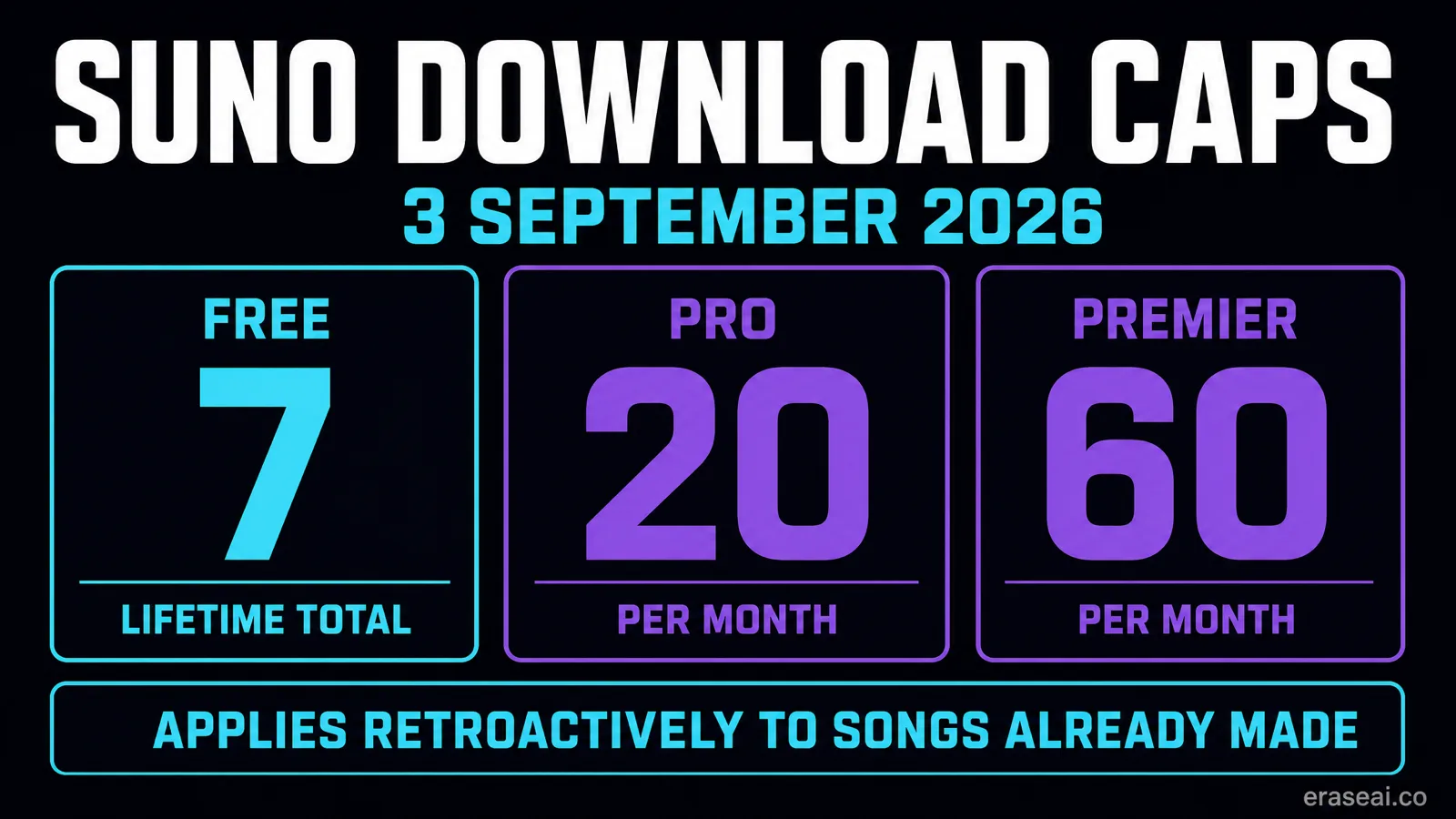
- Pro is 20 a month. Premier is 60. Free gets 7 lifetime trial downloads that never reset.
- Until the third, downloads are unmetered. That window is the whole opportunity here.
- Bulk export exists. Undetectr's Bulk Suno Song Downloader pulls a playlist, or your entire library, as a single ZIP.
What actually changes on 3 September
Two separate Suno announcements, four days apart, are usually reported as one. They are not.
On 6 August 2026, Suno co-founder Mikey Shulman published a post on building the future of music responsibly. It committed the company to audio watermarking and fingerprinting, described as durable and resistant to tampering, arriving in the coming weeks. No date was attached to it. Every track Suno generates would carry an inaudible signature in the waveform, so that platforms downstream can identify where the audio came from.
On 10 August, a separate post from Team Suno announced the downloads policy and a new Terms of Service, both effective 3 September 2026. That is the piece with a date on it, and it is the piece with a deadline you can actually act on. Suno's stated reason is to make it harder for bad actors to mass-export music into streaming services for artificial royalties, while leaving normal professional, creative and personal use intact.
The detail that catches people out is the scope. The caps are not limited to new generations. Suno's own help documentation states that download limits apply to all music on Suno starting 3 September, including songs created before that date. A catalogue you built over two years is inside the cap from day one.
| Plan | Download allowance | Reset behaviour | Rights on download |
|---|---|---|---|
| Free | 7 total, lifetime | Never resets | Personal, non-commercial only |
| Pro | 20 per month | Resets on billing date, no rollover | Commercial use rights |
| Premier | 60 per month | Resets on billing date, no rollover | Commercial use rights |
| Premier + Studio | Unlimited from Studio | Monthly caps still apply elsewhere | Commercial use rights |
Source: Suno downloads policy and help centre, read at source 24 August 2026.
Two things are explicitly not happening, and it is worth saying them plainly because the panic online has run ahead of the facts. Your library is not being deleted: Suno states every song you have made stays fully playable and shareable on the platform, on every plan including free. And downloads made on a paid plan keep their commercial rights. What is metered is the act of pulling a file off the platform, not the existence of the song or your rights to what you already pulled.
Why one-at-a-time stops working
Run your own number. It is usually worse than the guess.
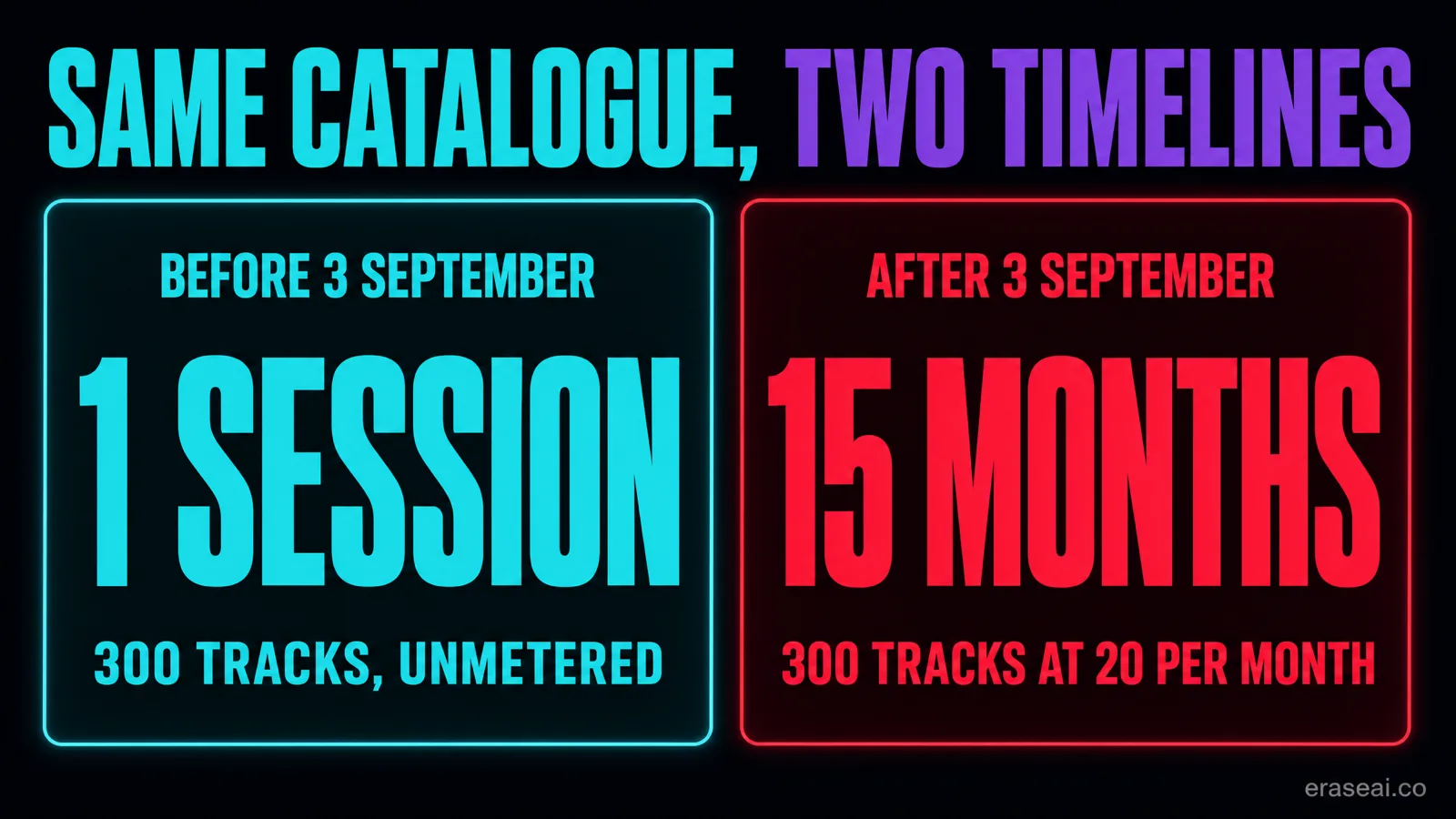
Divide the number of tracks you genuinely want on local storage by your monthly allowance. On Pro, a 60-track keeper list is three months of downloading. Two hundred tracks is ten months. Three hundred is fifteen. On Premier those become one month and just over three and five. On the free tier there is no monthly cycle at all, only seven lifetime trial downloads, so a free account with a catalogue worth keeping has a decision to make rather than a schedule to run.
There is a second reason the clock matters, and it has nothing to do with the caps. Suno has said its next generation of models, developed in partnership with the music industry, will retire all prior models when it launches, while existing songs remain in the library. If the specific character of a track matters to you commercially, holding the file is worth considerably more than being able to regenerate it, because the model that produced it will not be there to ask again.
Between now and 3 September, Suno has not said downloads are metered. That window is the cheapest time this catalogue will ever be to move, and it is the only genuinely time-limited part of the story. Everything else in this article will still be true in October.
Bulk export the whole catalogue
Suno's native download flow is one track at a time. The fix is a bulk tool, and it takes minutes rather than months.
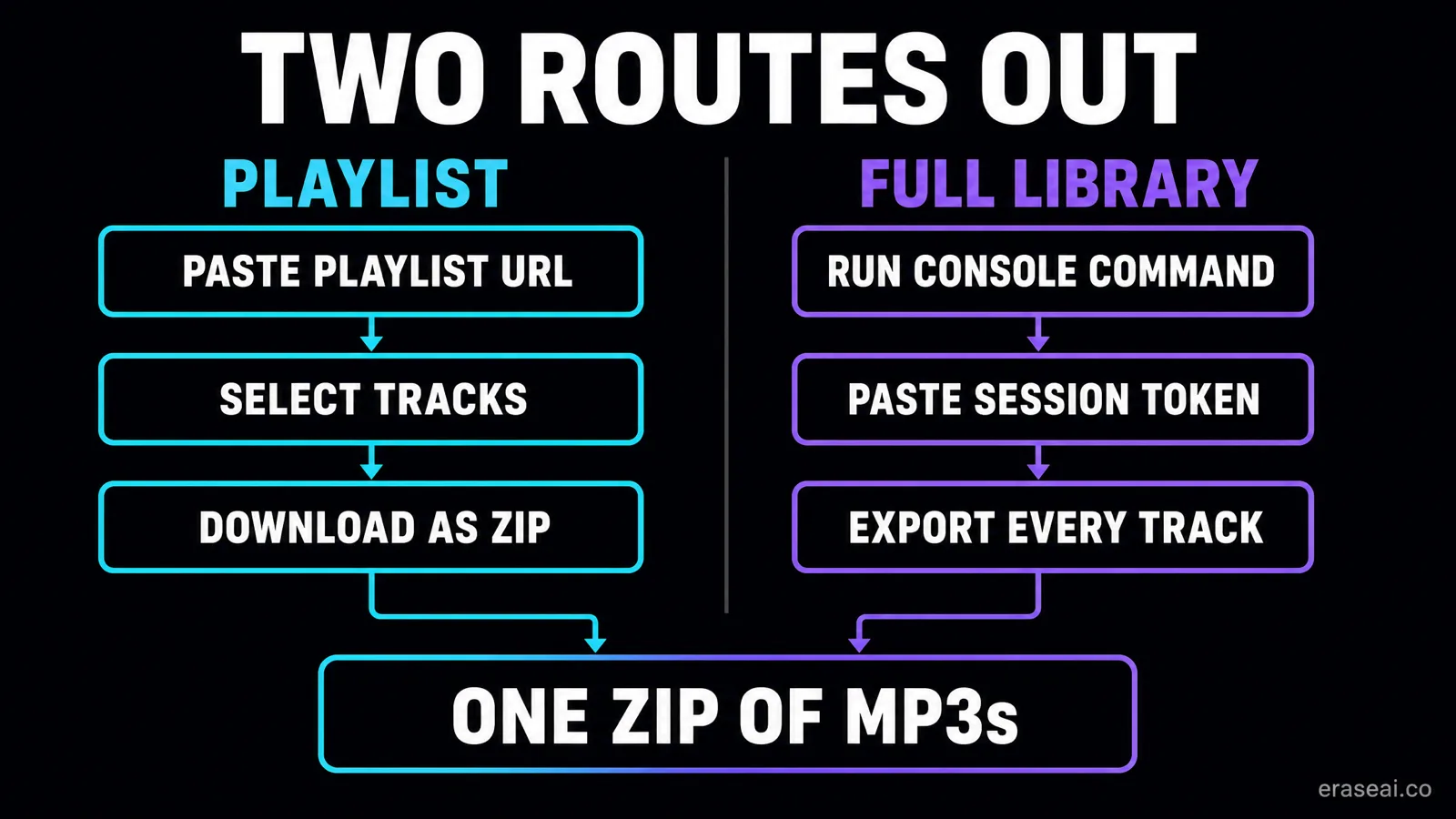
The tool is Undetectr's Bulk Suno Song Downloader, and it runs in the browser with nothing to install. It offers two routes. The Playlist tab takes any public Suno playlist URL, lists every track in it with checkboxes, and returns your selection as a single ZIP of high-quality MP3s pulled direct from Suno's own CDN. The Full Library tab goes further: it exports every track you have ever created on Suno, authenticated with your own session token via a console command the page gives you to copy and paste. Undetectr puts that route at about thirty seconds of setup.
The playlist route is the better workflow for most catalogues, and it is worth understanding why before you reach for the bigger hammer. Pulling eight hundred files in one operation gives you eight hundred files in one folder. Grouping them into playlists on Suno first, by genre or project or release intent, means the archive arrives already sorted into the categories you will actually work in. Five minutes spent organising before the export saves an evening of sorting after it.
Unlimited playlist downloads are included with Undetectr's one-time Lifetime plan, alongside unlimited track processing, MP3, WAV and FLAC output, and priority queue.
01Open the Bulk Suno Song Downloader
Go to undetectr.com/import-suno. Two tabs sit at the top: Playlist and Full Library. Playlist is the one to start with, because it lets you pull the catalogue in organised groups rather than as one undifferentiated dump.
02Group the catalogue into playlists on Suno first
Inside Suno, sort the tracks you care about into playlists by genre, project or release intent, and make them public. This is five minutes of work that decides whether the export arrives as a usable archive or a folder of eight hundred files called untitled.
03Paste the playlist URL and hit Fetch Playlist
Copy the playlist URL straight from the browser address bar and paste it in. The tool reads the playlist and lists every track in it, with checkboxes. It works with any public Suno playlist.
04Select the songs and Download as ZIP
Tick what you want, or take the lot, and download. Everything comes back as a single ZIP of high-quality MP3s pulled direct from Suno's CDN. Repeat per playlist and the catalogue lands on your drive already sorted.
05Use the Full Library tab for everything at once
The second tab exports every track you have ever created in one operation, authenticated with your own Suno session token. Undetectr gives you a console command to copy, paste and run, which takes about thirty seconds. Use it when the catalogue is too large to playlist by hand.
06Verify the archive, then back it up twice
Unzip, count the files against your track count, and spot-check that they play. Then put one copy on local storage and one off-site. After 3 September, re-downloading a lost file costs you an allowance slot instead of an afternoon.
Pull the catalogue, then make it releasable
The deadline creates two jobs and Undetectr covers both. Its Bulk Suno Song Downloader gets the back catalogue off the platform as ZIP archives while downloads are still unmetered. Then its processor removes the identifier layer that distributor screening reads, SynthID, C2PA content credentials, spectral fingerprints, temporal patterns, stereo-field anomalies and generation metadata, in one automatic pass of about ninety seconds, and masters the result to platform loudness specification. Use it on music you generated and hold the commercial rights to.
A downloaded file is not a finished record
The archive on your drive solves the deadline. It does not solve the distributor.
Once the catalogue is secured, the constraint stops being Suno and starts being whoever you release through. A raw generator export carries two distinct things that screening cares about. The first is audible: metallic cymbal timbres, phase-smeared bass, a compression-style distortion on vocals, and harsh peaks around 4kHz. Those are the artifacts a listener half-notices and a mix engineer hears immediately.
The second is not audible at all. Phase relationships, sub-threshold noise patterns and timing micro-variations sit below the threshold of human hearing but are exactly what distributor scanners read. This is the part that decides whether an upload sails through ingestion, goes to manual review, or gets rejected outright, and it is the part that ordinary audio-repair tools were never built to see.
Testing published by PopularAiTools in its 2026 artifact-removal software review puts numbers on the gap. Fifty AI-generated tracks from Suno v5, Udio and Stable Audio were processed through each tool, then uploaded to six distributors including TuneCore, DistroKid, Spotify direct, Apple Music, Amazon Music and YouTube Music, with results tracked at ingestion.
| Tool | Overall score | Passed DistroKid | Passed TuneCore |
|---|---|---|---|
| Undetectr | 98 / 100 | 50 of 50 | 49 of 50 |
| iZotope RX 11 | 72 / 100 | 22 of 50 | — |
| Ableton Live Suite | 58 / 100 | 14 of 50 | — |
| Logic Pro | 54 / 100 | 11 of 50 | — |
| FL Studio | 48 / 100 | 8 of 50 | — |
Source: PopularAiTools, Best AI Music Artifact Removal Software 2026. 50 tracks per tool.
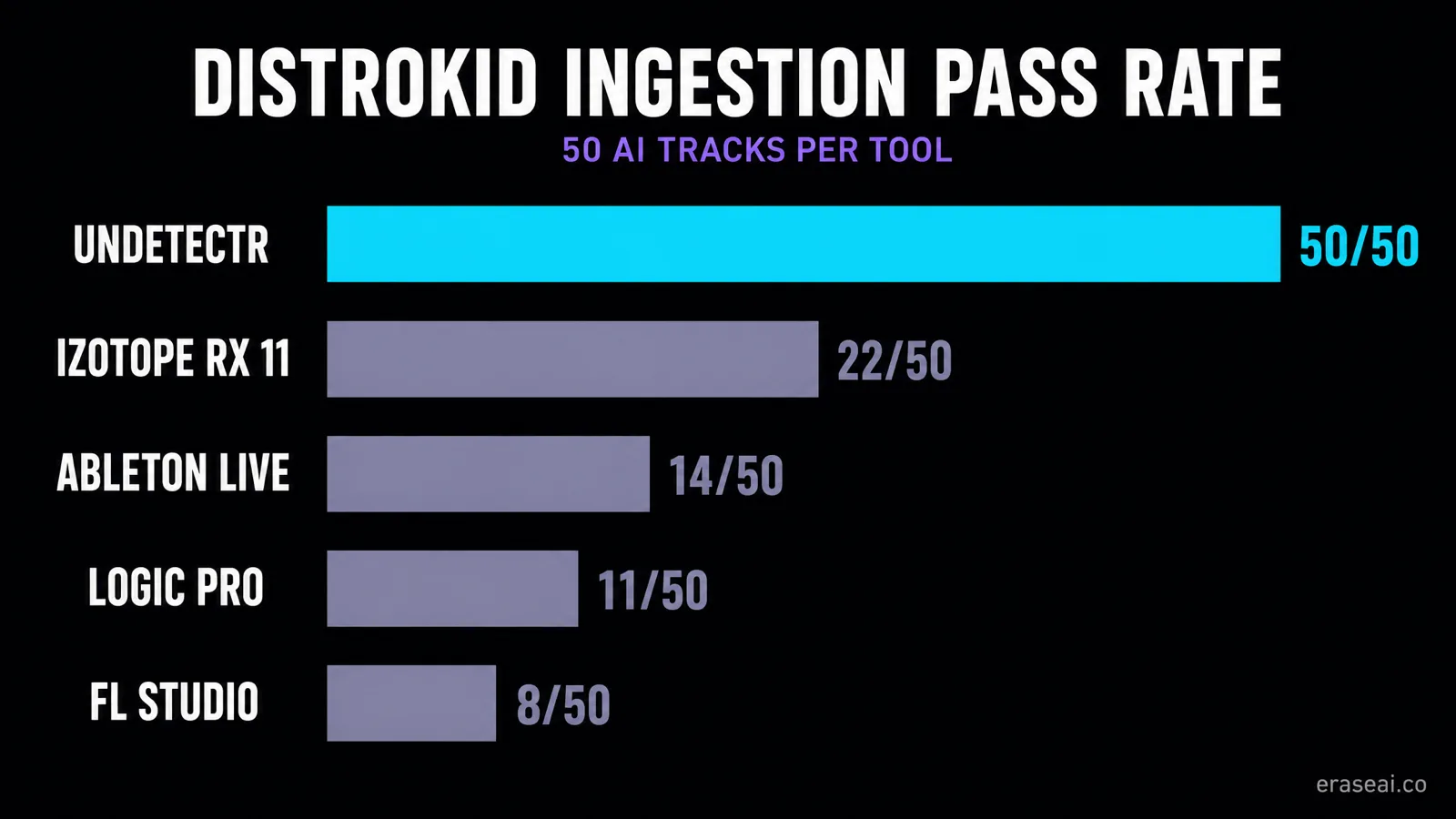
The pattern is consistent and the reason is structural. iZotope RX, Ableton, Logic and FL Studio are repair and production tools. They treat a watermark as an audio problem to be masked, and they are excellent at that. Undetectr treats it as a statistical fingerprint to be removed, which is a different operation on a different layer, and it is the only tool in the group built for that purpose. The review scores it 98 out of 100 and calls it the first, and still the only, purpose-built AI music artifact removal tool.
This matters more after 3 September than before it. Today, a track that gets bounced at ingestion costs you an afternoon and a re-upload. Once downloads are metered, re-pulling that file to try again costs you an allowance slot out of twenty. Processing the catalogue you export in this window is what stops a distributor rejection turning into a download you cannot afford. Our cleanup guide and Suno mastering guide cover the order of operations, which matters: clean first, then master, never the other way round. Our scored artifact removal tool comparison goes through each option in detail.
Where the watermark fits in
Undated, unshipped, and frequently confused with the deadline.
Suno's watermarking commitment has no announced ship date. The 6 August post said the coming weeks. The new Terms of Service that take effect on 3 September reserve Suno's right to append a fingerprint, watermark or metadata to an output, indicating the applicable service tier and whether the output was a permitted download. The same terms ask users not to remove, alter, obscure or circumvent those markers for the purpose of concealing or misrepresenting an output's provenance, service tier or download status.
We would rather be straight about that than sell around it. Undetectr is release preparation for music you generated and hold the rights to: it removes the identifier layer that trips distributor screening, and it masters the result to platform specification. It is not a way to misrepresent where a track came from, and if that is what you are looking for, this is the wrong article. Read Suno's current terms yourself before you act.
There is also a technical point worth understanding, because it changes what urgency actually means here. A watermark is applied at generation or export. Suno cannot reach a copy it does not hold. Files already on your drive are outside the pipeline and a later change to it does not touch them. So "download everything before the watermark lands" is not the reason to move; the retroactive download cap on 3 September is, and that one has a date attached and applies to a catalogue you already own. For the full technical background, our companion piece explains the watermarking and download changes in detail, and the catalogue checklist covers how to triage which tracks deserve the effort.
Suno bulk download FAQ
Can I bulk download from Suno?
Not natively in one action from inside Suno. Suno's own download flow is per-track. To pull a whole catalogue you need a bulk tool: Undetectr's Bulk Suno Song Downloader takes either a public playlist URL or your Suno session token and returns the tracks as a single ZIP of MP3s.
What is the deadline, exactly?
3 September 2026. From that date Suno meters downloads by plan tier, and the new Terms of Service take effect. Suno has confirmed the limits apply to all music on the platform from that date, including songs created before it, so an older back catalogue gets no exemption.
How many downloads do I get after 3 September?
Free accounts get up to 7 total lifetime trial downloads for personal, non-commercial use, and they do not reset. Pro gets 20 per month and Premier 60 per month, both with commercial use rights, both resetting on your billing date with no rollover of unused downloads. Premier subscribers working in Suno Studio have unlimited downloads from Studio. Suno says extra downloads will be purchasable beyond the tier allowance.
Are my songs being deleted?
No. Suno is explicit that every song you have made stays fully playable and shareable on the platform, on every plan including free. What changes is your ability to export the audio file off-site. The library is not the thing at risk; the file on your own drive is.
Is bulk downloading my own Suno tracks allowed?
Downloading music you generated, on a plan that grants you the right to it, is the normal use of the product. What Suno's updated terms address is mass export intended to flood streaming platforms, and evasion of the systems that police it. Pulling your own finished catalogue to your own storage before the cap lands is not that. Read Suno's current terms before you act on anything you are unsure of.
Does the file quality change after 3 September?
Suno has not announced a change to export quality. What Suno did announce, separately on 6 August 2026, is audio watermarking and fingerprinting described as durable and resistant to tampering, arriving in the coming weeks. The new Terms of Service reserve Suno's right to append a fingerprint, watermark or metadata to an output.
Does a watermark reach files I already downloaded?
No. A watermark or fingerprint is applied when audio is generated or exported. Suno cannot reach into copies it does not hold, so files already sitting on your drive are unaffected by a later change to its pipeline. That is a further reason to have the catalogue locally rather than only in the cloud.
What do I do with the files once they are downloaded?
Back them up, then prepare the ones you intend to release. A raw generator export is not a master: it carries the embedded identifier layer that distributor screening reads, and it usually sits outside platform loudness targets. Undetectr removes that identifier layer at signal level and masters to platform specification in one automatic pass.
Sources
- Team Suno, An update to our downloads policy and Terms of Service, 10 August 2026. Source of the tier allowances, the 3 September date and the retroactive scope.
- Suno Help Centre, Upcoming Changes FAQ: Downloads, Models, and Terms of Service. Source of the reset and rollover behaviour and the library-remains-playable statement.
- Mikey Shulman, How We're Building the Future of Music Responsibly, 6 August 2026. Source of the watermarking and fingerprinting commitment.
- Music Business Worldwide, Suno limits Pro subscribers to 20 song downloads per month. Source of the Terms of Service wording on fingerprints and circumvention.
- PopularAiTools, Best AI Music Artifact Removal Software 2026. Source of the 50-track distributor pass-rate testing and the tool scores.
- Undetectr, Bulk Suno Song Downloader. Source of the playlist and full-library export workflows and what the Lifetime plan includes.
Read at source on 24 August 2026. EraseAI recommends Undetectr, and those links are commercial.
Ten days before the catalogue stops being portable
Bulk export the whole library as ZIP archives while downloads are unmetered, then process the tracks you intend to release so they clear distributor screening first time.
Download my Suno back catalogue →