The Fix Did Not Leave. The Floor Moved.
A post with 118 upvotes says Suno is shutting Studio V1 in December, that the Suno editor lost its “Fixed” repair mode with v6, and that a 0.5-second artifact is now unfixable. If that is right, every short defect in your back catalogue just became permanent. We checked the claim one clause at a time against Suno's help centre, its pricing page, its billing payload and the 12,425 English strings its own app ships. Three of the four clauses do not survive the check — and the one that does is more useful than the complaint, because it names a number nobody has published: the floor is two seconds.
The short version
Five findings, each from a document or a payload you can open yourself.
The short version: the Studio 1.x deprecation is real, but its only published date is “early September 2026” — written in August, two months past, and still not carried out. No Suno document names December.
The “Fixed” replace mode is still in the product. It is in the Create form, where the tooltip says it “works better for 1-2 second selections”, and in Studio 2.0 alongside Classic and Smart.
The real constraint is a floor, and it is two seconds: “Selection must be at least 2 seconds long.” A 0.5-second artifact is below it — in every route, including the one being retired.
Six seconds is a warning, not a minimum. The editor’s own string reads “Selections under 6 seconds may give unexpected results”, which is where the figure in the complaint comes from.
Section editing is a Pro feature, not a Studio one. Suno’s billing payload puts edit_mode on Pro and above and studio on Premier and above — so a Pro subscriber loses nothing here.
- What is actually closing, and when
- The “Fixed” mode that did not disappear
- How short a section can you replace?
- Where the six seconds comes from
- Repairing half a second outside Suno
- Those clicks are not a watermark
- Who loses Studio, and on which plan
- What happens to V1 projects
- When regenerating is the right answer
What is actually closing, and when
There is a real deprecation. It is not the one going round.
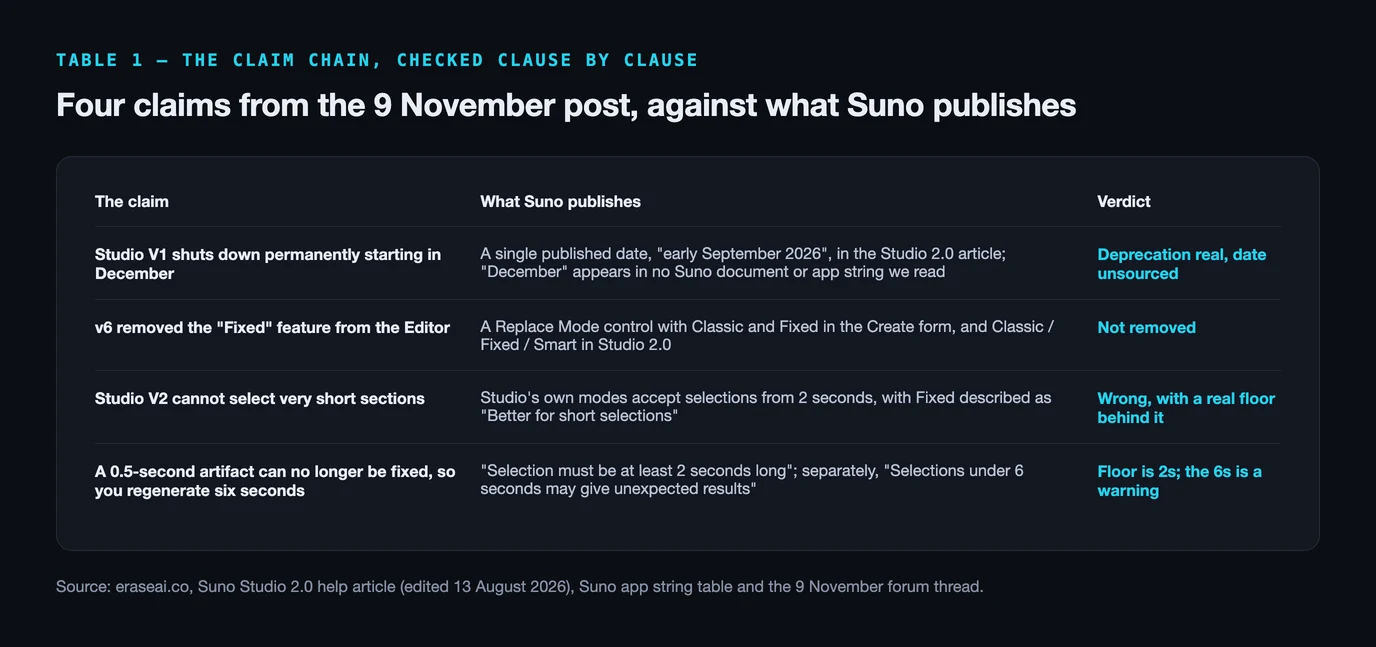
Suno has announced that Studio 1.x is going away. It did so once, in the help article introducing Studio 2.0, and the wording is specific: “For a few weeks, Studio 1.x will remain available to Premier users (choose ‘Open in v1’ from the project menu). We expect to deprecate Studio 1.x in early September 2026.” That article was last edited on 13 August 2026.
Which means the announced date passed two months ago and the feature is still there. We read Suno's complete English interface string table on 17 November 2026 — 12,425 strings, served as a public file — and it still ships “Open in Studio 1.2”, “Open a copy in v1” and a “Legacy” project badge. Commenters in the thread confirm the same from the other side: one says they use Studio v1 “way more than v2”, another asks, with evident surprise, “Wait you can still use v1? How?”
So the honest status is a deprecation that has been announced, missed its own date, and not yet happened. What there is no evidence for is December. The word does not appear once in those 12,425 strings, no Suno help article we opened names it, and across 98 of the thread's 101 comments the words “December”, “announcement” and “email” appear zero times — nobody, including the author, points at where it came from.
| The claim (9 Nov post) | What Suno publishes | Verdict |
|---|---|---|
| Studio V1 shuts down permanently starting in December | A single published date, “early September 2026”, in the Studio 2.0 article; “December” appears in no Suno document or app string we read | Deprecation real, date unsourced |
| v6 removed the “Fixed” feature from the Editor | A Replace Mode control with Classic and Fixed in the Create form, and Classic / Fixed / Smart in Studio 2.0 | Not removed |
| Studio V2 cannot select very short sections | Studio’s own modes accept selections from 2 seconds, with Fixed described as “Better for short selections” | Wrong, with a real floor behind it |
| A 0.5-second artifact can no longer be fixed, so you regenerate six seconds | “Selection must be at least 2 seconds long”; separately, “Selections under 6 seconds may give unexpected results” | Floor is 2s; the 6s is a warning |
The mode the Suno editor did not lose
It is still in two places. What changed is which model answers it.
The load-bearing claim in the complaint is that v6 took “Fixed” away. It did not. Suno's Create form still carries a Replace Mode control whose two named options are Classic and Fixed, and whose tooltip reads: “Fixed mode works better for 1-2 second selections, but is less stable over long selections. Leave blank to automatically choose based on duration.” Studio 2.0 carries the same thing with a third option: “Fixed — Better for short selections”, “Classic — Better for long selections” and “Smart — Auto-select based on length”.
There is a real change underneath, and it is more interesting than a removal. One string in the same table reads “v4.5 will still be used for ‘Smart’ and ‘Fixed’ replacements”. The surgical modes are served by an older model than the one generating your song. That is a plausible mechanical reason for a repair to feel like it no longer matches the material around it, and it is a different complaint from the feature being deleted.
The thread worked part of this out on its own. Its highest-scoring substantive reply, at +22 against the post's own 118, tells the author the job is still doable: “Yes, the removal of Fixed was frustrating. But now you can do the same in Simple mode. Just add a file here and write something like ‘Replace a mispronounced word from 1:15 to 1:18 from … to …. Don't change anything else.’ It works quite well.” Suno's own product copy says the same: its v6 FAQ answers “What can I edit after a song is made?” with “Describe the change in plain language and v6 edits just that part … without regenerating the rest of the song.” The author's reply to that comment was “I don't get what you're talking about” — which is the actual problem on this topic. The capability is documented in marketing copy and absent from the help centre.
How short a section can you replace?
Nobody publishes this table. These numbers come out of the app itself.
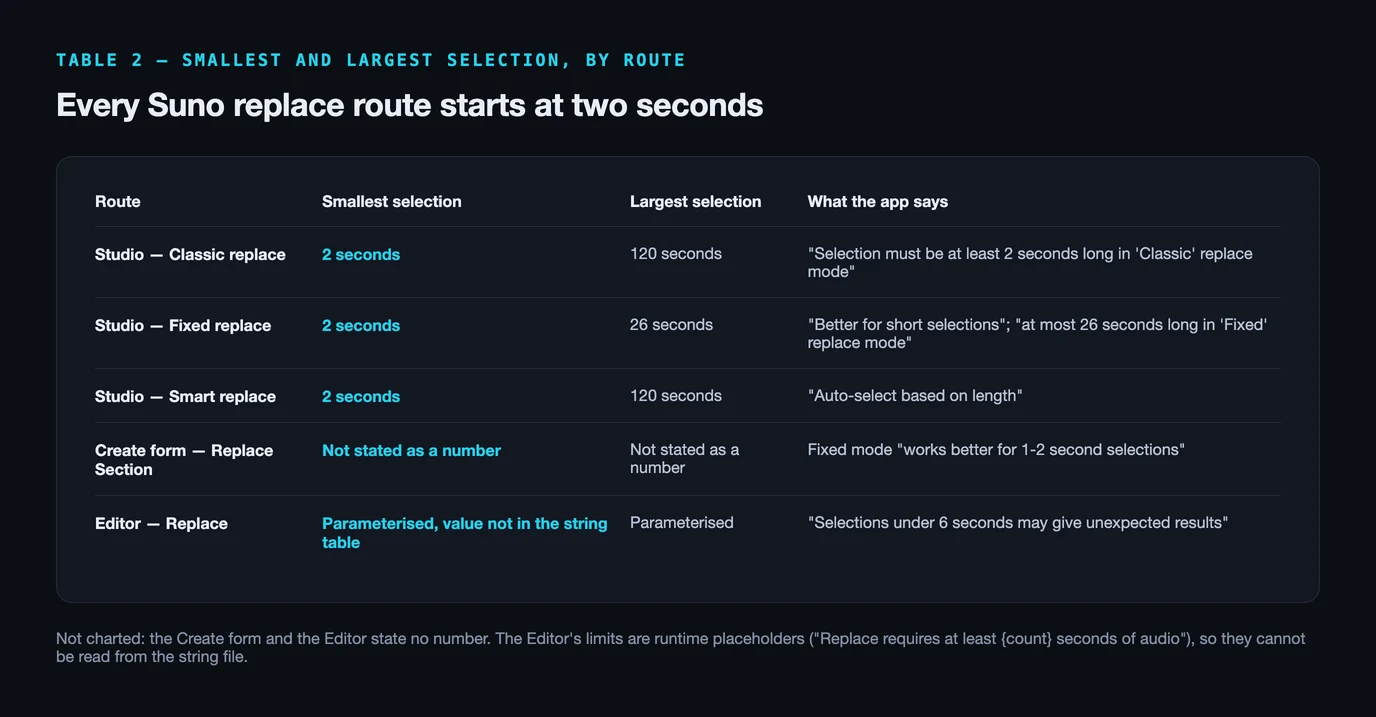
Suno's help centre article on Replace Section is a clear walkthrough and it states no durations at all — no minimum, no maximum, nothing about which mode suits which defect. It was last edited on 19 December 2025. Every number below is from the interface strings the app serves today, which is the only place Suno states them.
| Route | Smallest selection | Largest selection | What the app says |
|---|---|---|---|
| Studio — Classic replace | 2 seconds | 120 seconds | “Selection must be at least 2 seconds long in ‘Classic’ replace mode” |
| Studio — Fixed replace | 2 seconds | 26 seconds | “Better for short selections”; “at most 26 seconds long in ‘Fixed’ replace mode” |
| Studio — Smart replace | 2 seconds | 120 seconds | “Auto-select based on length” |
| Create form — Replace Section | Not stated as a number | Not stated as a number | Fixed mode “works better for 1-2 second selections” |
| Editor — Replace | Parameterised, value not in the string table | Parameterised | “Selections under 6 seconds may give unexpected results” |
Two honest caveats about that table. The Editor's minimum and maximum are stored as placeholders — “Replace requires at least {count} seconds of audio” — so the app fills the number at runtime and we cannot read it from the file. And the Create form's “1-2 second selections” sits oddly beside Studio's two-second floor; they are different surfaces and may genuinely differ. Where we could not read a number, the cell says so rather than guessing one.
The part that matters is not in dispute in any row. Half a second is under the floor everywhere, and it was under the floor in Studio 1.x too. The feature being retired was not what stood between you and a 0.5-second repair.
Where that number came from
It is real, it is Suno's, and it does not mean what the thread thinks.
“We'll have to regenerate six seconds of music” is the line that gave the post its force, and the six is not invented. It appears in the editor as a caution: “Selections under 6 seconds may give unexpected results”, sitting next to “Shorter selections are recommended”. Those two strings pull in opposite directions, which is probably why the figure reads as a rule to people who have met it in anger.
It is a warning, not a minimum. Between two and six seconds the editor will take the job and tell you the result may surprise you. That is a meaningfully different situation from being forced to regenerate six seconds, and it is worth knowing before you conclude a track is beyond saving.
Why a short selection is unstable at all is explained by another pair of strings, in Studio's context-window control. Suno defines the context window as the “span of time around selection that is referenced while generating”, and warns that “short context windows follow styles more closely, but may not be consistent with the rest of the song”. The model is not splicing audio into a gap; it is generating fresh audio conditioned on its neighbours. Ask for less material and you give it less to match, which is the continuity problem the thread describes without naming. It is the same family of behaviour we traced when we looked at whether v6 really degrades after two minutes.
Fixing half a second outside Suno
Below two seconds, this is an edit, not a generation.
A click, a pop, a half-second of digital hash: these are defects measured in milliseconds, and no generative route addresses them, because regenerating two seconds to remove a 40-millisecond tick replaces material you wanted to keep. In an audio editor the same fix is a redraw of the waveform at that point, and nothing else in the file moves.
Several in the thread had already arrived here. The most upvoted puts the trade honestly: doing the micro-edits locally is an “annoying extra step when you're paying for the top tier, but it usually beats burning credits trying to roll the dice on a whole 6-second regeneration”. Another fixed a section of hiss by cutting it out; a third uses iZotope RX.
The stem route is contested in that same thread. The post's author argues separated stems “bleed into one another” because they were never generated as independent tracks, and one commenter describes exactly that — a bass artifact that survived the fix because it had bled into the vocal stems. Others call bleed “a non issue 99% of the time”. Dense, synth-heavy passages are where it bites. Our guide to Suno stems covers what separation does and does not preserve.
One tool caution, because it catches people: noise reduction is usually the wrong instrument. Audacity's Noise Reduction profiles a region of the waveform containing only noise — at least 2,048 samples — and a generated track that is busy from the first bar often has no such region, so there is nothing to profile. A spectral repair tool working on a selected time-frequency patch is the right shape; iZotope RX starts at $99 for Elements and runs to $1,399 for Advanced.
Two jobs get muddled here, and they are worth separating. Patching one audible click is an edit. Reducing the broader artifact layer across a finished track, so that a distributor's automated screening is not what stops your release, is a pass over the whole file — which is what Undetectr is for. Its limit matters: it does nothing to how a platform labels your release, because labels follow from your own disclosure and from what your distributor passes on. Our artifact remover explainer and the AI audio cleanup guide go through what is actually in a raw export.
Those clicks are not a watermark
The thread’s most popular theory points people at the wrong repair.
One claim from the thread does need correcting, because it points people at the wrong repair entirely. Two commenters suggest the clicks and pops might be a watermark Suno does not want removed. There is no evidence for that and there is a published alternative: an ISMIR 2025 paper traces the characteristic spectral peaks in AI-generated audio to deconvolution upsampling and shows the effect is inherent to model architecture rather than to anything inserted deliberately — in music, the paper notes, it is heard as hiss. Suno's terms do reserve a right to append a marker, but the marker they describe indicates service tier and whether a download was permitted. That is licensing metadata, not an audible tick in your chorus.
Who actually loses Studio, and on which plan
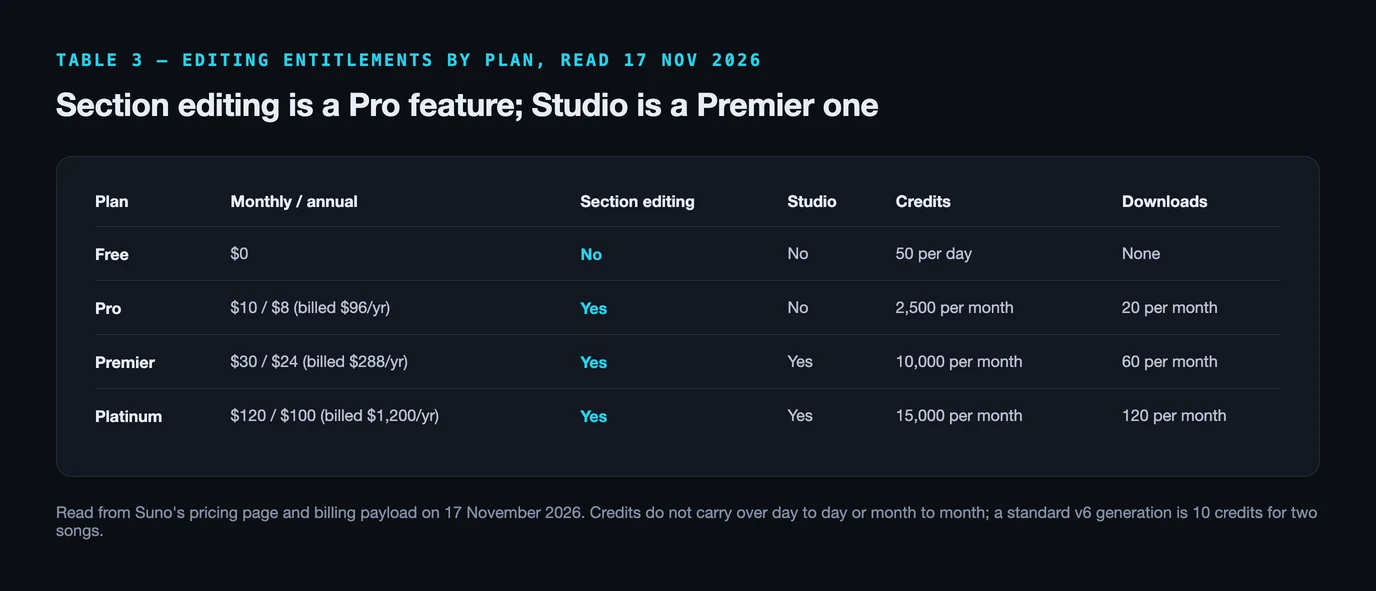
Editing and Studio are two different entitlements. Most people only have one.
This is the part that defuses most of the alarm. Suno's billing endpoint returns a feature list per plan, and section editing and Studio are separate flags on it: edit_mode appears on Pro, Premier and Platinum, while studio appears only on Premier and Platinum. Suno's help article says the same in words: Replace Section is for “Pro and Premier subscribers”.
So a Pro subscriber never had Studio 1.x and loses nothing when it goes, and a Premier or Platinum subscriber loses one of several routes to the same job. Prices and allowances below were read off Suno's pricing page on 17 November 2026.
| Plan | Monthly / annual | Section editing | Studio | Credits | Downloads |
|---|---|---|---|---|---|
| Free | $0 | No | No | 50 per day | None |
| Pro | $10 / $8 (billed $96/yr) | Yes | No | 2,500 per month | 20 per month |
| Premier | $30 / $24 (billed $288/yr) | Yes | Yes | 10,000 per month | 60 per month |
| Platinum | $120 / $100 (billed $1,200/yr) | Yes | Yes | 15,000 per month | 120 per month |
Two things that bear on the cost of repairing by regeneration. Credits do not roll over — Suno's pricing page states they “do not carry over from day to day or month to month” — and a standard v6 generation is 10 credits for two songs, so iterating on a stubborn two-second patch is cheap in credits and expensive in attempts. The scarcer budget is downloads, capped at 20 a month on Pro, which is the number that decides how many repaired tracks you can actually take out of the platform.
What happens to the projects you built in V1
The migration is non-destructive, and Suno says so twice.
Suno's Studio 2.0 article addresses this directly: “projects made in Studio v1.x can be opened in Studio 2.0, even after Studio 1.x is deprecated — you will be prompted to create a new version”. The app's own migration dialog is more reassuring still. It is headed “This project was created with an old version of Studio”, offers “Choose ‘Open in Studio 2.0’ to create an upgraded copy of this project”, and carries two lines that answer the fear directly: “This will not overwrite any existing work” and “You can go back to the old version later if you change your mind”.
There is one genuine one-way door, and it is the opposite of the one people are worried about. Suno's article continues that once you have made the upgraded copy, work done with Studio 2.0's new capabilities — effects, automation, MIDI tracks and synths — “will not be able to be carried back to Studio 1.x”. So the risk is not losing old projects. It is starting new work in 2.0 and then wanting the 1.x workflow back for that same project.
When regenerating is the right answer
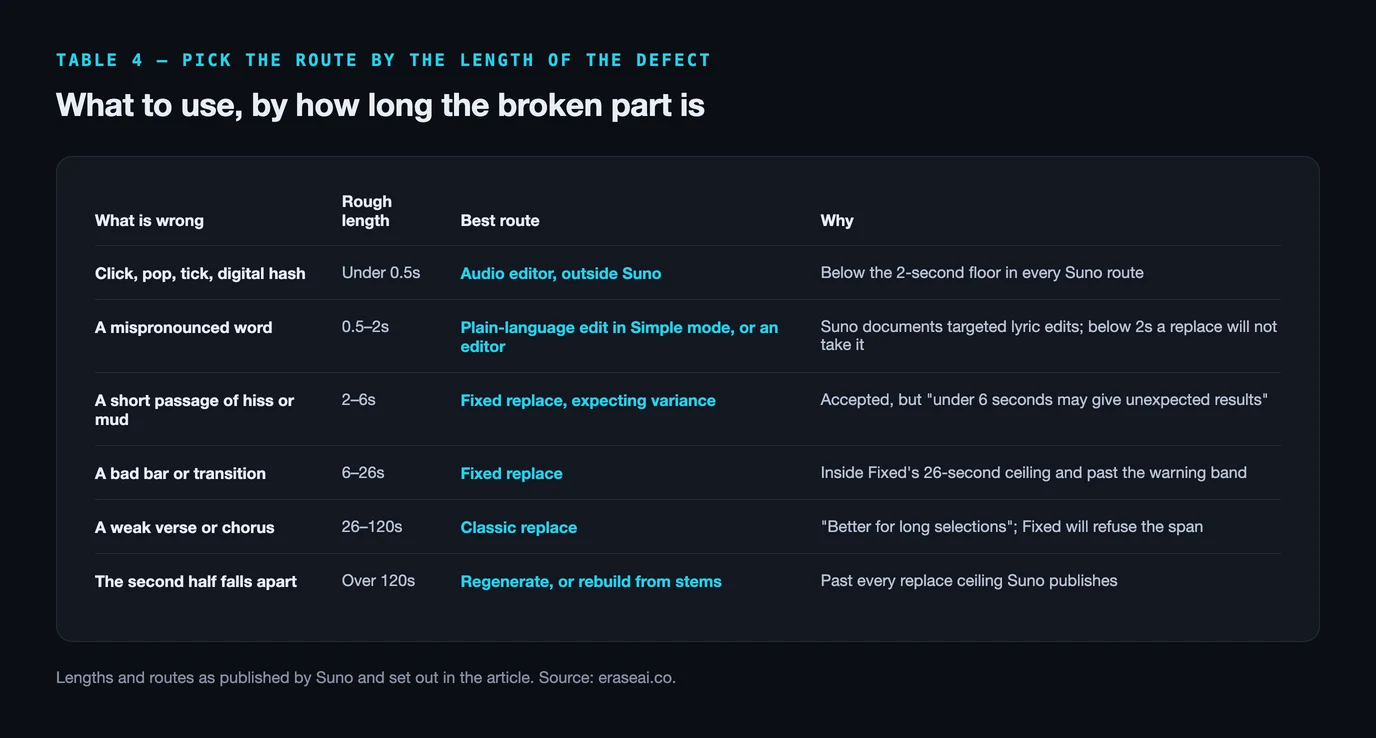
Repair is not always the better tool. Pick by the length of the problem.
An editor fixes defects. It does not fix decisions. If a whole verse sits wrong, if the vocal takes a line badly, if the mix falls apart in the last minute, no amount of spectral surgery rescues it — and those are exactly the cases Suno's own replace modes exist for, with Classic reaching 120 seconds. The decision is almost entirely a function of how long the broken part is.
| What is wrong | Rough length | Best route | Why |
|---|---|---|---|
| Click, pop, tick, digital hash | Under 0.5s | Audio editor, outside Suno | Below the 2-second floor in every Suno route |
| A mispronounced word | 0.5–2s | Plain-language edit in Simple mode, or an editor | Suno documents targeted lyric edits; below 2s a replace will not take it |
| A short passage of hiss or mud | 2–6s | Fixed replace, expecting variance | Accepted, but “under 6 seconds may give unexpected results” |
| A bad bar or transition | 6–26s | Fixed replace | Inside Fixed’s 26-second ceiling and past the warning band |
| A weak verse or chorus | 26–120s | Classic replace | “Better for long selections”; Fixed will refuse the span |
| The second half falls apart | Over 120s | Regenerate, or rebuild from stems | Past every replace ceiling Suno publishes |
The last honest word belongs to a point the thread raised without meaning to. A repaired track is not a released track, and a released track is not a heard one. Distribution is not the wall most people in this niche are standing at — distributors broadly accept AI music, and an automated flag on a release is not a ban. The wall is that nobody is listening. Once the defect is gone and the file is ready, the routes that do not depend on algorithmic discovery are worth more than another upload: pitching for paid sync placements in TV, film, games and ads puts the track in front of people whose job is to license music, and selling direct keeps the margin on the listeners you already have. Bandcamp, the usual suggestion, bars music generated wholly or substantially by AI, so it is not an option for this catalogue.
- Suno V6 Degrades After Two Minutes — what the evidence actually shows
- AI Music Artifact Remover — the audible-artifact layer in depth
- AI Audio Cleanup — what a raw export really carries
- Suno Stems — what separation preserves and what it loses
- Suno Mastering — loudness targets and the clean-then-master order
Questions readers ask
Is Suno Studio V1 shutting down in December 2026?
No published Suno document says December. The only date Suno has published is in its Studio 2.0 article, edited 13 August 2026: “We expect to deprecate Studio 1.x in early September 2026.” That date has passed and Studio 1.x is still reachable. The December date comes from a widely-read forum post, and no reply in that thread sources it.
Did Suno remove the “Fixed” feature from the editor?
Not as a whole. Fixed is one of three replace modes and it is still in the product: the Create form carries a Replace Mode control with Classic and Fixed, and Studio 2.0 offers Classic, Fixed and Smart. What did change is which model serves it — Suno’s own interface says “v4.5 will still be used for ‘Smart’ and ‘Fixed’ replacements”, so those modes do not run on v6.
What is the shortest section the Suno editor will regenerate?
Two seconds. Suno’s interface strings reject anything shorter with “Selection must be at least 2 seconds long”, and the same floor is stated again for Classic mode specifically. Suno’s help centre publishes none of these numbers; the ceilings are in the table above.
How do I fix a 0.5-second click or pop in a Suno track?
Not inside Suno, because half a second is below the two-second floor in every route. Export the track and repair the defect in an audio editor, where the edit is measured in milliseconds and nothing else in the file changes. That is a repair job rather than a regeneration job, and it is the only approach that leaves the surrounding bars untouched.
Do I need Premier to edit a section of a song?
No. Suno’s billing payload lists edit_mode as an entitlement on Pro, Premier and Platinum, and its help article on Replace Section says “Pro and Premier subscribers” have access. Studio is the Premier-and-above feature, so section editing was never part of Studio and survives the change.
Will I lose projects I built in Studio V1?
Suno says no. Its Studio 2.0 article states that projects made in Studio v1.x can be opened in Studio 2.0 “even after Studio 1.x is deprecated”, with a prompt to create a new version. The app’s own migration dialog adds that this “will not overwrite any existing work”. The one-way door is the other direction: work added in 2.0 cannot be carried back to 1.x.
Sources, and how we read them
- Suno's own documents, each opened on 17 November 2026: Introducing Suno Studio 2.0 (edited 13 August 2026), which carries the deprecation sentence and the project-migration answer; Can I replace a section of a song? (edited 19 December 2025) for the Pro-and-Premier gating; and suno.com/pricing for every price, credit and download figure in Table 3.
- Where the duration limits come from. Suno publishes no minimum or maximum selection length in its help centre. The numbers in Table 2 are quoted from Suno's English interface string table, a public file of 12,425 strings that the web app loads at runtime. These are product strings: they establish what the interface tells a user, not what any individual account experienced. The plan flags come from the billing endpoint the same app calls.
- The thread. “Suno is shutting down Studio V1: a huge step backward”, posted 9 November 2026, re-counted at 118 upvotes and 101 comments on 17 November (it was 97 and 85 when we queued it). We read 98 of the 101 through a public mirror; they come from 57 distinct people. It is one user's account plus its replies, quoted as that and not as a measurement.
- Tools and the artifact evidence: the Audacity manual's Noise Reduction page for the noise-profile requirement, iZotope's RX pricing, and arXiv:2506.19108, A Fourier Explanation of AI-music Artifacts, read in the paper's own text.
- What we did not do: we did not run a timed comparison of Studio 1.x against Studio 2.0, and we hold no Premier account screenshot of either. Nothing here is a test result. Where a number was not readable at source — the editor's runtime-filled minimum, for one — the table says so instead of estimating it.
Fix the defect. Not the whole bar.
One pass over the finished file for the artifact layer, before a distributor's automated screening ever hears it. It will not change how a platform labels your release, and no audio tool can.
▸ Independent · We recommend Undetectr