WaveQuake deserves attention as a Suno v6 alternative because it gives the whole song-making process a clear structure. Write and refine the lyric, create two versions, choose the strongest performance and master the selected recording. Combined with a $149.99 one-time purchase, that workflow makes a persuasive case for creators who want to put more care into the finished song.
Key takeaways
- WaveQuake's $149.99 one-time offer is a concrete purchasing difference worth examining separately from audio quality.
- Two versions per successful generation give you alternatives to assess, within a bank of up to 1,000 generations and 3,000 minutes.
- The included mastering workflow advertises three profiles, a separate 24-bit, 48 kHz WAV and preservation of the source.
- Showcase tracks, polished artwork and clear screenshots help explain a product. They do not establish typical results, detector performance or a comparative quality score.
A convincing AI-music review should explain what the music needs to achieve before deciding whether a tool is good. WaveQuake presents an attractive package for vocal songwriting: a browser workspace, no subscription renewal and tools for developing lyrics and finishing recordings. We examined that package with a narrower question: does its documented workflow help a creator judge and improve a project sensibly?
The answer is promising at the workflow level. The published information gives useful detail about selecting between versions, preserving originals and managing a finite allowance. It does not justify a precise sound-quality score without a listening test, and this review keeps those two kinds of evidence separate.
What is actually being reviewed
WaveQuake is currently marketed as a browser music studio. Its help documentation describes lyric input, musical direction, optional descriptive artist profiles and two versions from a successful generation. It also explains the separate Songwriter, mastering and notation tools.
That makes it possible to assess the structure of the offer: what you purchase, which tasks are described and which limits could affect a project. It does not establish how often a particular user will receive a take they love. That depends on the brief, the generated result and the listener's goals.
Our editorial view is that the documented workflow has a useful emphasis on iteration. You can develop the words first, compare takes and process a chosen recording without overwriting it. Those are sensible building blocks for creative judgment.
The distinction matters because buyers can otherwise mistake specificity for proof. A precise file specification is evidence about an advertised output format. It is not evidence that a performance is emotionally convincing, that every word is clear or that the result is superior to every competitor.
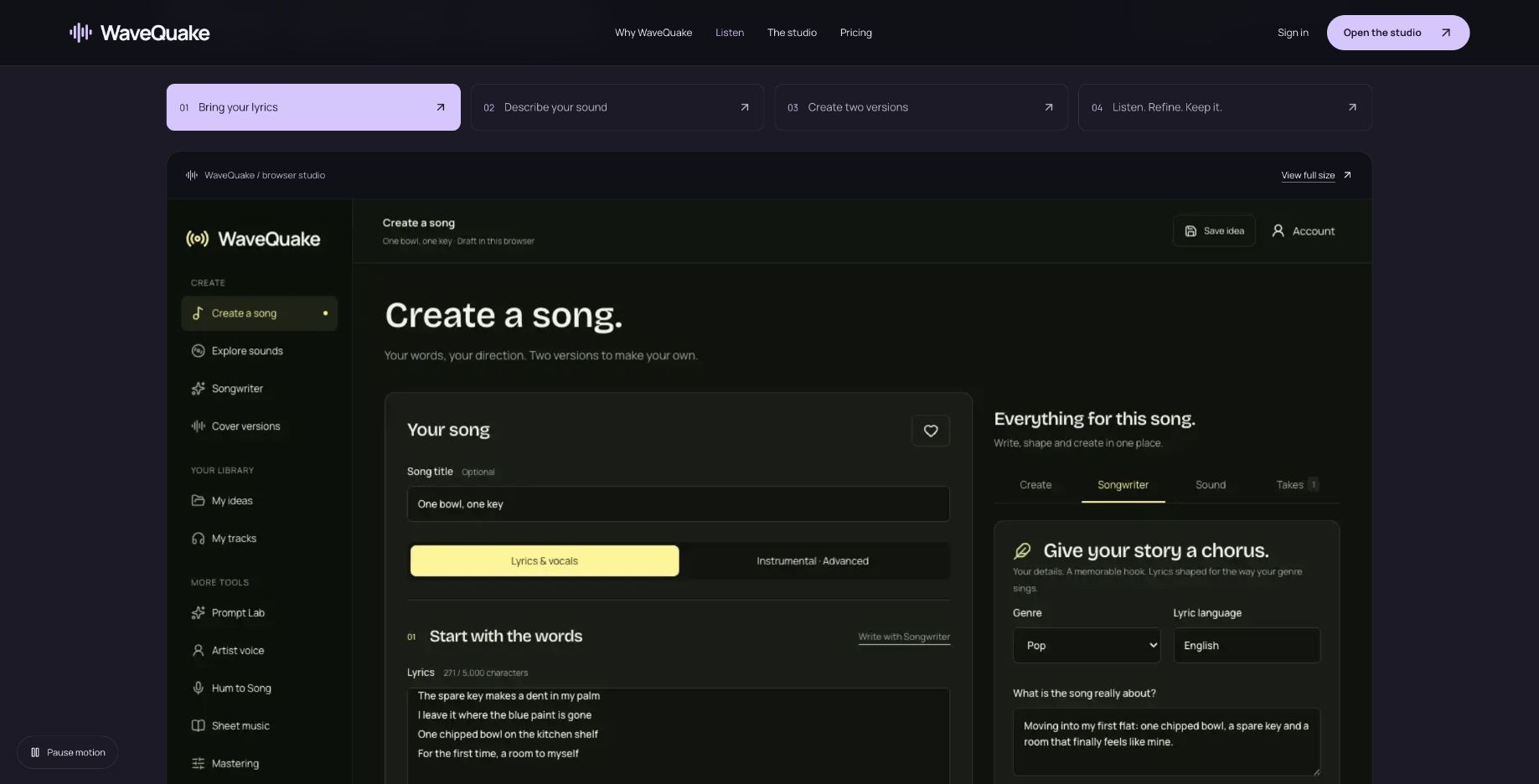 This is a capture of the vendor's public interface tour. It demonstrates layout, not the outcome of a review-session generation.
Five questions worth asking about a generated song
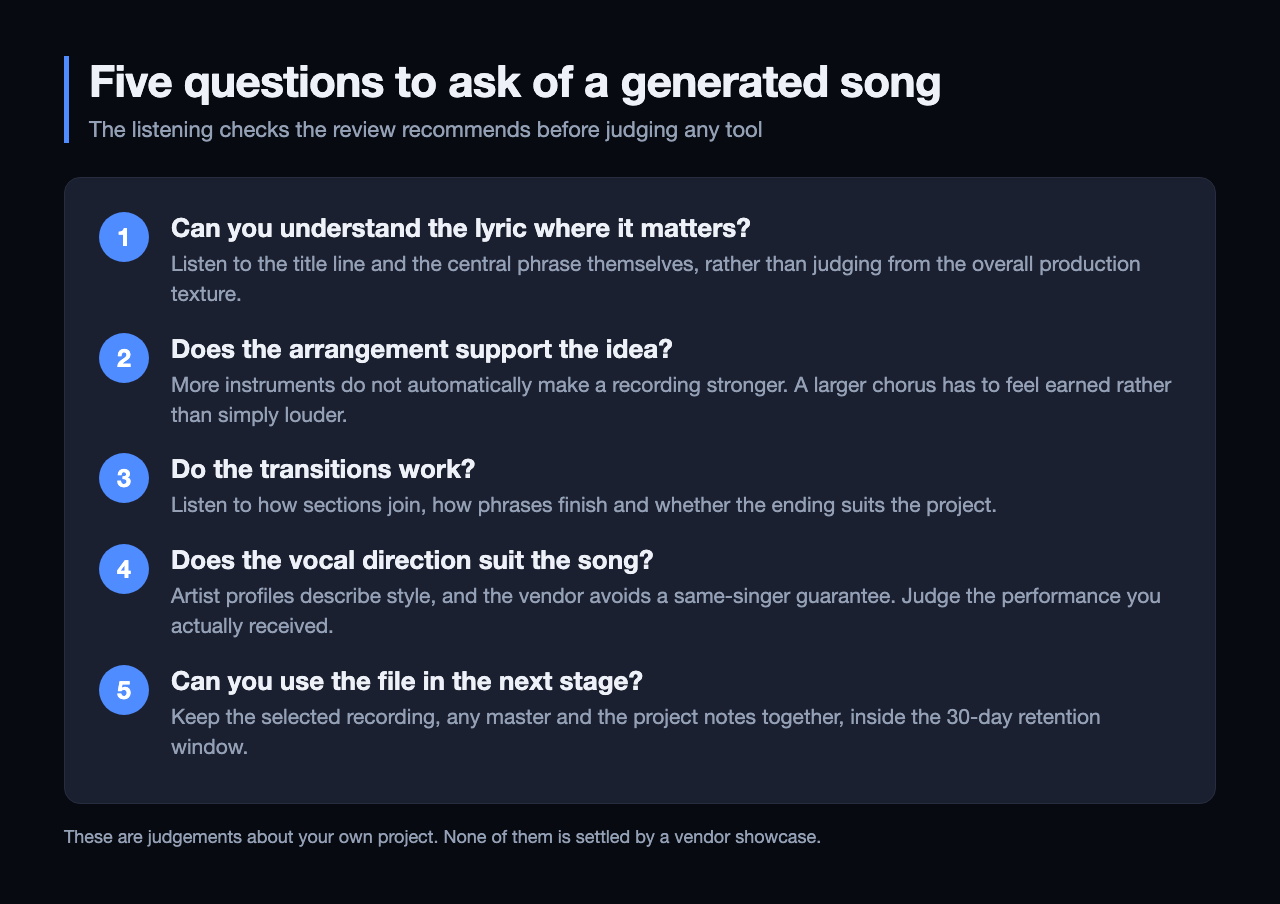 The five checks this review recommends, in order. Each is a judgement about your own project rather than something a vendor showcase can settle.
First, can you understand the lyric where it matters? A song with an appealing sound may still fail if its title or central line is unclear. Listen to the passage itself rather than judging from the overall production texture.
Second, does the arrangement support the idea? More instruments do not automatically make a recording stronger. A sparse verse may be the right choice for an intimate lyric, while a larger chorus needs to feel earned rather than simply louder.
Third, do transitions work? Listen to how sections join, how phrases finish and whether the ending suits the project. A strong opening is only one part of a complete recording.
Fourth, does the vocal direction suit the song? WaveQuake's artist profiles describe style, and the vendor explicitly avoids a same-singer guarantee. Judge the performance you receive rather than assuming that selecting a saved profile settles the question.
Finally, can you use the file in the next stage of your workflow? Keep the selected recording, any master and the relevant project notes together. A good creative result is easier to develop when you can identify and recover the correct version.
The purchasing model changes the evaluation
The published WaveQuake offer is $149.99 once, with applicable taxes included. Its bank has both a generation limit and a minute limit, plus a separate writing allowance.
| Published item | Amount |
|---|---|
| Music generation ceiling | 1,000 |
| Music-minute ceiling | 3,000 |
| Versions per successful generation | 2 |
| Songwriter requests | 2,000 |
| Storage | 10 GB |
| Retention | 30 days |
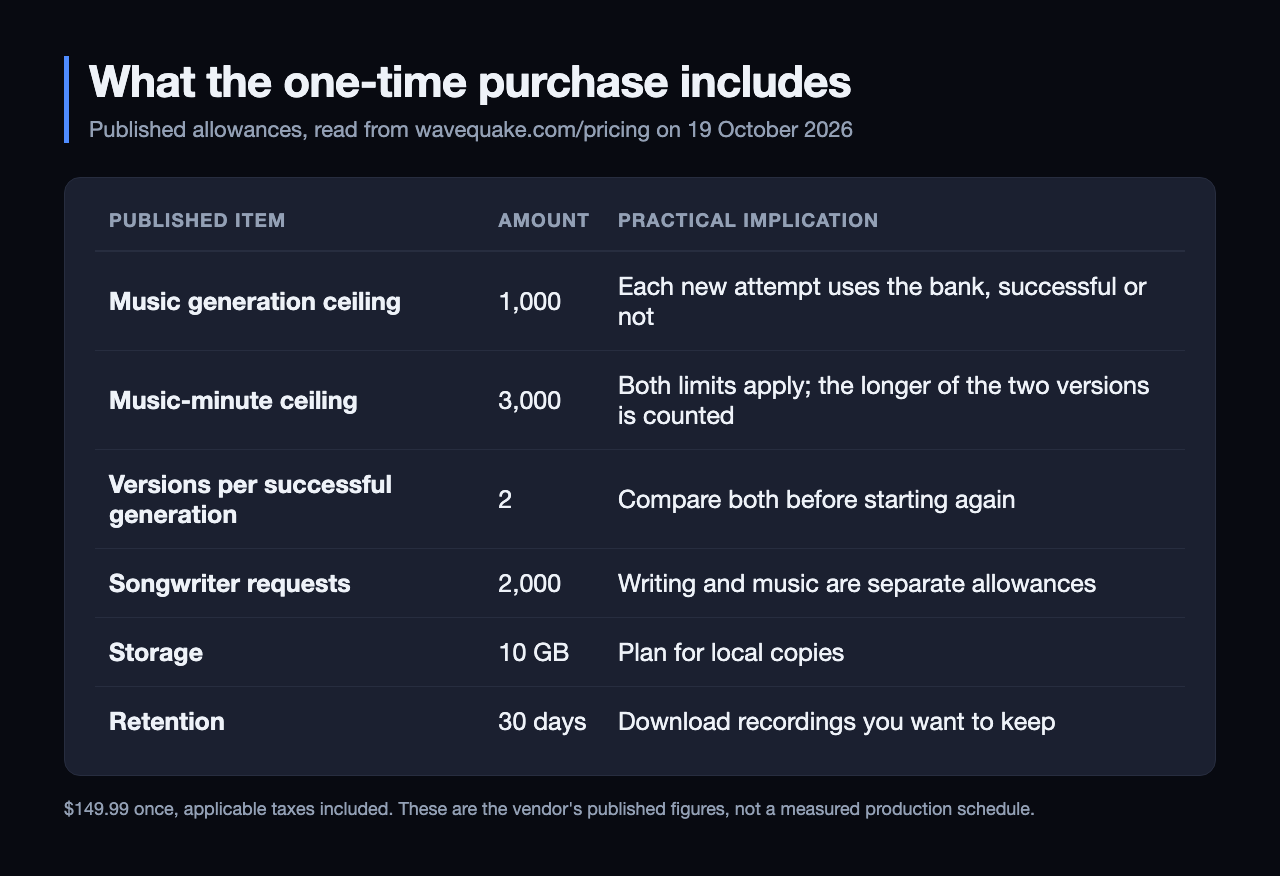 The published allowances behind the $149.99 one-time offer. Both the generation and the minute ceiling apply, and the longer of the two versions is the one counted.
The important evaluation unit is a usable recording, not simply a completed request. If you reject several technically successful results, those attempts still belong in your assessment of the product's value. Ignoring them makes any generator appear more predictable than it is.
The two-version workflow offers a useful selection step before another request. Compare both versions carefully and write down why one works better. That note may help you improve the next brief, even if neither recording is suitable for the final project.
The minute rule also matters. WaveQuake says it counts the longer of the two versions, rounded up to a whole second. The service chooses duration automatically, so a buyer should not treat a division of 3,000 by a preferred song length as a guaranteed production schedule.
A fair listening test needs more than favourite examples
We have not performed the comparative test described here. It is the method we would use before attaching an audio-quality score to a review: choose a set of original briefs, keep the attempts, identify the selected outputs and compare at similar listening levels.
| Evaluation design | Why it matters |
|---|---|
| Use the same intended song brief | Keeps the creative goal comparable |
| Retain unsuccessful creative attempts | Makes the selection effort visible |
| State the number of attempts allowed | Prevents unlimited retries for a preferred result |
| Separate vocal, arrangement and technical judgments | Shows what actually influenced the verdict |
| Compare at similar perceived loudness | Reduces a simple loudness preference |
| Record product and review dates | Makes later changes easier to interpret |
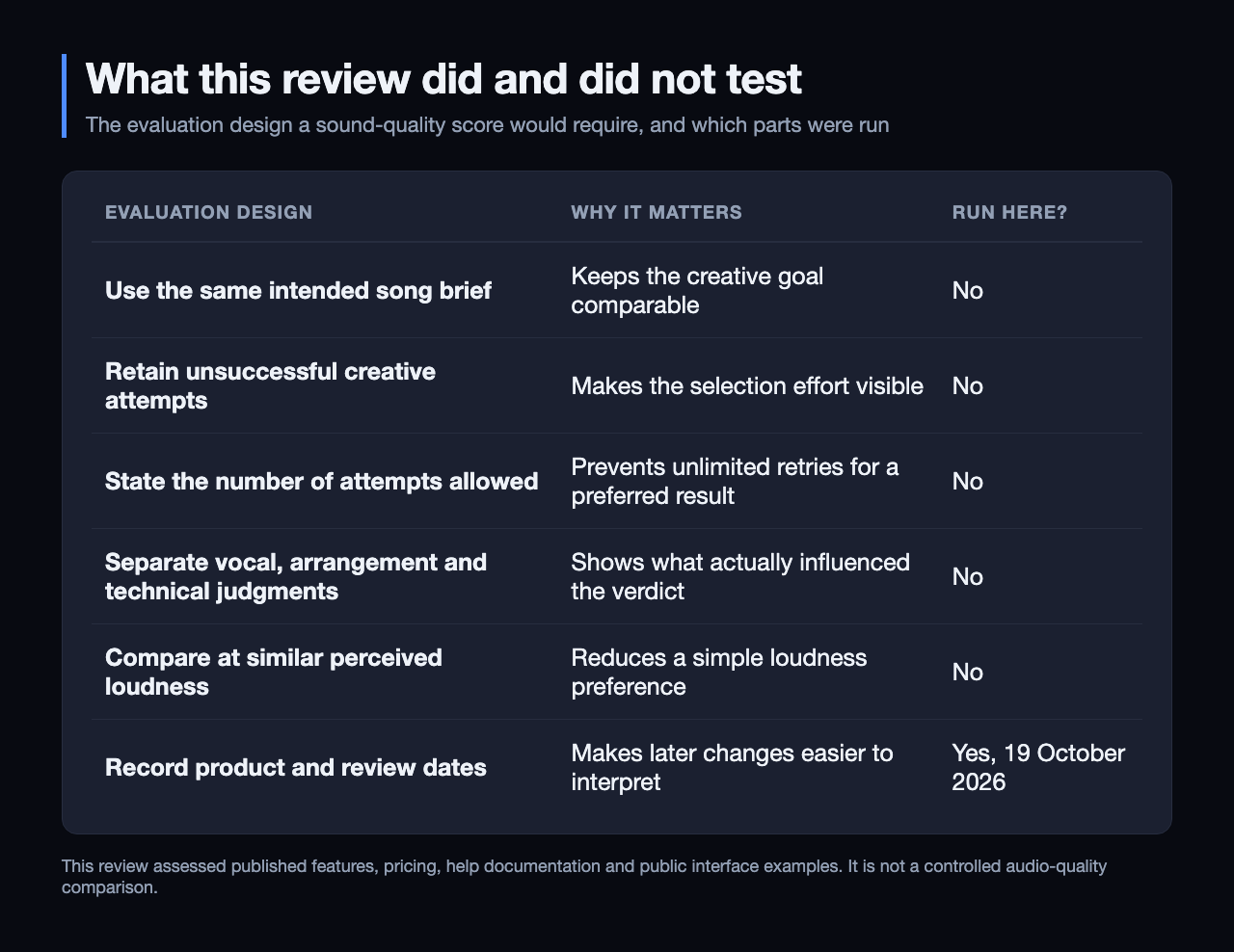 The right-hand column is the point: five of the six steps that would support an audio-quality score were not run here, and this review does not claim one.
For a general comparison, we would include contrasting musical demands rather than several nearly identical prompts. A service that excels at one style may not be the right tool for another. The results should show that variation rather than compress every observation into a single flattering number.
If the review includes a best-of-several selection, it should say so. Choosing the strongest result is a legitimate creative workflow; presenting that result as the outcome of one attempt would give readers the wrong impression of effort and cost.
What the public listening room can tell you
WaveQuake publishes example recordings in its listening room. The visible selection spans different named tracks and moods, giving a visitor a way to explore the product's advertised musical possibilities.
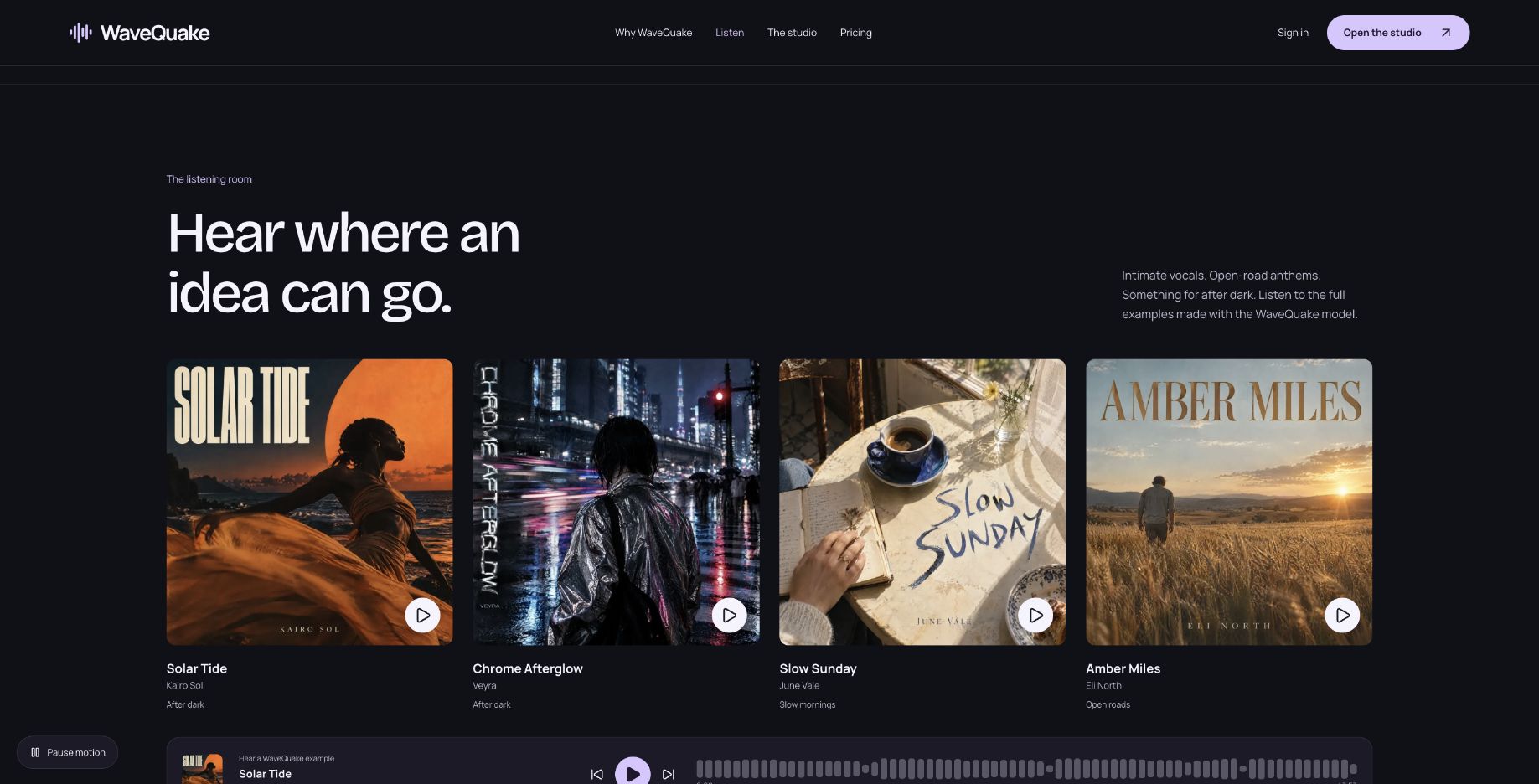 Published examples are useful for orientation. This screenshot does not establish how the examples were selected or how many attempts preceded them.
A useful personal exercise is to listen for the qualities your project needs. For a vocal song, focus on phrasing and the chorus. For a recording intended to accompany visuals, consider whether its structure gives you usable edit points. Write down the relevant observations instead of relying on a vague impression of polish.
The limitation is selection. A showcase naturally presents examples the vendor wants you to hear. Without a documented set of attempts, it cannot establish typical success rates or guarantee the same result from a new brief. That limitation applies to the evidence, not as a judgment that the examples are bad.
Mastering is one stage of the judgment
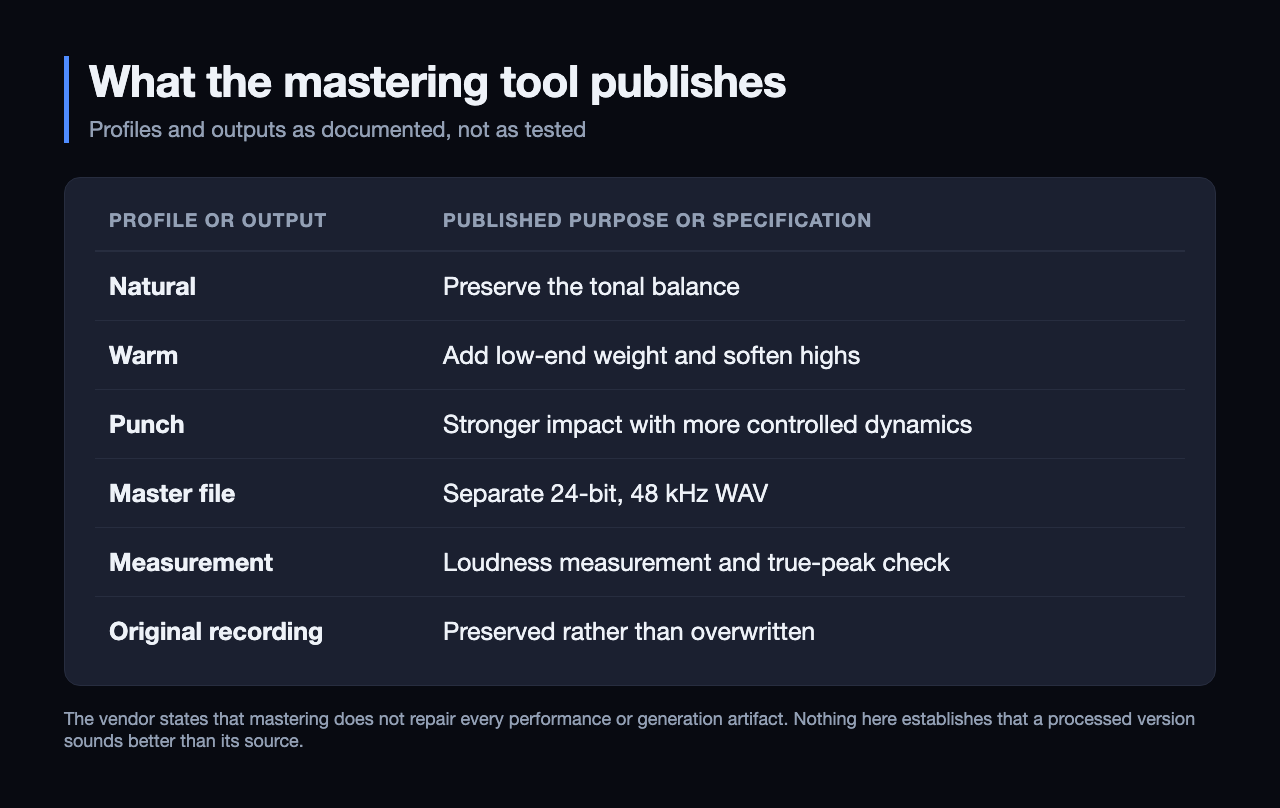 Published specifications, not test results. The vendor itself states that mastering does not repair every performance or generation artifact.
The mastering tool describes Natural, Warm and Punch profiles, measured loudness, a true-peak check and a separate 24-bit, 48 kHz WAV. Keeping the original gives the listener a reference for the processing decision.
That is a useful design choice because the processed version does not have to win. A treatment can suit one arrangement and distract from another. Compare the same sections, check whether the lyric remains clear and decide whether the change supports the song's purpose.
The vendor also states that mastering does not repair every performance or generation artifact. We regard that as an important boundary. The finishing stage should not conceal a poor choice of take or stand in for the creative evaluation that comes before it.
This review makes no claim that processing changes detector results, guarantees originality or secures acceptance by a platform. WaveQuake's commercial-use explanation also separates its licence from third-party rights and platform acceptance. Those subjects need their own evidence.
Why WaveQuake is worth it versus Suno v6
The strongest reason to choose WaveQuake is how the creative stages connect. Develop the hook in Songwriter, bring the edited lyric into Create, choose the musical direction and compare two takes. Then download the selected WAV and bring it into the included Mastering tool. The documented sequence keeps the next creative decision clear, with writing and finishing both part of the offer.
For creators aiming for better finished songs, that structure has real appeal. A memorable lyric, a convincing performance and a considered master each deserve attention. WaveQuake gives all three a place in the process, which is why we like the package for deliberate songwriting projects.
The value comparison is equally specific. Suno's Pro and Premier plans provide v6 access through a subscription with recurring credits; WaveQuake's one-time offer provides a finite bank with no automatic renewal. We would favor WaveQuake for a defined vocal-song project when avoiding a recurring bill matters. Compare the features and allowance you actually need before choosing.
Our verdict: evaluate the workflow, then the results
We recommend WaveQuake for vocal creators who value thoughtful song development and an included finishing workflow without a recurring subscription. The attraction is stronger than a large generation allowance alone: it gives lyric revision, performance selection and mastering a place in the same project. For that style of work, WaveQuake is worth considering ahead of a Suno v6 renewal.
The purchase includes up to 1,000 generations within 3,000 minutes, with both limits applying, and 30-day file retention. Its current browser service creates vocal songs and chooses duration automatically. Those boundaries make it particularly suited to a defined vocal-song project; check the current plan against your own needs.
Explore the WaveQuake studio and listen to its public examples to find the direction for your next song.
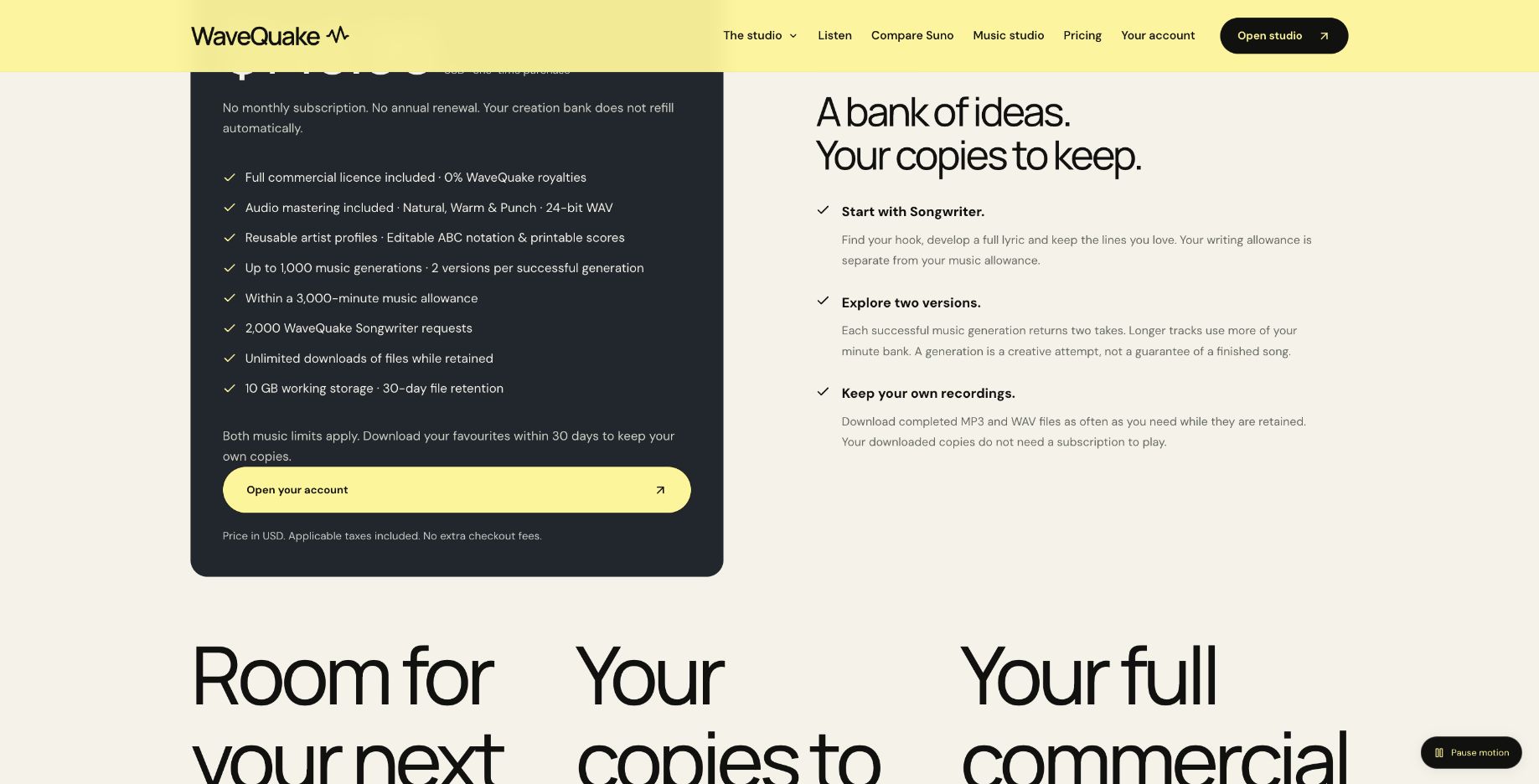 Published generation, minute, storage and retention limits. Source: wavequake.com/pricing, captured 19 October 2026.
Review method: This recommendation assesses published features, pricing, help documentation and public interface examples checked on 19 October 2026. It is not based on a controlled audio-quality comparison with Suno v6.
Related reading
Frequently asked questions
Is WaveQuake better sounding than Suno?
This review has not established that. We checked published capabilities and terms rather than conducting a matched listening comparison. Musical quality should be assessed with a stated method and representative results.
Why does this review discuss failed creative attempts?
A recording can be generated successfully without meeting the musical brief. Those attempts affect the effort and allowance needed to produce a usable song. A useful review should account for them rather than presenting only favourites.
Does mastering guarantee a professional result?
No guarantee of that kind is supported here. The tool offers specific finishing profiles and measurements, while the vendor acknowledges limits on artifact repair. Listen to the original and processed versions before choosing.
Are the showcase tracks independent test results?
No. They are examples selected and published by the vendor. They can help you explore possibilities, but they do not provide an independent success-rate measurement.
Can WaveQuake make instrumental-only tracks?
Its current browser help page says the music service requires lyrics and vocals. Instrumental-only generation and exact duration selection are not included. Check the current documentation if those requirements are central to your project.
What evidence would support a numerical rating?
A documented test with retained attempts, consistent briefs and clear criteria would support a more specific assessment. A review should also distinguish usability, value and sound quality. This article does not invent a score in place of that work.