Suno Albums 2026: What Publishing Actually Does
A video with 14,500 plays told people that Suno albums mean “no more distro kid” and no more Spotify AI tags, and 85 comments took it at its word. It is wrong in all three of its claims, and the cost of believing it is real: you tap publish, every unpublished song in the album goes public, your followers get a notification, and nothing at all has been sent to a streaming service. We read Suno's release note, three help-centre articles and its download policy at source on 25 October 2026, then priced the actual route out of Suno against six distributors' own published pages. Here is what the button does, what it costs to finish the job, and the one place Suno's own documents contradict each other.
The short version
Five findings, each from a document you can open yourself.
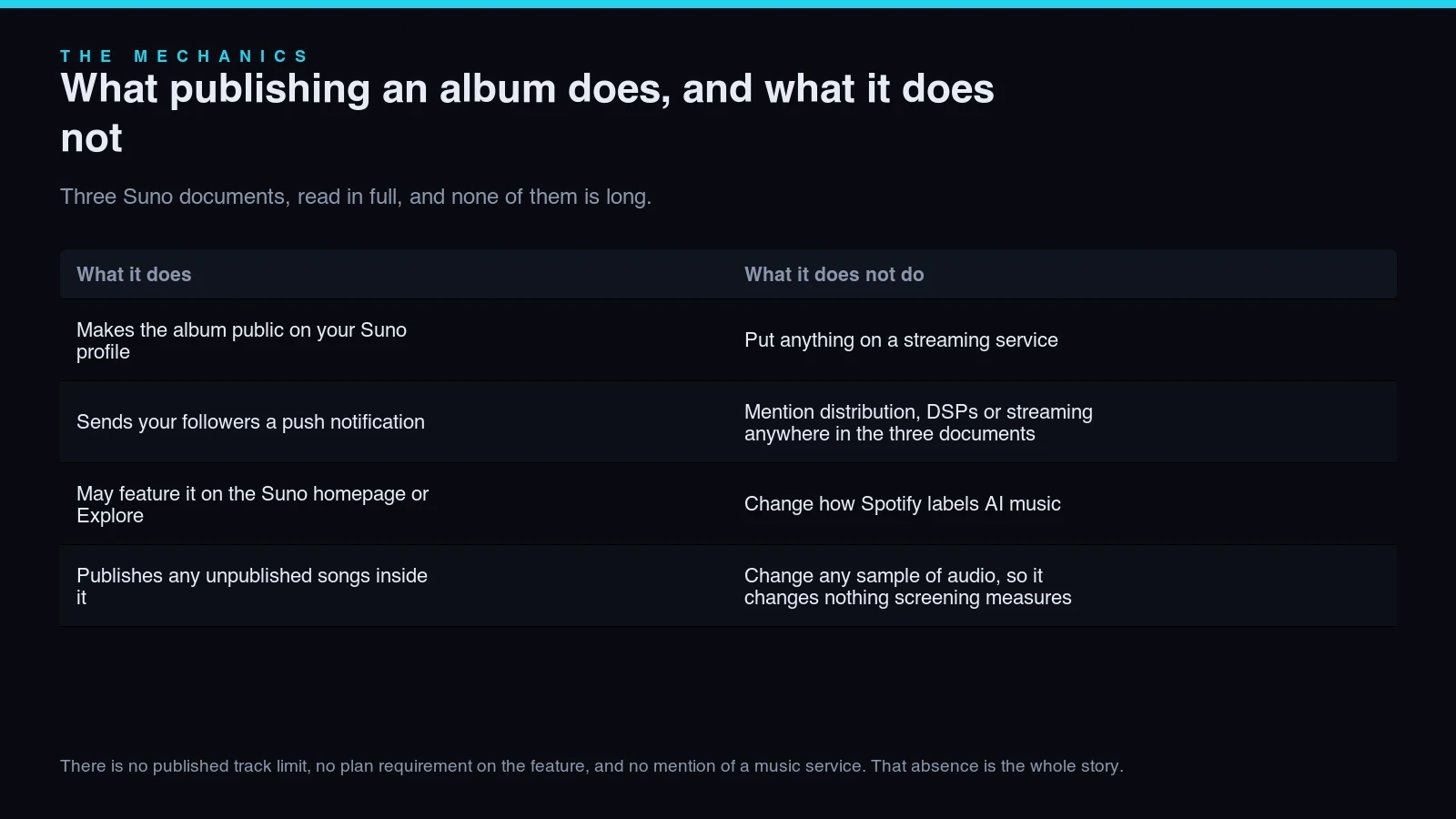
Publishing an album is a Suno-profile action. The 5 October release note, the Albums FAQ and the Publishing & Sharing article mention distribution nowhere — three documents, no mention, which is the correction to the viral claim.
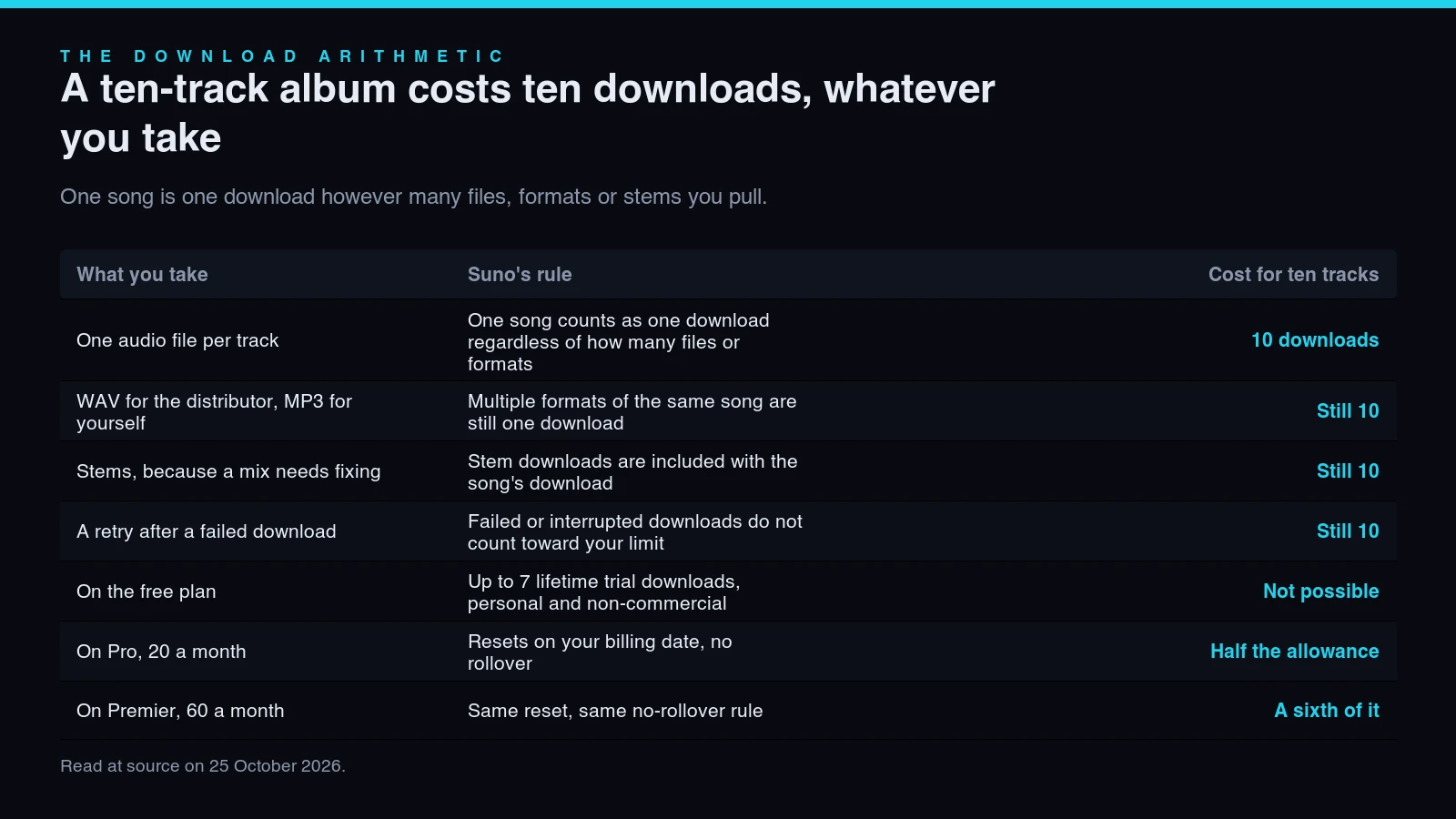
A ten-track album costs ten downloads. One song is one download whatever formats or stems you take, so an album is half of Pro's 20 a month and a sixth of Premier's 60, with no rollover.
The free plan cannot do this. Its allowance is “up to 7 lifetime trial downloads for personal, non-commercial use” — three files short of a ten-track album, under a licence that rules out selling it.
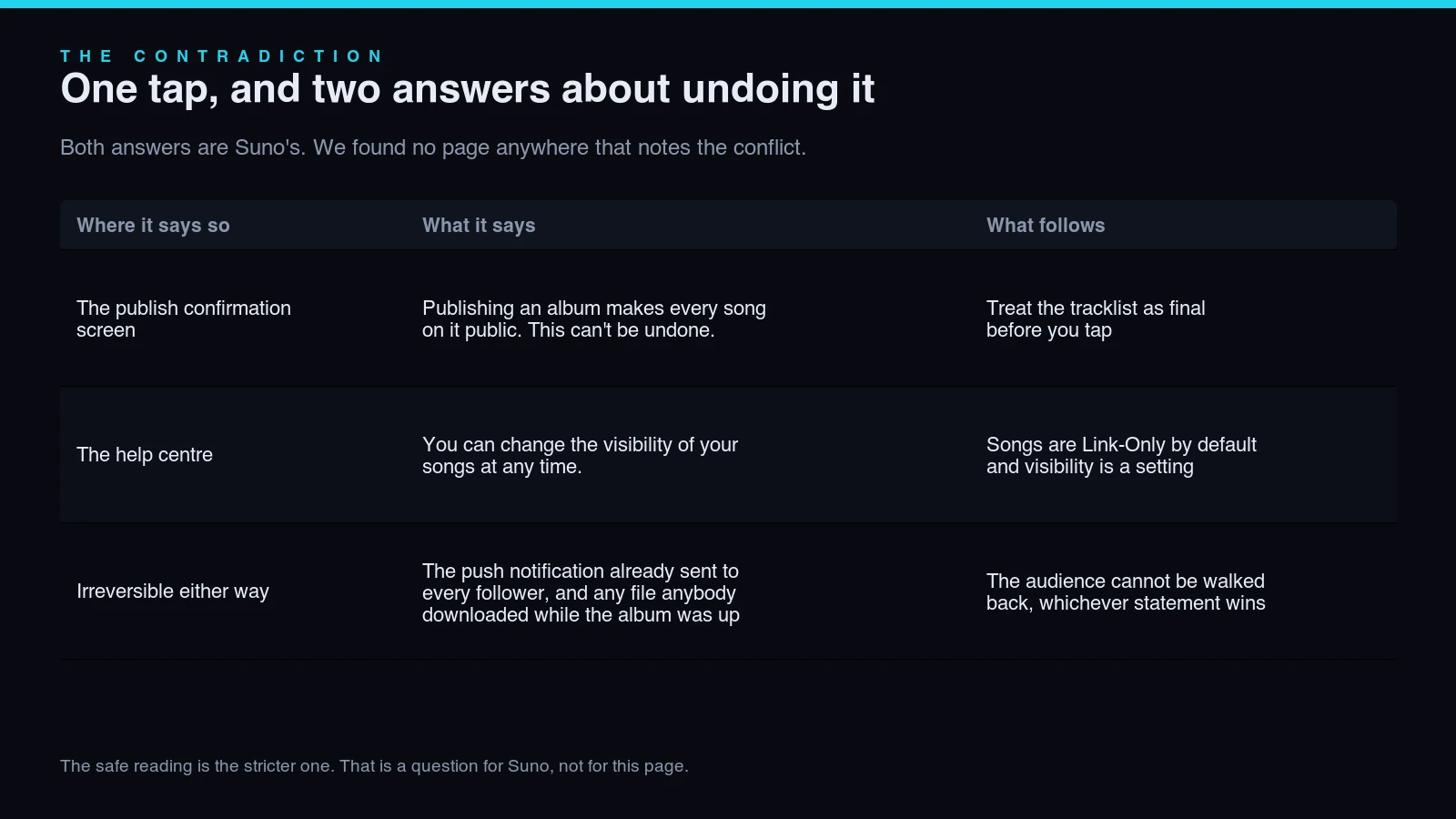
Suno's own documents disagree about undoing it. The publish screen says making songs public “can't be undone”; the help centre says “you can change the visibility of your songs at any time”. Nobody has reported the conflict.
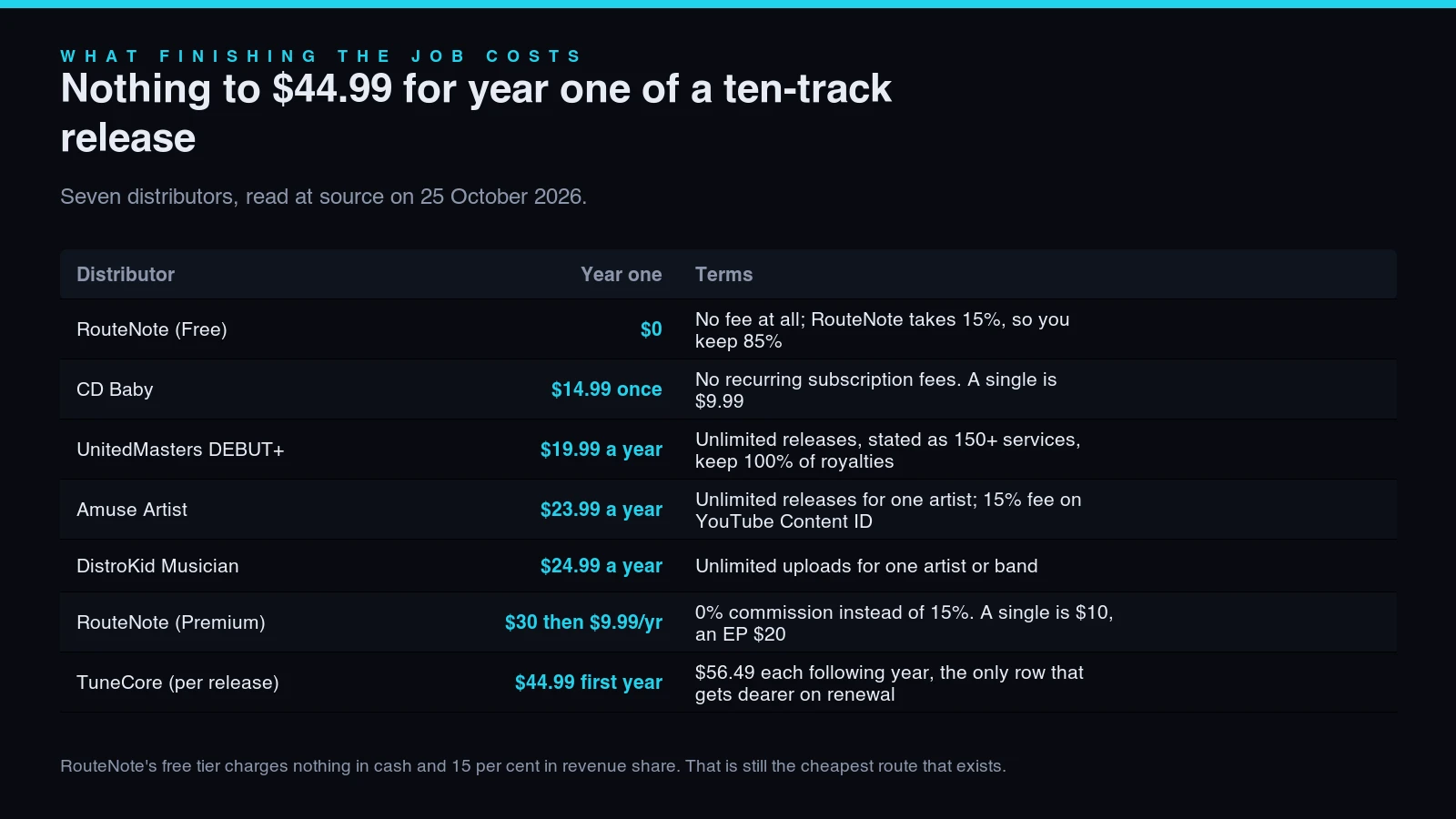
Finishing the job costs $0 to $44.99 for year one: RouteNote free (keeps 85%), CD Baby $14.99 once, UnitedMasters $19.99/yr, Amuse $23.99/yr, DistroKid $24.99/yr, TuneCore $44.99 then $56.49.
- What publishing an album actually does
- Three claims going round TikTok
- EP or LP, and what the label is worth
- One tap, and two answers about undoing it
- Getting it onto Spotify: what you download
- What a distributor charges for ten tracks
- Screening and labelling still apply
- How the first three weeks actually went
- If the album is finished and nobody listens
- FAQ
- Sources

What publishing an album actually does
Three Suno documents, read in full, and none of them is long.
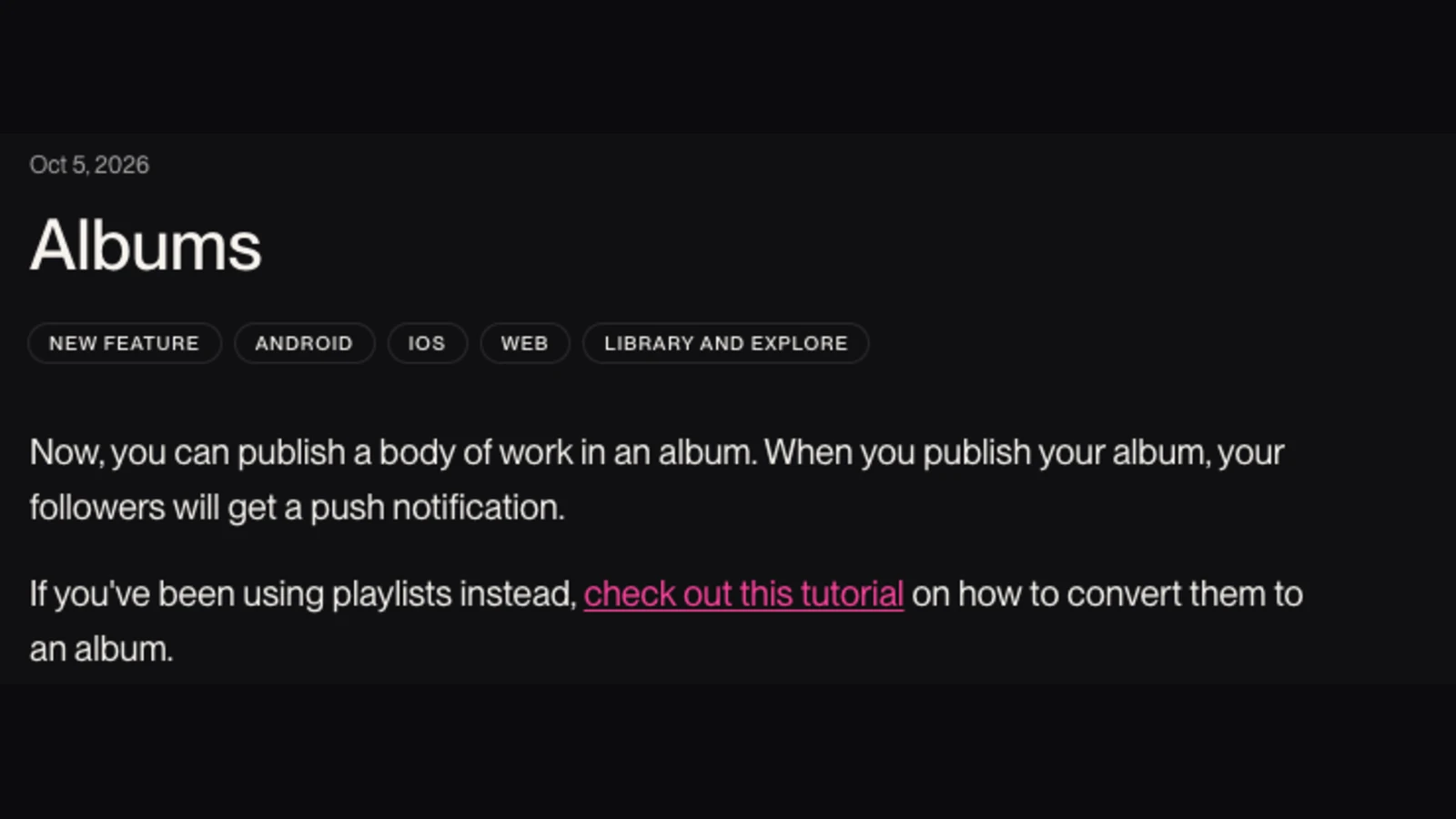
Albums landed on 5 October 2026, on Android, iOS and web at once, surfacing in Library and Explore. The whole release note is two sentences: “Now, you can publish a body of work in an album” and “when you publish your album, your followers will get a push notification”.
The distinction the Albums FAQ draws is from a playlist, not from a release. A playlist is “a compilation of songs and can include music from multiple artists”; an album is “a body of work associated with just one artist: you”. You get a title, a description, cover art and a track order, and a toggle marked “use album cover for all songs” that reverts a removed track to “the song's original artwork”.
Publishing itself is deliberately undramatic. The Publishing & Sharing article says you “select Publish Album directly from the Album page or from the Album's action menu”, get “one last chance to review the details”, and then the album is “showcased on your profile” and “may even be featured across the Suno homepage or Explore”. Before that, you can share a draft album by link for feedback.
What no Suno document says is that any of this reaches a music service. There is no track limit published, no plan requirement attached to the feature, and no mention of streaming, DSPs or distribution in any of the three. That absence is the whole story, and the next section is why it needs stating.
Three claims going round TikTok
One video, three assertions, and a document against each of them.
On 11 October a video reached 14,500 plays, 461 likes, 115 shares and 85 comments by announcing that Suno had changed the industry forever. We are quoting the claim, not the creator — the reason it travelled is that it describes the release everyone wants, where the feature you already have replaces the two steps you find tedious.
“suno just change the music industry forever with its new release of albums. no more Spotify AI Persona tags. no more distro kid and worrying about suno watermarks. now you just create the suno album and you can release albums with any AI music you want.” (source)
TikTok, 11 October 2026 — 14,500 plays, 85 comments
Taken one at a time, each clause fails against a document that was already published when the video went up.
| The claim | What the documents say | Source |
|---|---|---|
| “no more distro kid” | Nothing in the release note, the Albums FAQ or the publishing article mentions distribution at all. Publishing puts the album on your Suno profile and notifies your followers. A release on a streaming service still runs through a distributor, using files you download. | Release note, 5 Oct 2026; Albums FAQ; Publishing & Sharing |
| “no more Spotify AI Persona tags” | Spotify's AI treatment is driven by what is declared and detected on delivery, not by how tracks are grouped inside Suno. Its October 2026 update says AI Personas “are excluded from editorial or algorithmic recommendations by default” — an album cannot reach that decision. | Spotify newsroom, 20 Oct 2026 |
| “no more … worrying about suno watermarks” | An album is a label placed over songs you already generated. The FAQ is explicit that LP and EP are “just the label you pick”. Grouping tracks changes no sample of audio, so it changes nothing a screening system measures. | Albums FAQ |
The first clause is the expensive one. Believing it means uploading nothing to a distributor and waiting for streams that cannot arrive, which is a month lost rather than a mistake you notice. Our Suno to Spotify walkthrough is the end-to-end version of the route this page prices.
EP or LP, and what the label is worth
Suno asks you to pick one, and the FAQ defines both: “LP (Long Play) means a full album. EP (Extended Play) means a shorter release, just a few tracks.” Then it adds the sentence that settles how much the choice matters — “it works the same on Suno, LP vs EP is just the label you pick”.
No track count is published for either. There is no minimum that makes something an LP and no ceiling that stops an EP, so the distinction is presentational inside Suno and carries no mechanical effect at all. It also does not travel: a distributor classifies your release from the metadata you give it at upload, and nothing about the label on a Suno album page arrives with the audio files you downloaded.
Which makes the practical advice short. Pick the word that describes the listening experience, keep it consistent with whatever you type into the distributor later, and spend no further thought on it. The decisions that do have consequences are in the next two sections.
One tap, and two answers about undoing it
Both answers are Suno's. We found no page anywhere that notes the conflict.
Start with the part both sources agree on: publishing an album publishes its contents. The FAQ states that songs do not need to be published first, because publishing the album also publishes any unpublished songs inside it. If you built the tracklist out of drafts, every one of them becomes public in the same tap.
The publish confirmation screen puts that in stronger terms than the help centre does. As one guide quotes it from the dialog itself: “Publishing an album makes every song on it public. This can't be undone.”
Suno's help centre says the opposite, in as many words: “You can change the visibility of your songs at any time.” Songs are Link-Only by default, a triple-dot menu holds the Publish button, and the profile article describes visibility as a setting rather than a one-way door. The Albums FAQ agrees in spirit: you can “add, remove, or reorder your songs, and edit the title, description, or cover art at any time”.
We are not going to tell you which of Suno's two statements wins — that is a question for Suno, and the safe reading is the stricter one. What is irreversible either way is everything that happened in between: the push notification already sent to every follower, and any file anybody downloaded or shared while the album was up. Treat the tracklist as final before you tap, not because the button cannot be walked back, but because the audience cannot.
Getting it onto Spotify: what you download
The cost nobody adds up, because it is not charged in money.
A distributor needs files. That makes an album on streaming ten separate downloads out of Suno, and since 3 September 2026 downloads are metered: 20 a month on Pro and 60 on Premier, resetting on your billing date with no carry-over. The good news is that the counting rule is generous.
| What the release needs | How Suno counts it | At ten tracks |
|---|---|---|
| One audio file per track | “One song counts as one download, regardless of how many files or formats you download for that song” | 10 downloads |
| WAV for the distributor, MP3 for yourself | Multiple formats of the same song are still one download | Still 10 |
| Stems, because a mix needs fixing | “Stem downloads are included with the song’s download” | Still 10 |
| A retry after the download fails | “Failed or interrupted downloads don’t count toward your limit” | Still 10 |
| On the free plan | “Up to 7 lifetime trial downloads for personal, non-commercial use” | Not possible — 7 is a lifetime cap, and non-commercial |
| On Pro, 20 a month | Resets on your billing date; unused downloads do not carry forward | Half of one month’s allowance |
| On Premier, 60 a month | Same reset, same no-rollover rule | A sixth of one month’s allowance |
The rule that saves you is “one song counts as one download”, regardless of how many files or formats you take for it. A WAV for the distributor and an MP3 for your phone is one download; re-downloading is free; stems come with the song rather than costing extra; failed attempts do not count. So ten tracks is ten downloads, not thirty.
The plan that cannot do it at all is the free one. Its allowance is “up to 7 lifetime trial downloads for personal, non-commercial use” — three files short of the album, under a licence that excludes the thing you are trying to do. Our download-limits checklist is the per-release version of this sum, and artifactr's breakdown of the metering itself covers how the policy came in.
What a distributor charges for ten tracks
Every figure read off the distributor's own page on 25 October 2026.
This is the part the album announcement does not change and nobody prices. An album is usually not charged differently from a single on a subscription distributor, which is why the cheap end of this table is cheaper than people expect — and why the pay-per-release end punishes a ten-track release specifically.
| Distributor | Cost for the album | Shape of the charge | Note |
|---|---|---|---|
| RouteNote (Free) | $0 | No fee at all; RouteNote takes 15%, so you keep 85% | Cheapest route that exists. You pay in revenue share rather than cash |
| CD Baby | $14.99 per album, one-time | One-time — “CD Baby has no recurring subscription fees” | A single is $9.99. The only option here with no renewal of any kind |
| UnitedMasters DEBUT+ | $19.99 per year | Annual, unlimited releases stated as 150+ services | “Keep 100% of your royalties”. SELECT is $59.99; PARTNER is invitation-only |
| Amuse Artist | $23.99 per year | Annual, unlimited releases for one artist | 100% royalties except a 15% fee on YouTube Content ID on this tier |
| DistroKid Musician | $24.99 per year | Annual, “Unlimited uploads” for one artist or band | Musician Plus $44.99 covers two artists; Ultimate $89.99 covers up to 100 |
| RouteNote (Premium) | $30 one-time, then $9.99 a year | One-time release fee plus a per-release annual charge | 0% commission instead of 15%. A single is $10, an EP $20 |
| TuneCore (pay per release) | $44.99 first year | “$56.49 each following year” — the only row that gets dearer on renewal | Its Rising Artist subscription is $24.99 a year for unlimited releases instead |
Two patterns are worth more than the individual numbers. First, the only row that rises on renewal is TuneCore's pay-per-release album, at “$56.49 each following year” — its own subscription at $24.99 is cheaper than its album fee, which is a pricing decision you have to notice yourself. Second, the genuinely free route exists: RouteNote charges nothing and takes 15%, so the question is whether you would rather pay cash up front or revenue later.
What we are deliberately not putting in that table is an AI column. Every distributor help centre that publishes those rules — DistroKid, TuneCore, CD Baby, Amuse, RouteNote and UnitedMasters — returned HTTP 403 to us today, and third-party summaries of them contradict each other on at least three of the six. A blocked page is not a published policy, so rather than guess: six distributors accept AI music openly, the rules that bite are declaration fields rather than bans, and the two pages where we read them at source are platforms that accept AI music and DistroKid's AI credits fields.
Screening and labelling still apply
Once the files leave Suno, the album is irrelevant and the audio is everything. Two separate gates meet it, and they are routinely confused with each other.
The first is labelling, and it is paperwork. Spotify's October 2026 update lists what it uses: “listener engagement and feedback, upload patterns, metadata, and information from multiple third-party AI detection tools”. It also reports taking “more than 50 million slop and spam tracks out of recommendations” this year, says AI Personas “are excluded from editorial or algorithmic recommendations by default”, and notes that tracks with high-probability AI indicators are “10 times more likely to fall below” its 1,000-stream royalty threshold. Our AI Persona badge page covers how that designation is actually set.
The second gate is the automated screening a distributor runs before your release goes out, plus the audible generation artifacts a listener hears anyway — the smeared cymbals and gain creep that get worse across a long generation. Cleaning the file is for that, and Undetectr is what we point people at for it. It cannot change how a platform labels your track, and nothing can — that is decided by what gets declared on delivery, not by the audio. Any tool promising otherwise is selling you something it does not have.
How the first three weeks actually went
The feature works. Its most visible effect in week one was people unfollowing each other, because the push notification that makes publishing feel like a release also makes ten releases feel like spam.
“With the recent addition of being able to release full albums, which I find to be a fantastic feature, I do have to admit the following: if I follow someone and receive notifications of more than 3 album drops in 1 day from them, everyday since the feature became available, I am no longer following them.” (thread)
r/SunoAI, 12 October 2026 — 33 upvotes, 49 comments
A second thread the same day collected 55 comments of the same complaint with no upvotes at all, which is its own signal: nobody wanted to be seen agreeing, and everybody had something to say.
Read that as a distribution hint rather than etiquette. The one audience an album reaches on Suno is the followers you already have, and the notification spends their patience once. Publishing four albums in a fortnight does not quadruple your reach; it trains the people most likely to listen to stop seeing you. If you have a back catalogue to group, group it as one release and let the next one wait.
If the album is finished and nobody listens
Distribution has not been the hard part for a while. In the same fortnight these album threads ran, three peer-promotion threads in the same communities took 560 comments between them on almost no upvotes — creators posting their links for other creators, which is what “nobody can find listeners” looks like when you measure it instead of asserting it.
An album does not fix that, because an album is a presentation format. What changes the arithmetic is a route to money that does not depend on being recommended: a paid sync placement in a game, an ad or a show is one decision by one music supervisor, and it pays like a licence rather than like a stream. played.fm exists for that route and for selling direct to the listeners you do have, where you keep what you make. Our guide to selling AI music covers the rest of them.
Questions people ask about Suno albums
Seven answers, from the documents listed below.
Does publishing a Suno album put it on Spotify?
No. It makes the album public on your Suno profile and sends your followers a push notification. The release note, the Albums FAQ and the Publishing & Sharing article mention distribution nowhere. A Spotify release still goes through a distributor, using files you download.
Can you undo publishing a Suno album?
Suno's own documents answer differently. The publish screen says making every song public “can't be undone”; the help centre says “you can change the visibility of your songs at any time”. Irreversible either way: the notification already sent, and anything downloaded while it was up.
How many downloads does a ten-track album use?
Ten. One song is one download however many files, formats or stems you take, and failed attempts do not count. That is half of Pro's 20 a month and a sixth of Premier's 60, with no rollover.
Can I release a Suno album on the free plan?
Not as a commercial release. The free tier gives “up to 7 lifetime trial downloads for personal, non-commercial use” — three files short of a ten-track album, under a licence that excludes selling it.
Is there a real difference between an EP and an LP on Suno?
Not mechanically. The FAQ defines LP as “a full album” and EP as “a shorter release”, then adds that “it works the same on Suno, LP vs EP is just the label you pick”. No track count is published, and the label does not reach your distributor.
Does an album change how Spotify labels AI music?
No, and nothing you do to the audio does either. Spotify's October 2026 update lists its signals as listener engagement and feedback, upload patterns, metadata and third-party AI detection tools. None of them reads your Suno album page.
What does it cost to get a ten-track album onto streaming?
Between nothing and $44.99 for year one. RouteNote's free tier charges $0 and keeps 15%; CD Baby is $14.99 once with no renewal; UnitedMasters, Amuse and DistroKid run $19.99, $23.99 and $24.99 a year. Read at source on 25 October 2026.
Sources, and what we could not read
Everything quoted above, dated, plus what this page refuses to state.
- Suno — Albums release note (5 Oct 2026), Albums FAQ, Publishing & Sharing your Album, song visibility, why songs do not appear on a profile, what counts as one download and downloads per subscription. All read 25 October 2026.
- Spotify Newsroom, 20 October 2026 for the 50 million figure, the detection signals, the AI Persona exclusion and the 1,000-stream threshold.
- Pricing read at source on 25 October 2026: DistroKid, TuneCore, CD Baby, Amuse, UnitedMasters and RouteNote, whose pricing page renders client-side — its figures here come from RouteNote's own comparison page.
- The publish-dialog wording “this can't be undone” is quoted from AI Musicpreneur's guide, which captured the screen on 6 October; Jack Righteous's guide is the other substantial write-up and does not address reversibility either way.
- What we could not read. All six distributor help centres (DistroKid, TuneCore, CD Baby, Amuse, RouteNote, UnitedMasters) returned 403 to this run, so no AI-policy claim is made from them here. Reddit also blocks automated reads, so the two thread quotations come from our own research capture of 25 October 2026 and the thread links are provided for you to check.
Suno's two statements about undoing publication are quoted as we found them; we take no view on which governs. Prices change without notice and the date above is the date they were read. Table 3 is our arrangement of six pricing pages; the figures in it are theirs. Last updated 25 October 2026.
An album is a label. The audio is the gate.
Nothing about grouping ten tracks changes what a distributor's screening hears in them, or what a listener hears in the last minute of a long generation. That is the step worth spending effort on before the files go out — and the step after it is having somewhere to sell the release that does not depend on being recommended.
Independent guide · partner links · no audio tool changes a platform's AI label
Related guides
Suno to Spotify
The end-to-end upload route this page prices the album version of.
Suno download limits checklist
What each release costs you in downloads, per plan, before you start.
Platforms that accept AI music
Every published distributor position, read at source and dated.
DistroKid AI credits
The declaration fields an album release has to fill in correctly.
Spotify AI Persona badge
How that designation is set, and why no tool can remove it.
Selling AI music
Routes to a paying listener that do not need algorithmic reach.
Or browse every guide on the site.