One Switch Is On By Default. It Is Not The One You Think.
A creator opened their song menu, found allow remixes with allow downloads sitting under it, and wrote: “So now everyone will have easier time to steal each other songs.” Thirty-four replies later nobody in the thread had settled it. Get this wrong in either direction and you either publish a catalogue on terms you never read, or you hide work that was never exposed. So we checked every Suno sharing setting against Suno’s help centre, its terms of service, the 13,702 strings its own app ships, and four public song pages fetched with no account. The download toggle is harmless and misread. The one that is genuinely on by default changes who owns your song.
The short version
Five findings, each from a document or a payload you can open yourself.
The short version: “allow downloads” does not let anyone download your song. Suno’s own interface calls it “Allow downloads of remixes”.
One control really is on by default, and it is the other one. Suno documents that “all newly created songs will have Remix enabled”, and its publish tooltip says “by default, all your tracks are remixable”. Comments are on by default too.
Leaving Allow Remixes on is a rights decision, not just a sharing one. Suno’s terms say every remix is “a joint work owned jointly and equally by you and the Remixer”, usable only for “personal and non-commercial purposes”.
Suno’s app now ships a three-tier Sharing settings panel — Restricted, Anyone with the link, Everyone. Across all 163 help articles, every one of those three phrases appears zero times.
There is no setting that hides your prompt. We fetched four public song pages with no account and read the style text, the slider values and a playable audio URL straight out of the HTML.
- The four controls, and their real names
- Where the Suno sharing settings live
- What “allow downloads” actually governs
- What Allow Remixes hands over
- Permission is not a licence
- Is your prompt public too?
- What a public song link gives away
- If you already published with the wrong settings
- Where the music is worth putting instead
The four controls, and their real names
Four things govern what a published Suno song gives away. Two are on before you touch anything.
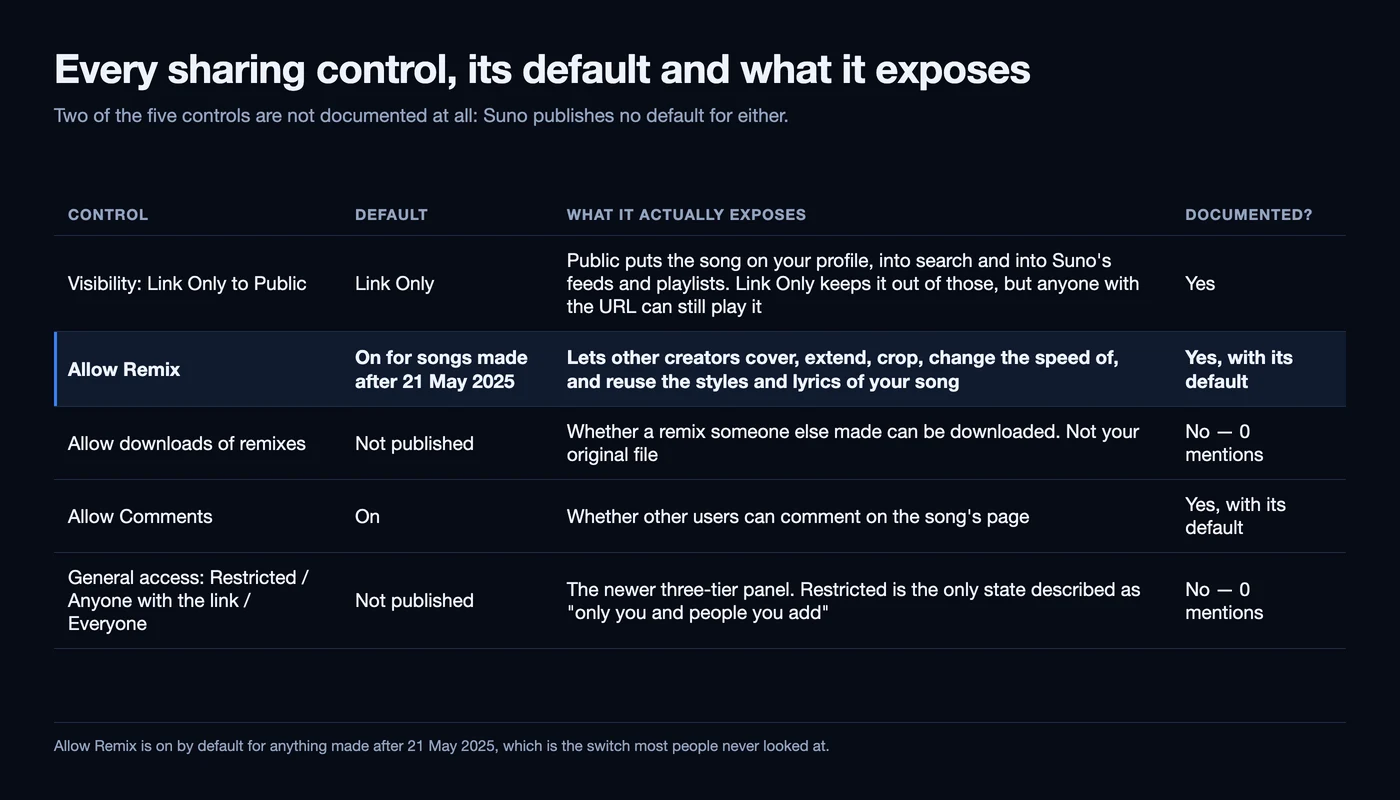
The confusion in that thread is a labelling problem, and it is Suno’s. The Suno sharing settings for a single song are split across two places with different names — a Visibility & Permissions block in the song menu, and a newer Sharing settings panel. The shortest label in the list is the one that caused the alarm.
| Control | Default | What it actually exposes | Documented? |
|---|---|---|---|
| Visibility: Link Only → Public | Link Only | Public puts the song on your profile, into search and into Suno’s feeds and playlists. Link Only keeps it out of those, but anyone with the URL can still play it | Yes |
| Allow Remix | On for songs made after 21 May 2025 | Lets other creators cover, extend, crop, change the speed of, and reuse the styles and lyrics of your song | Yes, with its default |
| Allow downloads of remixes | Not published | Whether a remix someone else made can be downloaded. Not your original file | No — 0 mentions |
| Allow Comments | On | Whether other users can comment on the song’s page | Yes, with its default |
| General access: Restricted / Anyone with the link / Everyone | Not published | The newer three-tier panel. Restricted is the only state described as “only you and people you add” | No — 0 mentions |
Where the Suno sharing settings live
Two menus, and the second one is not in the documentation at all.
The documented route is the one every Suno help article gives: open a song’s More Actions menu — the triple-dot icon in your Library or on the Create page — and find Visibility & Permissions. Suno’s remix FAQ spells it out: “Go to More Actions ( ... ), then find Visibility & Permissions and use the toggle next to Allow Remixes.” Its comments article puts Allow Comments “at the top of the dropdown menu”.
The second route is newer and undocumented. Suno’s app ships a panel literally titled Sharing settings, with a General access control offering three states — Restricted (“Only you and people you add can listen”), Anyone with the link (“Anyone with the link can listen”) and Everyone (“Anyone on Suno can listen”) — plus a People with access list you populate by handle, and an embed option. There is also an account-level switch, Restrict new songs by default, whose own hint warns that “your existing songs won’t change”.
We searched all 163 articles in Suno’s help centre, 51,054 words, for that panel. “Sharing settings”: zero. “General access”: zero. “Anyone with the link”: zero. “Restrict new songs”: zero. “Restricted” returns exactly one hit, and it is about logging in from a restricted region. So the control that finally answers “can I make this properly private” is the one you cannot look up.
What “allow downloads” actually governs
Remixes. Only remixes. And the community worked it out faster than the documentation did.
In Suno’s interface files the toggle is called “Allow downloads of remixes”. Save it and the app writes back “Downloads of remixes have been enabled.” Turn it off and you get “Downloads of remixes have been disabled.” There is a related string explaining that “This song’s contest controls whether its remixes can be downloaded”. Every one of them is about the derivative, never the original.
So why did it read as a catastrophe? Because in the song menu the control is abbreviated to one word — Downloads — nested under the remix switch, in a menu that also holds your own Download action with its MP3, M4A and WAV options. Read quickly, it looks like a permission just granted over your master.
The thread got there in the end. Its top substantive reply, at nine points, is someone who clicked the information button beside the toggle: “It doesn’t allow people to download your tracks. It allows people to download the remixes that they’ve made of your tracks.” The highest-scoring comment in the whole thread, at ten, is four words and an emoji: “Classic overreacting without understanding”. Two other commenters independently confirmed the switch appears on new songs but not older ones, which is exactly the pattern Suno documents for remix defaults.
And the thing the toggle cannot do is the thing worth knowing: “allow downloads” appears zero times across all 163 help articles. A setting that frightened a subreddit has no entry anywhere in the product’s documentation.
What Allow Remixes hands over
The poster was right that something is on without asking. It is the switch above the one he found.
Suno’s own article on the toggle is unambiguous: “Remix uses the following features: Cover, Extend, Reuse Prompt, and Adjust Speed… By default, any songs made before May 21, 2025 are set with Remix disabled. All newly created songs will have Remix enabled, but your songs will still be set to link-only.” The app says the same in its publish tooltip: “By default, all your tracks are remixable, but you can turn this off anytime.”
Note what is in that feature list. A separate Suno article gives a longer version — “Cover, Extend, Adjust Speed, Use Styles and Lyrics, Crop, Replace Section” — so the permission you leave on by default is not only “someone may cover this”. It is “someone may take the styles and lyrics out of this and start from them”. The two articles do not list the same features, so trust the app’s current strings over either.
What Suno promises in return is attribution. Its FAQ says every version “will lead back to your original”, with a clickable link on the remixer’s page, and that you can see every remix from your song’s own sidebar. Turn it off and covers stop entirely: “To rule out covers entirely, turn off Allow Remixes in the song’s Visibility & Permissions.”
Permission is not a licence
Three different questions get asked as one. They have three different answers.
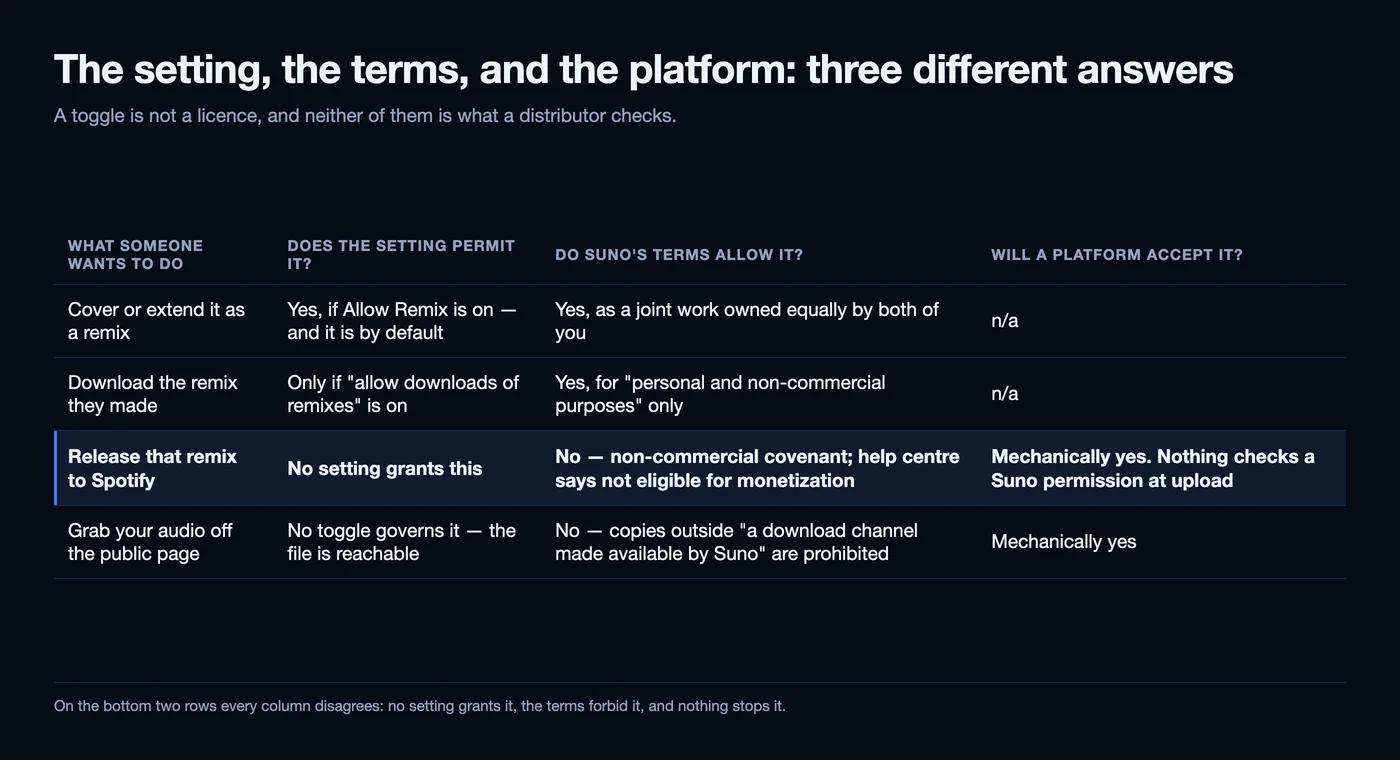
“So now I am allowed to just download someone elses song and publish it as my own?” is three questions: what the toggle permits on Suno, what Suno’s terms allow the other person to do with the result, and what a streaming platform will accept. Answered together, you get the wrong answer twice.
The terms are the half nobody quotes, and they are stronger than the help centre. Suno’s Terms of Service — last revised 10 August 2026, effective 3 September 2026 — say that if you “activate features that permit other users of the Service (‘Remixers’) to remix your Outputs”, then “all Remixes shall be a joint work owned jointly and equally by you and the Remixer”, and you additionally covenant that the remix “may only be used for lawful, personal and non-commercial purposes, regardless of your subscription tier or whether the Remix is a permitted Download”.
Read that twice, because it cuts both ways. Leaving the default on does not give your song away — but it does acquire you a co-owner on every remix, and it binds you to a non-commercial covenant on that joint work even on a paid plan. The help centre is gentler about the other person and says the same thing: turning remixing on “does not mean they give up the rights, or allow you to monetize your version of their track”. There is a fuller walk through what Suno’s terms actually grant on our sister site.
The third column is the one to be honest about: a contract term is not a technical block. None of this stops a determined person uploading something, which is why the original poster’s real worry was not theft at all. His follow-up names it precisely — “two same songs of slightly different variation can not live in the same space on streaming platform, so I would have to show proof of my song”. That is a duplicate-claim problem, and it has its own answer.
| What someone wants to do | Does the setting permit it? | Do Suno’s terms allow it? | Will a platform accept it? |
|---|---|---|---|
| Cover or extend it as a remix | Yes, if Allow Remix is on — and it is by default | Yes, as a joint work owned equally by both of you | n/a |
| Download the remix they made | Only if “allow downloads of remixes” is on | Yes, for “personal and non-commercial purposes” only | n/a |
| Release that remix to Spotify | No setting grants this | No — non-commercial covenant; help centre says not eligible for monetization | Mechanically yes. Nothing checks a Suno permission at upload |
| Grab your audio off the public page | No toggle governs it — the file is reachable | No — copies outside “a download channel made available by Suno” are prohibited | Mechanically yes |
Is your prompt public too?
Seventy-nine replies, no answer, and the answer is worse than the question assumed.
A professional songwriter put the second half of this question to the subreddit: they had spent “months experimenting, tweaking, refining” a set of prompts, and the one thing stopping them publishing on Suno was “not being able to hide my prompts”. The thread has since grown from 36 comments to 79. Nobody quoted a setting, because there is not one.
We searched 13,702 strings across Suno’s three English interface files. “Hide prompt”: zero. “Prompt visibility”: zero. “Hide styles”: zero. The only control that touches prompt reuse is the remix switch, because Reuse Prompt and Use Styles and Lyrics are remix features. Turning Allow Remixes off is the nearest thing to a prompt setting Suno has, and it does not clear the style text from the page.
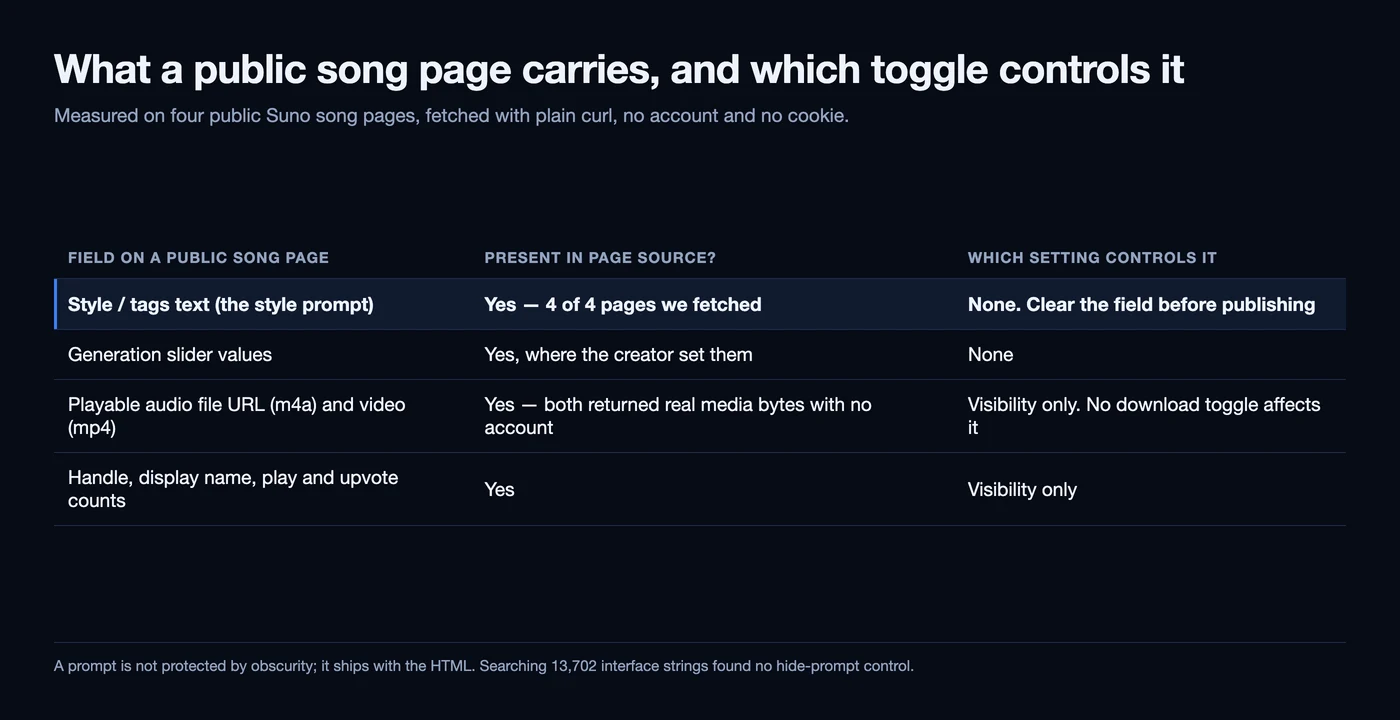
It gets worse, and we measured it rather than assuming it: four public Suno song pages, fetched with plain curl, no account and no cookie. All four carried the song’s style field verbatim in the page source — on one, a 321-character block beginning “Texture: vinyl crackle, tape saturation, lo-fi hiss, room tone, dusty”. Two also carried the exact generation slider values. So a prompt is not protected by obscurity; it ships with the HTML.
The thread’s own best replies converge on the three workarounds that actually exist, and they are all the same shape: get the metadata off the file rather than hide it. Re-export the song through Studio (“This will kill lyric and style prompts”, at four points), clear the style field before publishing so the page shows “[No Styles]” (seven points), or do what the highest-scoring reply in the thread does at sixteen points and publish somewhere else entirely. Suno’s Studio deprecation is worth checking before you lean on the first of those.
| Field on a public song page | Present in page source? | Which setting controls it |
|---|---|---|
| Style / tags text (the style prompt) | Yes — 4 of 4 pages we fetched | None. Clear the field before publishing |
| Generation slider values | Yes, where the creator set them | None |
| Playable audio file URL (m4a) and video (mp4) | Yes — both returned real media bytes with no account | Visibility only. No download toggle affects it |
| Handle, display name, play and upvote counts | Yes | Visibility only |
What a public song link gives away
The audio was always reachable. The toggle is not what changed that.
There is a claim going round that all Suno song URLs are public. We could not trace it to a verifiable source, so here is what we measured instead. On each of the four public song pages, the embedded payload contained a direct media URL on a CloudFront host and a video URL on Suno’s CDN. Requested with no account, both returned HTTP 206 and real media bytes — an audio/mp4 stream and a valid MP4 file.
That reframes the worry. Nothing in the September change made audio reachable; publishing a song is what does that, and always has. Suno’s robots file allows crawlers over /song/ paths, disallowing only follower lists, login and voice pages. In the other direction, its sitemaps list 4,478 URLs and not one of them is a user song, so public songs are crawlable but not submitted.
Suno’s terminology does not help: one help article says “Songs are private by default” while another calls the same state “Private/Link Only”. A state called private in which anyone with a URL can listen is not private, which is precisely why the undocumented Restricted option matters.
Unpublishing is not a recall either. Suno’s own dialog says the song “won’t show in Contests, Search, Feed, or Profile anymore, but anyone with the link can still hear it”. And at the album level there is no undo at all: “Publishing an album makes every song on it public. This can’t be undone.” If you are weighing a release, what Suno album publishing actually does is the detail to read first.
If you already published with the wrong settings
Most of it is reversible. Two things are not, and one of them needs a different kind of fix.
Start with the order of operations, because one control is blocked while a song is live. Suno’s sharing panel says so: “This song is published, so anyone can listen. Unpublish it to change general access.” Narrowing access means unpublishing first, then setting it.
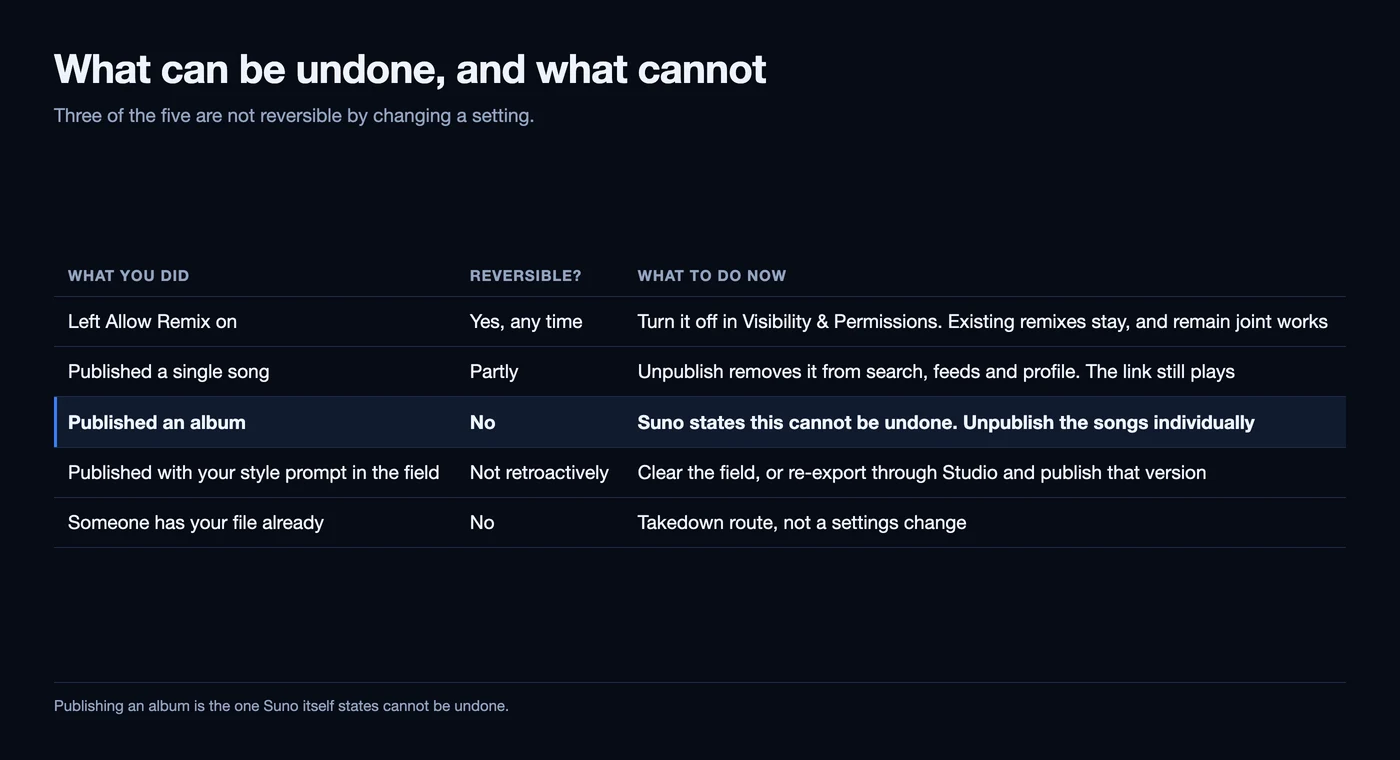
The toggles are all reversible at any time. What is not is the album publish, a link already shared, or a file someone already holds. If a track of yours has turned up somewhere it should not be, what to do when someone re-uploads your AI track covers the takedown route, and filing a DMCA takedown for an AI song covers the paperwork.
There is one case the settings cannot touch at all: re-delivering a track you are putting out again after a mess like this. A file that has been round the houses still has to clear a distributor’s automated screening and still carries whatever generation artifacts it shipped with, and that is a job for a cleanup pass over the finished audio before it goes back in. That is about artifacts and automated screening only: no audio tool changes how a platform labels a release. Our guide to what a raw export actually carries sets out what is in the file.
| What you did | Reversible? | What to do now |
|---|---|---|
| Left Allow Remix on | Yes, any time | Turn it off in Visibility & Permissions. Existing remixes stay, and remain joint works |
| Published a single song | Partly | Unpublish removes it from search, feeds and profile. The link still plays |
| Published an album | No | Suno states this cannot be undone. Unpublish the songs individually |
| Published with your style prompt in the field | Not retroactively | Clear the field, or re-export through Studio and publish that version |
| Someone has your file already | No | Takedown route, not a settings change |
Where the music is worth putting instead
The thread’s most-upvoted advice was to publish somewhere else. It is worth taking seriously.
The strongest replies in the prompt thread were variants of one move: keep Suno as the workstation and publish elsewhere. “Suno is just the ‘weird DAW’ of my choice”, as one put it. If your reason for publishing on Suno was reach, weigh that honestly — the harder problem in AI music is not getting distributed, it is getting heard at all.
Which is the argument for routes that do not depend on a feed deciding to show you. Suno’s own terms leave commercial use of your originals with you on a paid plan, so the question is where to point them. Pitching for paid sync placements in TV, film, games and ads puts a track in front of people whose job is licensing music rather than scrolling, and selling direct keeps the margin and the relationship with listeners you already have. Bandcamp, the usual suggestion, bars music generated wholly or substantially by AI, so it is not an option for this catalogue.
Nothing here is legal advice. Settings, labels and terms all change; everything above was read at source on 19 November 2026, and the dates are given so you can check what has moved.
Questions readers ask
Does “allow downloads” let other people download my Suno song?
No. The toggle sits under Allow Remixes and governs remixes only: Suno’s interface names it “Allow downloads of remixes”, and the toast it writes on save reads “Downloads of remixes have been enabled.” In the song menu it is abbreviated to just “Downloads”, which is why it reads as something far broader.
Which Suno sharing settings are on by default?
Remix and comments. Suno’s help centre says “all newly created songs will have Remix enabled” and that “comments are enabled by default”. Visibility is not: a new song is Link Only, so it stays off your profile and out of search until you publish it.
Can I make a Suno song genuinely private?
The app ships a Restricted option described as “Only you and people you add can listen” — the first state that is private in the ordinary sense. Link Only is not: Suno’s help centre calls it private in one article and link-only in two others, and anyone holding the link can play the song.
Does unpublishing a Suno song take it offline?
Not completely. Suno’s unpublish dialog says the song “won’t show in Contests, Search, Feed, or Profile anymore, but anyone with the link can still hear it” — so it withdraws a song from discovery, not from the URL you already shared.
Can I hide my prompts on Suno while still sharing the song?
There is no setting for it. We searched 13,702 strings in Suno’s interface files and found no prompt-visibility control of any kind, and the style text sits in the page source of public songs. What exists is Allow Remixes, which is what exposes styles and lyrics for reuse, and clearing the style field before you publish.
If someone remixes my Suno song, can they release it?
Not under Suno’s rules. Its help centre says a remix by another creator “will not be eligible for monetization”, and its terms go further: the remix is a joint work owned equally by both of you, usable only for “personal and non-commercial purposes”. That is a contract term, not a technical block.
Can I undo publishing a Suno album?
No, and Suno says so before you confirm: “Publishing an album makes every song on it public. This can’t be undone.” Individual songs can be unpublished afterwards, with the link caveat above, but the album action is one-way.
Sources, and how we read them
- Suno’s help centre, crawled in full on 19 November 2026. Nine categories expand to 26 sections and 163 articles (51,054 words), fetched individually and searched. Defaults: enable or disable Remixes, turn off comments, share my music and appear on the home page. Rights: Remix FAQ’s, Can I monetize a Remix? and How do I make a Remix?
- Where the undocumented controls come from. Every toggle name, confirmation message and the three-tier panel is quoted from Suno’s English interface string table, a public file the web app loads at runtime — 12,428 strings, plus 1,274 across two companion files. These are product strings: they establish what the interface tells a user, not what any account was shown. Every near-miss match was read before a zero was called.
- The contract. Suno’s Terms of Service, 12,076 words. The joint-work clause and the download-channel prohibition are quoted verbatim from its “Remixes” and “Permitted Commercial Use” sections.
- What we fetched ourselves, and its limits. Four public song pages reached from Suno’s Explore page, plus suno.com/robots.txt and its sitemaps. Four pages is a spot check, not a survey, and we did not test a link-only song, because we hold no account whose settings we could vary.
- The two threads. “Why did Suno allow downloads of my songs by default?” (2 upvotes, 34 comments from 15 people) and “Want To Share My Music—Do Not Want To Share My Prompts” (1 upvote, 79 comments from 32 people). Read through a public mirror and quoted as user accounts with their scores, never as measurements.
- What we did not do: we changed no live setting and made no attempt to reach a song that was not already public. Where Suno publishes no default, the tables say “not published” rather than estimating it. Wider risk picture: is Suno safe to use.
Check the toggle. Then check the file.
A sharing setting decides who can reach your song on Suno. It does nothing to the audio itself — so if a track is going back out to distribution, the artifacts and the automated screening are a separate pass. Neither changes how a platform labels your release, and no tool can.
▸ Independent · We recommend Undetectr